








Catalog and course details
Courses are listed by category and subcategory. The detail page includes the curriculum, instructor and price.
- Catalog search
Course sales
The learner browses the catalog, adds the course to the cart, uses their coupon and pays. Once payment is confirmed, course access opens automatically; you track your sales and net revenue from the dashboard.
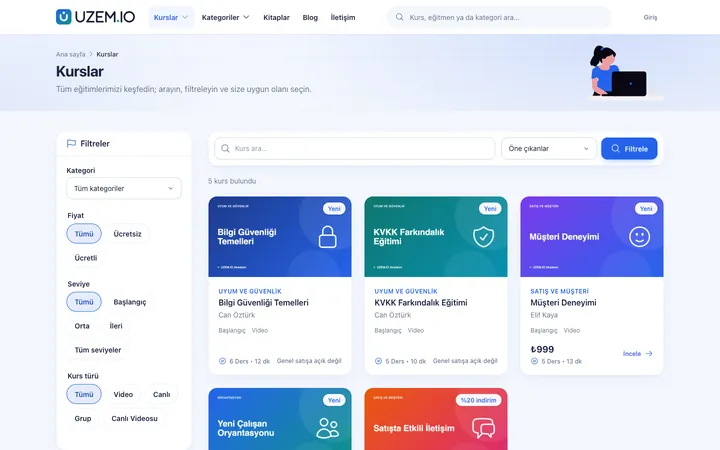
Courses are listed by category and subcategory. The detail page includes the curriculum, instructor and price.
Learners add multiple products to the cart. The coupons you define are applied as discounts in the cart.
Payments go to your organization's own PayTR or iyzico account. For learners paying by bank transfer, you approve the order from the dashboard.
Sell your printed books on the same storefront as your courses. The delivery address is collected with the order, and you update the shipping status from the dashboard.
Once payment is confirmed, the learner's course enrollment opens. When you record a refund, you choose whether to revoke access.
See term collections, refunds and net revenue on the sales dashboard; export the earnings report as CSV.
The learner browses the catalog and course details.
Applies their coupon and chooses a payment method.
Pays via PayTR, iyzico or bank transfer.
Course access opens once payment is confirmed.
Screenshots are taken from UZEM's real interface with sample data.


If the answer you're looking for isn't here, write to us and our team will help.
Help centerFor course sales, payments go to your organization's own PayTR or iyzico account defined in the dashboard. Bank transfer payments are made directly to your own bank account.
The learner places their order with the bank transfer option. When you see the payment, you approve the order from the dashboard; approval opens access to the course.
Yes. You can sell books on the same storefront as courses, collect the delivery address with the order and update the shipping status from the dashboard.
You create the refund record from the dashboard; partial refunds are supported too. The amount itself is refunded from your payment provider's dashboard. Refunds are reflected in sales reports and net revenue.
Connect your payment account and open your first course for sale today.
Strictly necessary cookies are used for the site to work. Analytics and marketing cookies are enabled only with your consent. Cookie policy