







Services & hospitality
Have your team ready to welcome guests before the season opens
Turn every department's standard, from reception to the kitchen, into short video lessons. New staff are enrolled in their training the moment they are added to their department; they take the exam, receive their certificate, and you see which team is ready in a single report.
- 7 units
- 6 categories
- 4 sample courses

Bringing a team that changes every season up to the same standard, fast
In tourism, a large part of the team works seasonally; reception, housekeeping, kitchen and service staff start a few weeks before the season opens and must be ready to welcome guests quickly. Having department heads deliver the same orientation from scratch every year takes time and erodes standards. A UZEM academy turns orientation into recorded courses that unlock gradually and end with an exam, and offers content in different languages for multilingual teams.

- Ready-made season orientation Reuse last season's courses and enroll new staff in their training by adding them to their unit.
- Lessons that unlock day by day Organize staff's first week by unlocking orientation lessons in sequence from the course enrollment date.
- Tracking by department Reception, kitchen and housekeeping are separate units; each head sees only their own team's progress.
- Content in different languages Enable more than one language and prepare the same training in a separate language for foreign staff; translation is not automatic.
- Returning staff Reactivate an employee deactivated at the end of the season the following year and see their past training history in the records.
- Motivation with points and badges Staff who finish lessons earn points and badges, boosting the drive to complete training across departments.
- Hygiene training records The kitchen and service team's completion of in-house hygiene training is recorded along with exam results.
Industry challenges and solutions
Problem
Dozens of new staff start in the same week at the beginning of the season.
Solution
Assign the orientation program to department units; every new staff member added to a unit is enrolled in the program automatically.
Problem
The service standard varies from shift to shift and person to person.
Solution
Show the standards in short video lessons and verify understanding with a short exam.
Problem
There is no record of who received hygiene training.
Solution
Completion and exam results for kitchen and service teams are stored by department; before an inspection you download the list and put it in your file.
Problem
Foreign staff struggle to understand Turkish content.
Solution
Enable more than one language in the academy and prepare different language versions of the same training; staff choose their own language.
Problem
Telling new staff everything on day one causes information overload.
Solution
Spread orientation across the first days with content that unlocks in stages, so only the section needed opens each day.
Problem
Department managers cannot follow their team's training.
Solution
Make the manager the unit manager of their department, so they see who is stuck on which training without asking the training lead.
Who uses it?
Reception / front office
Learns the check-in and check-out flow, guest welcome standards and how to route special requests correctly.
Housekeeping
Sees the room cleaning sequence, checklist, lost-and-found procedure and safe use of chemicals in video lessons.
Kitchen
Reinforces the basics of food safety, the cold chain, allergen management and kitchen hygiene with short modules and an exam.
Service
Learns the property's service standard for table setting, service sequence, menu knowledge and communicating with guests.
Restaurant / cafe team
Barista and cashier teams learn product preparation standards, the order flow and managing guests during rush hours.
Department managers and human resources
Managers see gaps in their own department before the season; human resources adds the whole property's training breakdown to personnel files.
Use cases
- Seasonal staff orientation Present the property introduction, work rules and department standards in a program spread over the first week.
- Hygiene and food safety Reinforce basic hygiene rules for kitchen and service teams with video, a short exam and a certificate.
- Guest experience standards Assign the welcome, complaint handling and farewell steps to all guest-facing teams.
- Multi-branch restaurant chain Define each branch as a unit and publish product preparation standards to all branches at once.
- Motivation across departments Encourage training completion with points and badges, and share the rankings with teams.
Features you'll use
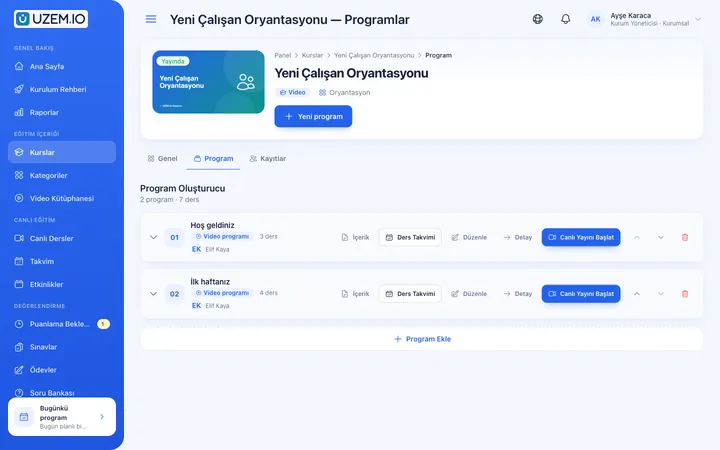
Course and Program Management
Organize your courses into programs and lessons; bring video, text, PDF, files, exams and live sessions together in a single flow.

Video Training
Publish your video lessons through a secure video infrastructure and record viewing progress for each lesson.

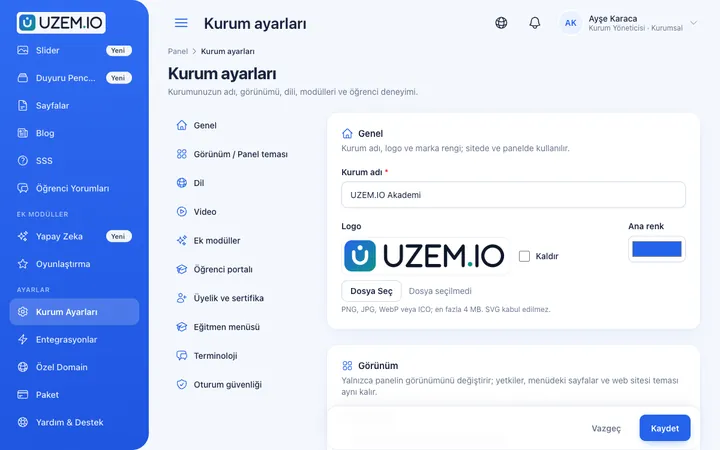
Organization Units
Build your departments, branches, regions and stores as a unit tree; assign training to units and let managers follow their own units in read-only mode.
Drip Content
Unlock lessons on the days you choose, counted from each learner's enrollment date, so content is absorbed step by step.
Exams
Measure learning with timed exams and quizzes; you decide the passing score, attempts, question shuffling and result visibility.

Certificates
Automatically issue certificates in your own design, verifiable by QR code, to everyone who completes a course.

Multilingual Content
Enable more than one language in your academy and prepare course, page and FAQ content for each language.
Gamification
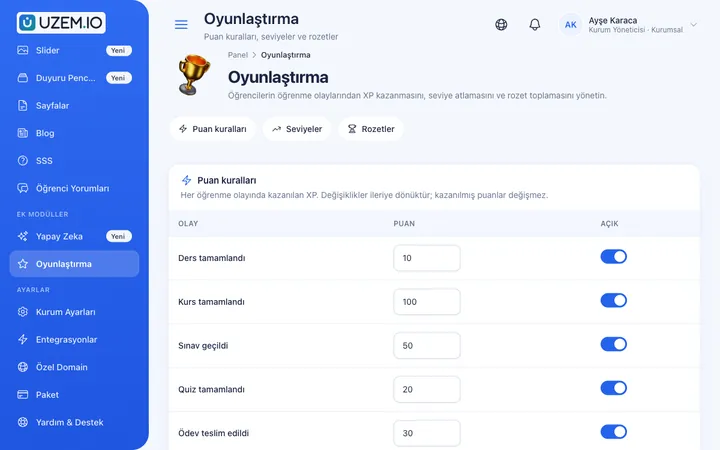
Use points, badges, levels and leaderboards to make steady learner effort visible and motivating.
Reporting
Report on course progress, video viewing, exams, assignments, certificates, live sessions and sales; export to CSV.

Announcements
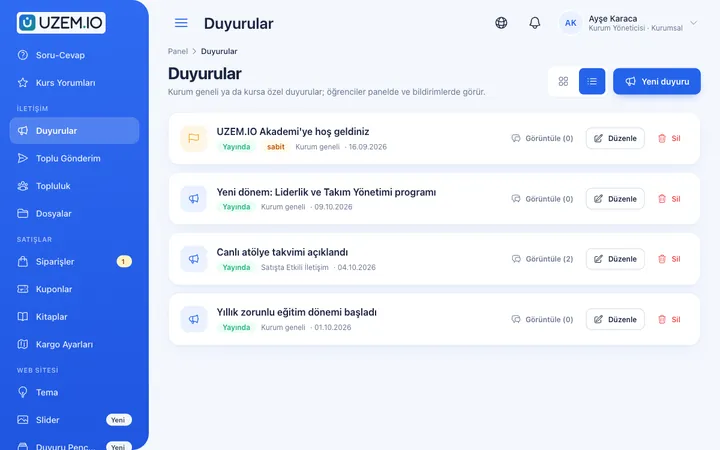
Publish announcements to your whole academy or to specific courses, so important information does not get lost in email and chat groups.
This structure comes ready with your academy
No credit card required; explore a dashboard set up with sample content right away.
How your academy is prepared
When you open an account with this industry, the structure below is set up as a draft; you adjust everything to fit your organization.
7 units · 0 categories · 4 sample courses
Properties and departments in one tree
Define each of your properties and the departments under it as units. When you assign orientation training to a property, all departments are covered; hygiene training can go only to the kitchen, service and restaurant-cafe teams. If you have more than one property, each property manager sees only their own property's progress.
Sample unit tree
Sample structure: Sample Property → Reception / Housekeeping / Kitchen / Service / Restaurant-Cafe / Management
- New Staff Orientation Property introduction, work rules and what to know in the first week; ends with a short exam.
- Guest Welcome Standards Steps for greeting, eye contact, addressing guests by name and directing them.
- Hygiene and Food Safety Basics Personal hygiene, cross-contamination, the cold chain and allergen awareness.
- Handling Customer Complaints Turning a complaint into an opportunity with listening, apology, a proposed solution and follow-up steps.
- Service Quality and Communication Communication between departments, body language and consistent service delivery.
- Chemical Safety in Housekeeping Rules for reading cleaning chemical labels, not mixing them and protective equipment.
Measure and document learning
- At least one of the sample courses comes with a short quiz; you edit the questions in the question bank.
- You set the passing score, number of attempts and question shuffling.
- Those who complete receive a certificate verifiable by QR code; the template comes ready.
- You open assignments for hands-on work and grade the submissions.
Which department is ready for the season?
See who completed which training, exam scores and certificates by property and department. Before the season opens, download the gap list and distribute it to department managers.
- Orientation progress by department Filter the course tracking report by department unit to see staff who have not finished orientation before the season opens.
- Hygiene exam results The exam success report lists which kitchen and service staff passed the hygiene training exam and who needs to retake it.
- Certificate list by property If you have more than one property, run the certificate report by property unit to track each hotel's training status separately.
- Seasonal staff member report The members report lets you export the academy's staff list; use it to identify employees to deactivate at the end of the season.
Your property academy is ready: Under Sample Property we prepared the Reception, Housekeeping, Kitchen, Service, Restaurant-Cafe and Management departments, plus the Orientation, Hygiene, Guest Experience, Service Standard, OHS and Product categories. The sample courses New Staff Orientation, Guest Welcome Standards, Hygiene and Food Safety Basics and Handling Customer Complaints are ready too, and gamification is enabled. Start by updating your property name.
Rollout steps
-
Set up properties and departments
Update the preset Sample Property structure with your own departments, and make managers unit managers.
-
Film your standards
Even short videos shot on a phone are enough; create a lesson for each standard.
-
Invite staff with their departments
Add employees to their departments; assigned training appears in their lists automatically.
-
Measure pre-season readiness
Track completion and exam results by department, and send reminders about gaps with an announcement.
Solutions for this industry
- Onboarding / Orientation Instead of explaining the same things to every new hire, schedule the first week: lessons unlock day by day, short quizzes confirm understanding, and managers follow the process.
- Employee Training If training is scattered across emails, folders and class lists: gather all employee training in one corporate academy, assign it to people or units, and see who completed it in the report.
- Branch / Unit-Based Training Bring your branch, store, region and department structure into the academy: assign training to a unit, enroll newcomers automatically, and let each manager see only their own unit’s status.
- Mandatory / Compliance Training If you replan KVKK, information security, OHS and internal policy training every year: assign it, verify completion with an exam, and keep a CSV record of who took which training.
- Certificate Programs Combine training, exams and certification in one flow: you set the success criteria, the certificate is generated automatically, and third parties verify its authenticity with a QR code.
Frequently asked questions
The 9 most frequently asked questions.
Can't find the answer you're looking for?
Browse the help center or write your question to us.
What happens to seasonal staff when the season ends?
You deactivate departing staff; their training history stays in the records and inactive users do not count toward licenses. When an employee returns next season, simply reactivate them.
Can staff access training from their phone during a break?
Yes. The academy opens in the phone browser; staff can watch a short video during a break and continue the rest at the end of their shift, right where they left off.
Can we offer training in different languages?
Yes. You can enable more than one language and prepare the same training's content separately for each language; content is not translated automatically.
Does the hygiene certificate replace an official document?
No. A UZEM certificate shows that staff completed your property's training. Official documents required by regulations must be obtained separately from authorized bodies.
We have several hotels; can we track them separately?
Yes. You can define each property as a separate unit so property managers see only their own property.
Can training be watched in areas with weak internet?
An internet connection is required to watch training. We recommend planning viewing in areas with a good connection, such as the staff room.
How do we bring over training videos from previous seasons and our staff list?
Upload the training videos you have, attach standard operating documents to lessons as PDFs, and enter hygiene and service questions into the question bank from the dashboard. You can bulk-import seasonal staff with name, email and phone from a CSV file. Ready-made course packages from another system cannot be imported.
Can we use a different plan depending on the season?
Plans are tiered by active learner capacity and can be upgraded or downgraded from the dashboard, so you can adjust capacity to the season's demand. Current capacity options and prices are on the Pricing page.
Is there a connection to our hotel management system or HR software?
We do not offer a ready-made connection to hotel management systems, payroll or HR software; you can import staff with a CSV. The academy works with Zoom for live orientation sessions and with Netgsm or Mutlucell SMS services for short staff notices.
Set up your academy for Tourism / Hotels / Restaurants / Cafes today
- No credit card details required
- Automatic setup
- You can connect your domain later