









Training & engagement
In all plansLive Training
Schedule live sessions inside your courses with the Zoom integration; attendance is recorded and session recordings are added to the course as video lessons.
Industries that benefit from this feature
- Corporate Companies
- Holdings and Groups of Companies
- Sales and Marketing Teams
- Franchise and Dealer Networks
- Banking and Finance
- Insurance
- Real Estate and Brokerage Networks
- Healthcare / Hospitals / Clinics

Live sessions as a natural part of the course
When live training lives in a separate tool, learners hunt for links, instructors take attendance by hand and recordings are forgotten on someone's computer. In UZEM, live sessions are created inside the course through the Zoom integration. Each session appears on the course calendar, learners join from the academy, and attendance and duration are recorded. The session recording can be moved to the secure video infrastructure and linked to the course as a lesson.
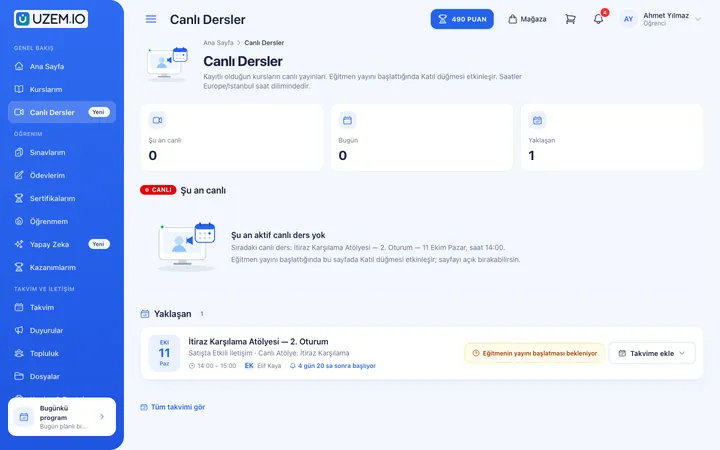
- A single entry point Learners reach both live and recorded lessons from the same course screen.
- Missed sessions can be caught up Session recordings appear in the course as video lessons that learners can watch later.
- No more manual attendance Who attended, when they joined and left, and how long they stayed are all recorded.
- Instructor reports Track the live session hours your instructors deliver in reports.
What can you do?
-
Zoom integration
Create sessions from the admin panel; participants join through the link in the academy.
-
Live sessions inside the course
Add a live session as a course lesson; it appears on the calendar automatically.
-
Attendance records
Participants' join and leave times and time spent in the session are recorded.
-
Recordings added to the course
The session recording is moved to the video infrastructure and linked to the relevant lesson.
-
Reminders and announcements
Keep participants informed with notifications, announcements and optional SMS.
Sample screens
Real screens from the admin, instructor and learner side.
Live session management screen
Learner's live sessions screen
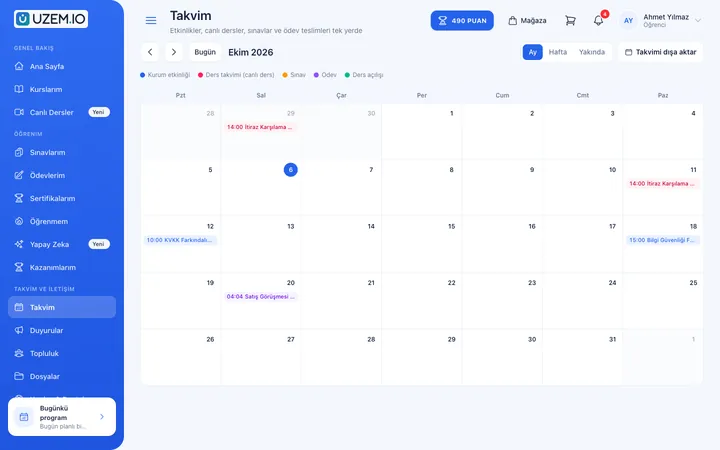
Learner's lesson calendar
Before and after
Before
Meeting links are shared in messaging groups.
Next
The session is in the course and on the calendar; learners join from the academy.
Before
Attendance is taken by hand at the end of the session.
Next
Attendance and duration are recorded automatically.
Before
Recordings stay on the instructor's computer.
Next
Recordings are added to the course as video lessons.
Frequently asked questions
The 4 most frequently asked questions.
Can't find the answer you're looking for?
Browse the help center or write your question to us.
Which meeting tool is used?
Live sessions run through the Zoom integration.
Who provides the Zoom license?
How Zoom access is provided depends on your plan and academy settings; the right option for you is confirmed during setup.
How are recordings made available to learners?
The session recording is moved to the secure video infrastructure and linked to a lesson in the course so learners can watch it.
Can we sell live training?
Yes. You can put courses that include live sessions on sale using the course sales features.
Solutions that use this feature
- Employee Training If training is scattered across emails, folders and class lists: gather all employee training in one corporate academy, assign it to people or units, and see who completed it in the report.
- Partner / Dealer Training If your dealers and partners learn about product changes late and incompletely: use a separate academy that carries your brand to deliver knowledge to every location at once, at the same quality.
- Customer Training Cut down the “how do I use this” questions reaching your support team: open a branded training center that teaches customers your product with video lessons, short quizzes and certificates.
- Member Training Offer seminars, courses and announcements to association, chamber and foundation members from one address; record attendance and completion, and open courses for a fee if you like.
- Student Training Bring lessons, assignments, exams and live classes together on a single student platform for schools, course centers and universities; see where every student stands in the progress report.
- Sales Team Training If it takes weeks for the field team to be ready when a new product launches: quickly update and measure your sales team’s knowledge with short video lessons, exams and a leaderboard.
- Live Training Management If Zoom links, attendance lists and recordings are scattered everywhere: schedule live sessions inside the course, record attendance automatically and add the session recording to the lesson.
- Launch an Online Academy Quickly launch an online academy on your own domain and under your own brand, without setting up servers, a software team or a separate payment system.
- Course Sales Sell courses, live training and books from your own storefront: cart, coupons, payment via PayTR, iyzico or bank transfer, and order management in one dashboard.
- Continuing Professional Development Help professionals stay current throughout their careers by gathering seminars, courses and certificate programs in one development academy, with attendance history kept on each person’s record.
Industries that benefit from this feature
- Corporate Companies
- Holdings and Groups of Companies
- Sales and Marketing Teams
- Franchise and Dealer Networks
- Banking and Finance
- Insurance
- Real Estate and Brokerage Networks
- Healthcare / Hospitals / Clinics
- Pharmaceuticals
- Medical Devices
- Cosmetics / Beauty
- Aviation
- Educational Institutions / Schools
- University
- Course Centers
- Publishing
- NGOs, Associations and Foundations
- Professional Chambers and Associations
- Public Institutions / Municipalities
Features in the same category
Set up your academy today
- No credit card details required
- Automatic setup
- You can connect your domain later