



Finance
Help new agents take their first listing better prepared
Your agents spend most of their day on showings and client meetings; they rarely have time for a long classroom session at the office. Turn orientation, listing and negotiation skills into short video lessons, and track where every office and team stands on one screen.
- 5 units
- 7 categories
- 3 sample courses

In real estate, know-how is passed on differently from office to office
Most agents work in the field, drop by the office irregularly and usually learn the trade by watching a senior colleague; this leads to different sales and contract practices across offices of the same brand. A UZEM academy turns topics such as taking listings, valuation presentations and the title deed process into recorded lessons. Office managers track their own agents' progress; if you wish, you can also sell your training to agents outside your network.

- Lessons watched in the field Between two showings, an agent opens a short lesson in their phone browser and later resumes where they left off.
- Offices and teams kept separate Each office and its teams are separate units; an office manager sees only their own agents' data.
- Capturing senior know-how Record listing and negotiation lessons taught by your successful agents on video and open them to your entire network.
- Revenue from course sales Sell your courses on the storefront, receive payments into your own PayTR or iyzico account, and create coupons for campaigns.
- Live office meetings Hold market reviews and new listing presentations live over Zoom and add the recording to the course.
- Sharing between agents In the community area, agents ask questions and share situations they encounter in the field.
- No license for departed agents When you deactivate an agent who leaves the office, their active learner license is freed up and their training history is not deleted.
Industry challenges and solutions
Problem
New agents keep asking the office manager the same questions.
Solution
The orientation program is prepared once and assigned to the office; new agents are enrolled automatically when added.
Problem
It is hard for agents to take time out of the field for training.
Solution
Short video lessons open in the phone browser between showings; the recording of a missed team meeting is waiting in the course too.
Problem
When an experienced agent leaves, their know-how leaves too.
Solution
Experienced agents are set up as in-house instructors, and their experience stays in the academy as video lessons.
Problem
Service quality varies between offices.
Solution
Common listing and client relationship standards are assigned to all offices and reported by office.
Problem
The organization's training expertise stays internal only.
Solution
Offer selected training as paid courses on the storefront; payment is taken by card or bank transfer, and coupons are created for campaign periods.
Problem
Changes to rules on license certificates, contracts and service fees reach agents late.
Solution
A briefing lesson is assigned to offices and announced; agents who have not completed it are listed in the report.
Who uses it?
New agent
Learns the office's way of working, the steps of taking a listing and the first client meeting through short lessons.
Experienced agent
Develops skills in negotiation, pricing and digital marketing, and can share know-how as an in-house instructor.
Team leader
Tracks the training progress of agents on the team and leads discussion of difficult sales and rental cases in live sessions.
Office manager / broker
Sees in a report filtered to their own office whether agents who joined have finished orientation and who is stuck on which training.
Head office training team
Builds the network-wide common training program, assigns it to offices and compares differences between offices.
External participant
Buys paid courses the organization opens to the industry from the storefront and receives a certificate on completion.
Use cases
- Agent orientation Explain office rules, the tools in use, taking listings and the steps of the first client meeting in a sequential program.
- Listing management training Turn taking listings, the valuation approach, preparing listings and regular communication with sellers into a course.
- Weekly team meeting Team leaders discuss cases in live sessions; recordings stay in the academy for those who could not attend.
- Paid courses open to the industry Put your specialist training on sale on the storefront and run campaigns with coupons.
- Sharing between agents Make room in the community area for agents to share good practices and questions.
Features you'll use
Video Training
Publish your video lessons through a secure video infrastructure and record viewing progress for each lesson.

Course and Program Management
Organize your courses into programs and lessons; bring video, text, PDF, files, exams and live sessions together in a single flow.

Organization Units
Build your departments, branches, regions and stores as a unit tree; assign training to units and let managers follow their own units in read-only mode.

Live Training
Schedule live sessions inside your courses with the Zoom integration; attendance is recorded and session recordings are added to the course as video lessons.

Reporting
Report on course progress, video viewing, exams, assignments, certificates, live sessions and sales; export to CSV.

Community
Open a community space where your learners ask questions under topics, share experiences and help each other.

Course Sales
Sell courses and books from your own academy with a cart, orders, PayTR, iyzico or bank transfer payments, and refunds.
Coupons
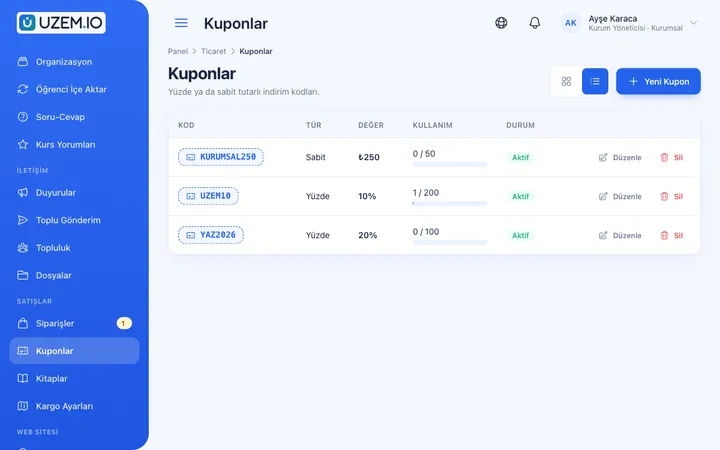
Create percentage or fixed-amount discount coupons, and keep your promotions under control with usage limits and validity dates.
Course Storefront
Manage your academy's public website with a course catalog, course landing pages, sliders, pop-ups, a blog and FAQs.

Certificates
Automatically issue certificates in your own design, verifiable by QR code, to everyone who completes a course.

This structure comes ready with your academy
No credit card required; explore a dashboard set up with sample content right away.
How your academy is prepared
When you open an account with this industry, the structure below is set up as a draft; you adjust everything to fit your organization.
5 units · 0 categories · 3 sample courses
Head office, office and team structure
Offices are defined under the head office, and teams under offices. When you assign agent orientation to the head office, it reaches every office; an agent who newly joins an office is enrolled automatically. Office managers see their own office and teams, and team leaders see only their own team.
Sample unit tree
Sample structure: Head Office → Sample Office 1 (Team A, Team B) / Sample Office 2
- Agent Orientation Office routine, workflow, first-week tasks and communication rules; ends with a short assessment exam.
- Listing Management The listing meeting, preparing the listing, photos and a routine for keeping sellers informed.
- Negotiation and Offer Management Managing expectations between buyer and seller, presenting offers and reaching agreement.
- Client Relationships First meeting, needs assessment, showings and after-sale communication.
- Digital Marketing Basics Writing listing copy, image quality and professional visibility on social media.
- Introduction to Real Estate Trade Regulations In-house briefing on topics such as the license certificate, written brokerage agreement and property showing form.
Measure and document learning
- At least one of the sample courses comes with a short quiz; you edit the questions in the question bank.
- You set the passing score, number of attempts and question shuffling.
- Those who complete receive a certificate verifiable by QR code; the template comes ready.
- You open assignments for hands-on work and grade the submissions.

Progress tracking by office and team
See which agents have finished orientation, which training they are progressing in and who has earned a certificate. Office managers can access only their own office's table; earnings from training you sell to the industry are tracked in a separate sales report.
- New agent onboarding progress Filter the course tracking report by office unit to see where recently joined agents stand in the onboarding program.
- Certificate status by office The certificate report lists which offices' agents have finished the core program and received their in-house certificate.
- Course sales earnings report Track earnings from courses you sell outside your network by period and course, and export them as a CSV to your accounting file.
- Agent sign-in records Use the sign-in records report to share agents who have not accessed the academy for a long time with the office manager.
Your real estate academy is ready: We added the Head Office, Team A and Team B along with the Sample Office 1 and Sample Office 2 units, plus the Orientation, Listings, Sales, Negotiation, Client Relationships, Regulations and Digital Marketing categories to your academy. The sample courses Agent Orientation with an exam, Listing Management and Negotiation and Offer Management, along with the community area, are ready too. Replace the sample offices with your own and invite your agents to get started.
Rollout steps
-
Add your offices
Add your offices and teams to the unit tree and assign office managers as managers.
-
Invite agents
Invite agents and place them in the office and team they work in.
-
Publish training
Assign orientation and sales training; if you wish, put some of it on sale on the storefront.
-
Track by office
Follow completion and certificate status by office and team.
Solutions for this industry
- Onboarding / Orientation Instead of explaining the same things to every new hire, schedule the first week: lessons unlock day by day, short quizzes confirm understanding, and managers follow the process.
- Sales Team Training If it takes weeks for the field team to be ready when a new product launches: quickly update and measure your sales team’s knowledge with short video lessons, exams and a leaderboard.
- Branch / Unit-Based Training Bring your branch, store, region and department structure into the academy: assign training to a unit, enroll newcomers automatically, and let each manager see only their own unit’s status.
- Course Sales Sell courses, live training and books from your own storefront: cart, coupons, payment via PayTR, iyzico or bank transfer, and order management in one dashboard.
- Launch an Online Academy Quickly launch an online academy on your own domain and under your own brand, without setting up servers, a software team or a separate payment system.
- Certificate Programs Combine training, exams and certification in one flow: you set the success criteria, the certificate is generated automatically, and third parties verify its authenticity with a QR code.
Frequently asked questions
The 8 most frequently asked questions.
Can't find the answer you're looking for?
Browse the help center or write your question to us.
Can we sell our training to agents outside our network?
Yes. You can offer your courses as paid on the storefront, receive card or bank transfer payments through your own PayTR or iyzico account, and create coupons.
Does an agent who leaves the office keep using a license?
No. Pricing is calculated on active learners; when you deactivate a departed agent, they no longer count toward licenses, and records of completed training are kept.
Can an office manager see other offices' data?
No. Office managers see their own office and its teams; a neighboring office's agent list and results are closed to them.
Do regulation courses replace legal advice?
No. Regulation lessons are for in-house briefing; the accuracy and currency of the content are your organization's responsibility. Official documents such as license certificates are obtained from the relevant authorities.
Can agents access training while in the field?
Yes. The academy opens in the phone browser; an agent can watch a short lesson between two showings and continue the rest on a computer at the office, right where they left off.
How do we bring over the training videos and contract samples we use in the office?
Upload your recorded training videos to the academy, attach contract templates and checklists to lessons as PDFs or files, and enter knowledge exam questions into the question bank. You can bulk-import your agent list with a CSV file. Ready-made course packages from another platform cannot be imported.
How is pricing determined for our network?
Plans are tiered by active learner capacity; instructor and admin accounts do not use licenses. Compare the capacity that fits the size of your office network and current prices on the Pricing page.
Is there a connection to our listing management software or listing systems?
We do not offer a ready-made connection to your listing, client tracking or listing portal systems; you import agent records with a CSV. The academy works with Zoom for office meetings, PayTR and iyzico for course sales, and Netgsm and Mutlucell for notification messages; you can also add a WhatsApp contact button for visitors.
Industries in the same group
Set up your academy for Real Estate and Brokerage Networks today
- No credit card details required
- Automatic setup
- You can connect your domain later