







Corporate & commercial
Keep your master technicians’ know-how from getting lost between shifts
The right setting for a machine, a quality check step that must not be skipped, or the assembly point to go to when the alarm sounds becomes a risk when it lives only in experienced employees’ memories. With UZEM, turn your work instructions into short videos and documents, assign them to the relevant line and verify them with a quiz.
- 8 units
- 6 categories
- 3 sample courses

Why does factory knowledge stay in the master technician’s head?
In manufacturing, training is often about a machine setting, a quality step or what to do in an emergency; this knowledge lives in experienced employees more than in written instructions. Three shifts, contractor teams and operators without computers make classroom training hard. With UZEM, you turn instructions into short videos and documents, assign them by line, verify them with a quiz and keep records department by department.

- Line-specific instructions You assign a machine instruction only to the line where that machine is; operators are not burdened with irrelevant content.
- Master know-how on record Short videos shot on a phone at the machine become permanent lessons.
- One source through revisions When an instruction is revised, the lesson is updated and an announcement sends a notification and email to the employees concerned.
- Separate group for contractors Contractor workers are trained in their own group, only with the site induction and facility rules.
- Access from a shared computer On the shared computer in the training room, each operator signs in with their own account and their progress is recorded under their name.
- Verifiable internal certificate The certificate of an employee who passes the quiz is verified by QR code; records are ready for facility audits.
- Keeping interest through repetition Points and badges add a sense of progress across departments to recurring safety training.
Industry challenges and solutions
Problem
Work instructions are on boards, in binders and on personal phones; it is unclear which one is current.
Solution
The current instruction document and explainer video sit in one source within the relevant course; when there is a revision, the lesson is updated and an announcement is made.
Problem
Gathering training records for a customer or certification audit takes days.
Solution
Who completed which training when and what they scored on the quiz is listed by department and line and exported as a file.
Problem
Scheduling classroom training on a three-shift system stops production.
Solution
Short lessons are completed between shifts or on the shared computer in the training room, each employee with their own account.
Problem
The knowledge of master technicians nearing retirement leaves before it is recorded.
Solution
The master technician explains the instruction in short videos shot at the machine; these videos become lessons in the training assigned to the line.
Problem
Contractor workers enter the site without knowing the facility rules.
Solution
A short safety program and quiz assigned to the Contractor Workers group is completed before entry; the certificate of those who pass can be verified by QR code.
Problem
Interest drops as safety training is repeated.
Solution
Points are defined for completed lessons and passed quizzes, and badges for specific achievements; progress across departments becomes visible.
Who uses it?
Production operator
Learns the work instruction for their workstation, setup steps for product changeovers and safe working rules at the machine through visual lessons.
Shift supervisor / line lead
As unit manager, tracks which instruction training each operator on their line has completed and reminds them of gaps at the start-of-shift meeting.
Maintenance technician
Learns periodic maintenance steps, lockout and tagout practice and the fault logging procedure.
Quality control officer
Turns measurement methods, segregation of nonconforming product and root cause analysis basics into lessons for operators.
OHS specialist and OHS unit
Adapts the content of basic induction and emergency training and tracks who has completed it across the factory.
Contractor and temporary worker
Completes facility rules and safety induction with a short program and quiz before entering the site.
Use cases
- Machine work instruction library Assign a step-by-step explainer video and downloadable instruction for each machine to the relevant production line.
- Emergency and evacuation training Assign assembly points, alarm types and emergency team duties to the whole factory before the drill.
- 5S and lean manufacturing basics Explain the sort, set in order, shine, standardize and sustain steps with before-and-after photos from your own shop floor.
- Quality awareness Give operators a short program on nonconformity reporting, measurement errors and tracing customer complaints to their source.
- Contractor site induction Assign facility rules and safety induction with a short quiz to the contractor group.
Features you'll use
Organization Units
Build your departments, branches, regions and stores as a unit tree; assign training to units and let managers follow their own units in read-only mode.

Video Training
Publish your video lessons through a secure video infrastructure and record viewing progress for each lesson.

Files
Add lesson notes, handouts, forms and guides to a course or to the whole academy, so learners reach the current document in one place.
Exams
Measure learning with timed exams and quizzes; you decide the passing score, attempts, question shuffling and result visibility.

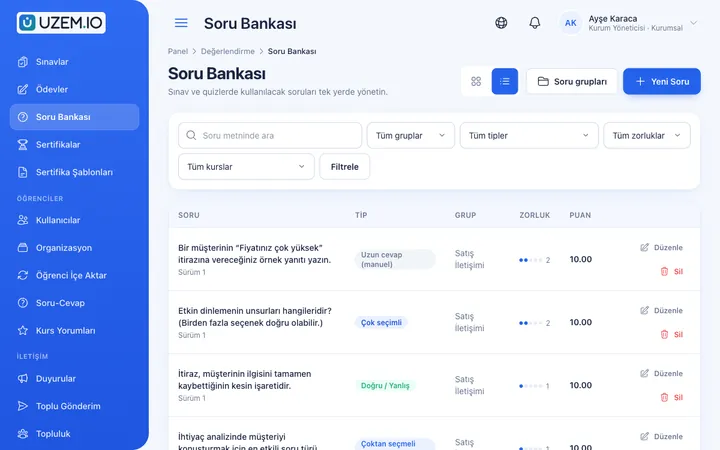
Question Bank
Prepare your questions once with groups, difficulty levels and explanations, then reuse them across different exams.
Certificates
Automatically issue certificates in your own design, verifiable by QR code, to everyone who completes a course.
Reporting
Report on course progress, video viewing, exams, assignments, certificates, live sessions and sales; export to CSV.

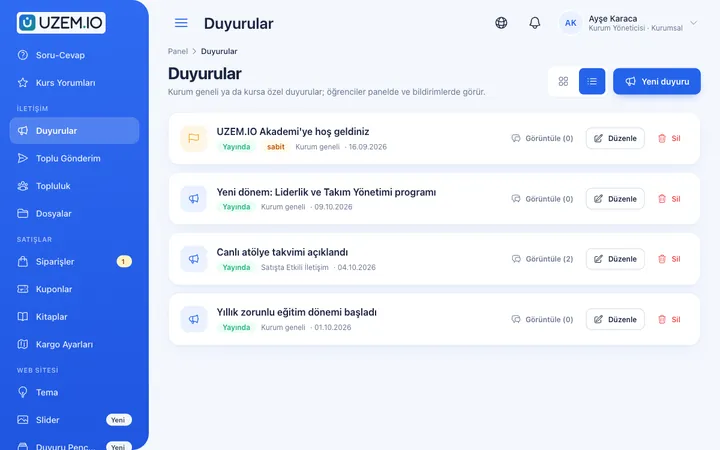
Announcements
Publish announcements to your whole academy or to specific courses, so important information does not get lost in email and chat groups.
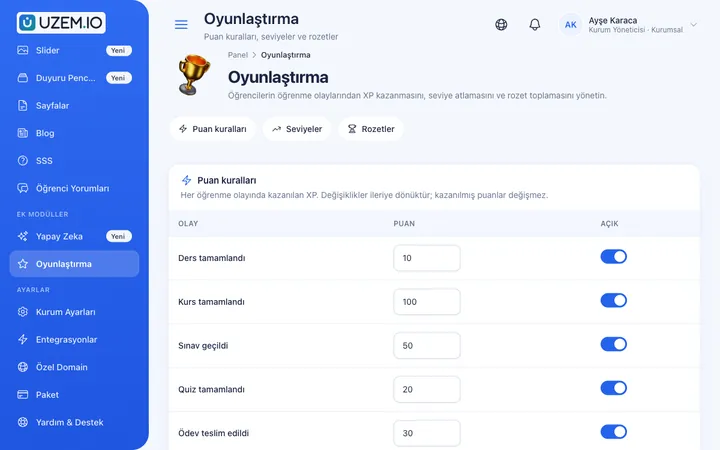
Gamification
Use points, badges, levels and leaderboards to make steady learner effort visible and motivating.
Course and Program Management
Organize your courses into programs and lessons; bring video, text, PDF, files, exams and live sessions together in a single flow.

This structure comes ready with your academy
No credit card required; explore a dashboard set up with sample content right away.
How your academy is prepared
When you open an account with this industry, the structure below is set up as a draft; you adjust everything to fit your organization.
8 units · 0 categories · 3 sample courses
Factory, departments, lines and contractors
The factory sits at the top, with Production, Maintenance, Quality, OHS and Logistics departments below it, and production lines under the Production department. Contractor workers are kept in a separate group. When you assign emergency training to the factory, everyone is covered; a machine instruction goes only to the line where that machine is. If you have multiple facilities, each factory becomes its own branch.
Sample unit tree
Sample structure: Sample Factory → Production (Sample Production Line 1) / Maintenance / Quality / OHS / Logistics / Contractor Workers
- OHS Basic Induction Hazard and risk concepts, personal protective equipment and incident reporting; adapted with your OHS specialist, ends with a short quiz.
- Emergency Plan Steps to follow in fire, earthquake and leak situations and the assembly point; updated to match your facility’s plan.
- 5S Practices What the 5S steps mean on the shop floor for an organized, clean and standardized workplace.
- Lockout and Tagout Steps for safely isolating and tagging energy sources before maintenance.
- Measurement and Nonconforming Product Management Correct use of measuring instruments, sampling and segregation of nonconforming product.
- Safe Work at the Machine Guards, the emergency stop button and what to watch for during line cleaning.
Measure and document learning
- At least one of the sample courses comes with a short quiz; you edit the questions in the question bank.
- You set the passing score, number of attempts and question shuffling.
- Those who complete receive a certificate verifiable by QR code; the template comes ready.
- You open assignments for hands-on work and grade the submissions.
Which line has completed which instruction?
See each department’s and line’s completion status for required training, quiz scores and certificates. The line lead monitors only their own line; the OHS unit monitors the whole factory. You prepare the training list requested in an audit in a few steps with a department or line filter.
- Course tracking report by line Shows each line’s completion status in machine work instruction training; the line lead directs operators with gaps at the start of the shift.
- OHS quiz exam results Lists OHS Basic Induction quiz scores with department and line filters; the OHS specialist plans refreshers based on low results.
- Contractor certificate report Shows who in the Contractor Workers group completed the site induction and received a certificate; used for site entry checks.
- Members report Lists registered employees in factory, department and contractor groups; deactivating contractors whose work is finished frees capacity for newcomers.
Your factory academy opens with this structure: Under Sample Factory, the Production (with Sample Production Line 1), Maintenance, Quality, OHS and Logistics departments and the Contractor Workers group come ready. OHS, Machines, Maintenance, Quality, Emergency and Work Instructions categories are defined. OHS Basic Induction, Emergency Plan and 5S Practices are added as drafts, and the gamification module is turned on.
Rollout steps
-
Build the factory tree
Replace the sample factory and line with your own facilities, departments and lines; make shift supervisors unit managers.
-
Record your instructions
Add short machine videos shot on a phone and instruction documents to the relevant courses.
-
Assign to departments and lines
Assign OHS and emergency training to the factory, machine instructions to lines, and the site induction to the contractor group.
-
Check before audits
Track completion and quiz results by department and line, and close gaps at the start of each shift.
Solutions for this industry
- Mandatory / Compliance Training If you replan KVKK, information security, OHS and internal policy training every year: assign it, verify completion with an exam, and keep a CSV record of who took which training.
- Branch / Unit-Based Training Bring your branch, store, region and department structure into the academy: assign training to a unit, enroll newcomers automatically, and let each manager see only their own unit’s status.
- Onboarding / Orientation Instead of explaining the same things to every new hire, schedule the first week: lessons unlock day by day, short quizzes confirm understanding, and managers follow the process.
- Employee Training If training is scattered across emails, folders and class lists: gather all employee training in one corporate academy, assign it to people or units, and see who completed it in the report.
- Continuing Professional Development Help professionals stay current throughout their careers by gathering seminars, courses and certificate programs in one development academy, with attendance history kept on each person’s record.
Frequently asked questions
The 8 most frequently asked questions.
Can't find the answer you're looking for?
Browse the help center or write your question to us.
How do operators without a computer or corporate email get trained?
They sign in from their own phone’s browser or from the shared computer in the training room, each with their own account. An internet connection is required.
Does OHS training in UZEM replace official OHS training?
No. UZEM publishes, measures and records in-house training. The content, duration and certification of legally required training remain the responsibility of your organization, your OHS specialist and authorized bodies.
Can we keep contractor firms’ workers separate?
Yes. Contractor workers are kept in their own group and see only the training assigned to them; they can also be split into sub-units by firm.
Are operators notified when an instruction is revised?
When you update the lesson and publish an announcement, the employees concerned receive an in-app notification and an email.
We have multiple factories; can they be reported separately?
Yes. Each factory is defined as its own branch; reports are filtered by factory, department and line.
How do we bring over our printed work instructions and training videos?
You attach scanned or digital versions of instructions as PDFs to the relevant course; videos shot at the machine are uploaded from the dashboard and become lessons. You enter quiz questions into the question bank grouped by machine or topic. You can import employees and the department-line structure via CSV; importing ready-made lesson packages is not supported.
How do contractor and shift workers affect licensing?
Only active users count toward the license. When you deactivate a contractor worker whose job is done or an operator who has left, capacity is freed and the training record is kept. Plans are tiered by active user capacity; you can see current options on the Pricing page.
Can it connect to our production or maintenance management software?
No, we do not offer ready-made connections to enterprise software such as production planning, maintenance management or HR systems; you import the employee list via CSV. You can use Zoom for live briefings across facilities and a Netgsm or Mutlucell connection for bulk SMS to shifts.
Industries in the same group
Set up your academy for Industry and Manufacturing today
- No credit card details required
- Automatic setup
- You can connect your domain later