






Healthcare
Everyone who sells, installs and uses the device works from the same knowledge
Turn installation steps, daily operating checks and service procedures into video lessons. Train your own team, your dealers and the users at customer hospitals in separate units, and see in reports who has completed training on which device.
- 7 units
- 5 categories
- 3 sample courses

Device training does not end at installation; it must reach every user
In a medical device company, the sales team, service technicians, clinical application specialists, dealers and users at customer hospitals all need to know the same product at different depths. Face-to-face training given during installation does not reach users whose shift changes or who join later. The UZEM academy separates device training by user group, measures it with exams and provides manuals as protected files.

- Content by user group Technicians, the sales team and hospital users are separate units; each group sees only the device training assigned to it.
- Customer hospital units You make each hospital where you install a device its own unit and assign its users only to that device’s training.
- Protected manual files Service manuals and checklists are kept in private storage; only those with access to the relevant course can download them.
- Remote device demos You present a new model live to dealers and clinical teams over Zoom and add the recording to the course.
- Knowledge confirmed by exam At the end of technical training, an exam with a passing score measures whether the technician understands the product, and the result is recorded.
- Academy on your own domain You publish the academy with your logo, colors and custom domain and reach your customers under your own brand.
- QR-verified device certificate Users who complete device training receive an internal certificate verified by QR; it does not replace an official authorization document.
Industry challenges and solutions
Problem
The same operating training has to be repeated on site with every new device installation.
Solution
Prepare basic operating training as a video course; reserve on-site training for the hands-on part only.
Problem
When the software or hardware version changes, knowledge in the field goes out of date.
Solution
Add release notes to the existing course as a new lesson; the announcement appears on the relevant units’ screens and in their email.
Problem
There is no way to measure dealers’ technical competence.
Solution
Document which device training dealer staff have successfully completed with device-based exams and QR-verified certificates.
Problem
Service manuals and checklists get lost in different folders.
Solution
Attach documents to the files of the relevant device course; only those with access to that course can download them.
Problem
A professional, company-owned environment is wanted for training users at customer hospitals.
Solution
Open the academy with your own logo, colors and domain; hospital users see only the relevant device in their own unit.
Problem
Live demos for remote regions create travel costs.
Solution
Add a Zoom session to the calendar; the recording is added to the course and can be watched later.
Who uses it?
Product specialist / application engineer
Learns the device’s operating principle, software version changes and common faults in depth; prepares content for the technical team.
Clinical application specialist
Prepares standard training content to teach users correct use of the device in the hospital setting and updates it as versions change.
Sales representative
Learns, in short modules, to connect technical features to clinical benefit and which needs questions to ask the hospital before a quote.
Service technician
Reviews preventive maintenance steps, calibration checks and safety warnings with videos and documents.
Training team
Builds device-based training programs, organizes live demo sessions and issues certificates based on exam results.
Dealer and distributor staff
Are trained with the same installation and maintenance content as the central service team; because each dealer is tracked in its own sub-unit, headquarters sees status by dealer.
Use cases
- Device operation certificate Build a program of video lessons, a short exam and a certificate for each device; the certificate can be verified by QR code.
- Dealer technical training Add dealer staff as units, assign installation and maintenance training and get completion reports by dealer.
- Service technician development Deliver preventive maintenance and troubleshooting training in sequenced sections, and add new versions to the same course.
- Hospital user training Provide hospital teams with short content on daily use, cleaning and safety warnings for the device; a new user is enrolled once added to the team.
- Product knowledge for the sales team Introduce a new product to the sales team in a live launch session, then reinforce the knowledge with a short exam.
Features you'll use
Course and Program Management
Organize your courses into programs and lessons; bring video, text, PDF, files, exams and live sessions together in a single flow.
Video Training
Publish your video lessons through a secure video infrastructure and record viewing progress for each lesson.

Organization Units
Build your departments, branches, regions and stores as a unit tree; assign training to units and let managers follow their own units in read-only mode.

Exams
Measure learning with timed exams and quizzes; you decide the passing score, attempts, question shuffling and result visibility.

Certificates
Automatically issue certificates in your own design, verifiable by QR code, to everyone who completes a course.

Files
Add lesson notes, handouts, forms and guides to a course or to the whole academy, so learners reach the current document in one place.
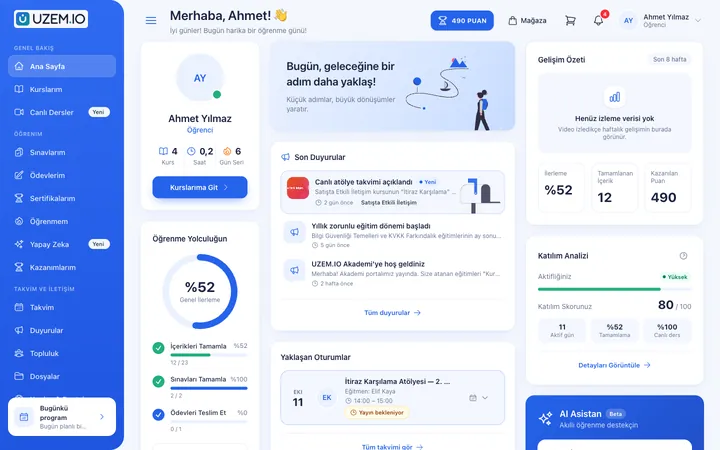
Live Training
Schedule live sessions inside your courses with the Zoom integration; attendance is recorded and session recordings are added to the course as video lessons.

Reporting
Report on course progress, video viewing, exams, assignments, certificates, live sessions and sales; export to CSV.

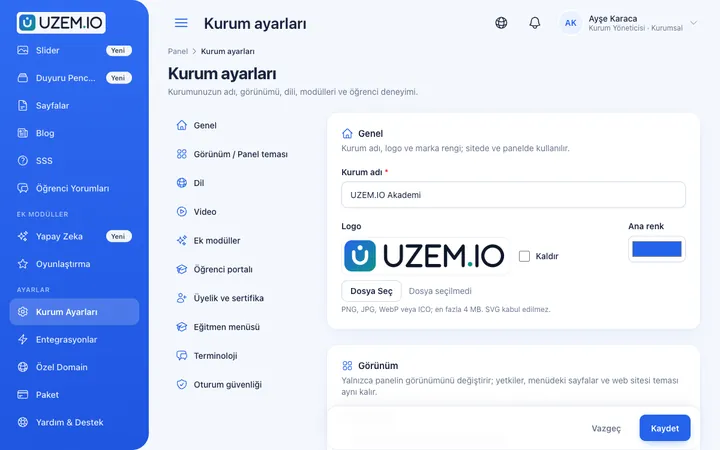
White Label / Branding
Present your academy entirely under your own brand with your logo, colors, fonts and choice of theme.
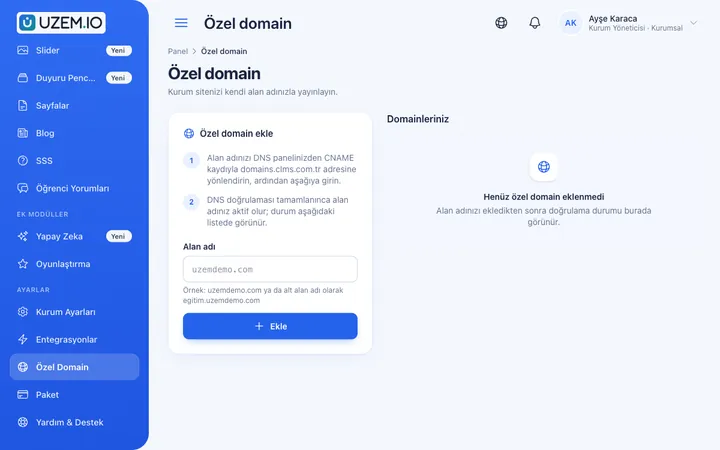
Custom Domain
Publish your academy on your own domain, with verification and SSL certificate handled automatically.
This structure comes ready with your academy
No credit card required; explore a dashboard set up with sample content right away.
How your academy is prepared
When you open an account with this industry, the structure below is set up as a draft; you adjust everything to fit your organization.
7 units · 0 categories · 3 sample courses
Internal teams and the dealer network in one structure
Define your Technical, Clinical Application, Sales, Service and Training teams as units; group dealers under a Dealers unit with a separate sub-unit for each. When you assign installation training to the Dealers unit, all dealers are covered; a dealer manager sees only the status of their own technicians.
Sample unit tree
Sample structure: Sample Medical → Technical / Clinical Application / Sales / Service / Training / Dealers
- Device Operation Basics Power on and off, daily checks, user interface and basic alarm messages; an exam-based template you adapt to your own device.
- Installation and Commissioning Site preparation, installation steps, first startup checks and the handover report.
- Preventive Maintenance Procedure Maintenance planning, using the checklist and keeping complete maintenance records.
- Device Cleaning and Safety Warnings Cleaning according to the manufacturer’s instructions, electrical safety and warnings to pass on to the user.
- Technical Sales Conversation Questions for understanding customer needs and turning technical features into benefits.
Measure and document learning
- At least one of the sample courses comes with a short quiz; you edit the questions in the question bank.
- You set the passing score, number of attempts and question shuffling.
- Those who complete receive a certificate verifiable by QR code; the template comes ready.
- You open assignments for hands-on work and grade the submissions.
Training visibility by device and dealer
See which technician has completed training on which device, their exam result and certificate date, by person and dealer. Dealer managers access only their own staff’s list; headquarters can export a breakdown of the entire network as a file.
- Device training progress by hospital Filter the course tracking report by customer hospital unit to see whether users completed training after installation.
- Technician exam results The exam pass report shows service staff who did not reach the passing score in technical training for a new model.
- Dealer certificate report The certificate report lists, by unit, which dealer employees finished product training and received a certificate.
- Live demo instructor hours The instructor live session hours report summarizes the total duration of remote demo sessions delivered by clinical application specialists.
Your medical device academy is ready: Under Sample Medical, we have prepared Technical, Clinical Application, Sales, Service, Training and Dealers units, and Device Operation, Installation, Maintenance, Clinical Application and Sales categories. Start by adapting the exam-based Device Operation Basics, Installation and Commissioning, and Preventive Maintenance Procedure template courses to your own device models.
Rollout steps
-
Add teams and dealers
Place your internal teams and dealer network in the unit tree and define dealer managers.
-
Prepare device courses
Gather your existing training videos and manuals into a separate course for each device.
-
Set up exams and certificates
Add an exam with a passing score and a certificate template to each device course.
-
Track by dealer
Monitor who holds which device certificate at each dealer, and send an announcement to dealers that are behind.
Solutions for this industry
- Product Training If product knowledge is explained differently to every team: deliver the same content to sales, support, dealer and field teams at the same time, and verify it was learned with an exam.
- Partner / Dealer Training If your dealers and partners learn about product changes late and incompletely: use a separate academy that carries your brand to deliver knowledge to every location at once, at the same quality.
- Customer Training Cut down the “how do I use this” questions reaching your support team: open a branded training center that teaches customers your product with video lessons, short quizzes and certificates.
- Sales Team Training If it takes weeks for the field team to be ready when a new product launches: quickly update and measure your sales team’s knowledge with short video lessons, exams and a leaderboard.
- Certificate Programs Combine training, exams and certification in one flow: you set the success criteria, the certificate is generated automatically, and third parties verify its authenticity with a QR code.
Frequently asked questions
The 8 most frequently asked questions.
Can't find the answer you're looking for?
Browse the help center or write your question to us.
Is training assigned automatically by device model?
No, there is no device-based automatic assignment rule. You assign training to units or individuals; people who join a unit are automatically enrolled in that unit’s training.
Can we also train users at customer hospitals?
Yes. You can open each customer hospital as a separate unit and assign its users only to the training for the installed device.
Is the certificate we issue an official authorization document?
No. The UZEM certificate shows that the person completed the training and exam you prepared. Authorized service documents and official certificates required by regulation depend on the relevant authorities and processes.
Can a technician check the manual at the installation site?
Manuals and checklists added to the course open in a phone or tablet browser anywhere with an internet connection. Files are kept in private storage; only users with access to that course can download them.
Can we open the academy under our own brand?
Yes. You can adapt the academy to your brand with logo, color and theme settings and publish it on your own domain.
How do we move our installation videos and service manuals?
You upload installation and operating videos to the academy, attach service manuals and checklists to lessons as files, and enter assessment questions into the question bank. You can bulk import technician, dealer and customer users with a CSV file. Importing ready-made course packages is not supported.
Do users at customer hospitals use licenses too?
Yes, every user who is an active learner in the academy counts toward the license; users you deactivate do not. You can free capacity by deactivating hospital users who have finished device training. You can review plans tiered by active learner capacity on the Pricing page.
Can it connect to our service tracking or ERP system?
We do not offer a ready-made connection to your service tracking, ERP or HR software; you can import users via CSV. The academy’s ready-made connections are Zoom for remote demos, PayTR and iyzico for course sales, Netgsm and Mutlucell for SMS, and a WhatsApp contact button.
Industries in the same group
Set up your academy for Medical Devices today
- No credit card details required
- Automatic setup
- You can connect your domain later