






What do you want to achieve?
Course Sales
Sell courses, live training and books from your own storefront: cart, coupons, payment via PayTR, iyzico or bank transfer, and order management in one dashboard.
Suitable industries
- Real Estate and Brokerage Networks
- Cosmetics / Beauty
- University
- Course Centers
- Publishing
- Professional Chambers and Associations

Sell your courses from your own storefront, under your own brand
Selling training takes a page that presents the course, secure payment, order tracking and instant access once payment is made. UZEM brings all of this into a single flow. A participant adds the course to the cart in the storefront, pays via PayTR, iyzico or bank transfer, and is enrolled once the payment is confirmed. Coupon campaigns, order history and refunds are tracked from the admin dashboard.
Problems and solutions
Problem
Course access is granted manually after payment.
Solution
Once payment is confirmed, the participant is automatically enrolled in the purchased course.
Problem
Bank transfer payments are hard to track.
Solution
Bank transfer orders appear as pending orders in the dashboard, and access opens once they are approved.
Problem
Campaigns and discounts are calculated by hand.
Solution
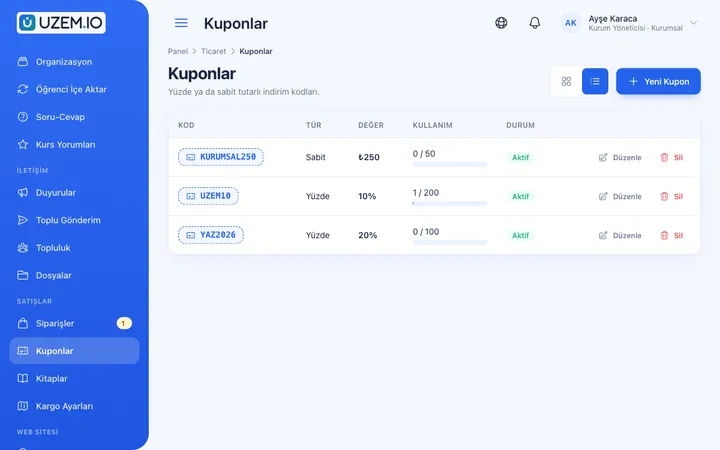
Coupons define percentage or fixed-amount discounts, usage limits and validity periods.
Problem
Refunds are handled off the record.
Solution
Refunds are processed through the order and stay recorded in the order history.
Who is it for?
Education providers and course centers
Organizations that want to sell their programs online.
Instructors and experts
Professionals who want to offer their expertise as paid courses.
Publishers
Publishers who want to sell print or digital books alongside courses.
Chambers and associations
Organizations that want to open their certificate programs to non-members for a fee.
Use cases
- Single course sales Put each course on sale in the storefront with its own landing page and price.
- Live training and workshop sales Sell programs with live sessions through pre-registration.
- Book sales Sell your books alongside your courses in the same cart.
- Seasonal campaigns Run discount campaigns for specific periods with coupon codes.
- Corporate bulk sales Make group enrollment easier with coupons dedicated to organizations.
Features used
Course Sales
Sell courses and books from your own academy with a cart, orders, PayTR, iyzico or bank transfer payments, and refunds.
Coupons
Create percentage or fixed-amount discount coupons, and keep your promotions under control with usage limits and validity dates.
Course Storefront
Manage your academy's public website with a course catalog, course landing pages, sliders, pop-ups, a blog and FAQs.

Course and Program Management
Organize your courses into programs and lessons; bring video, text, PDF, files, exams and live sessions together in a single flow.

Live Training
Schedule live sessions inside your courses with the Zoom integration; attendance is recorded and session recordings are added to the course as video lessons.

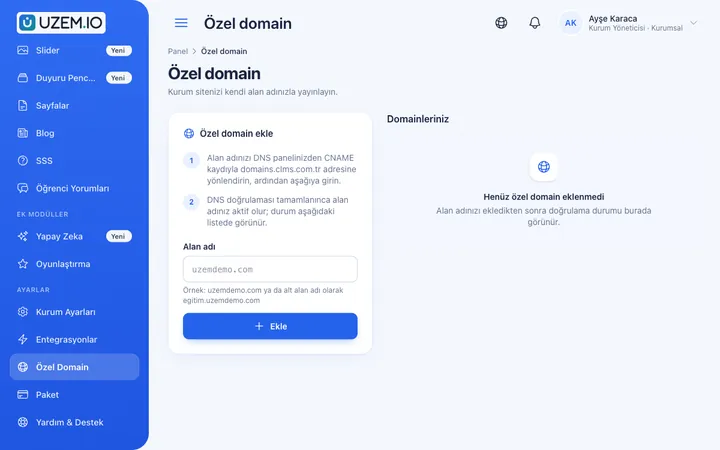
Custom Domain
Publish your academy on your own domain, with verification and SSL certificate handled automatically.
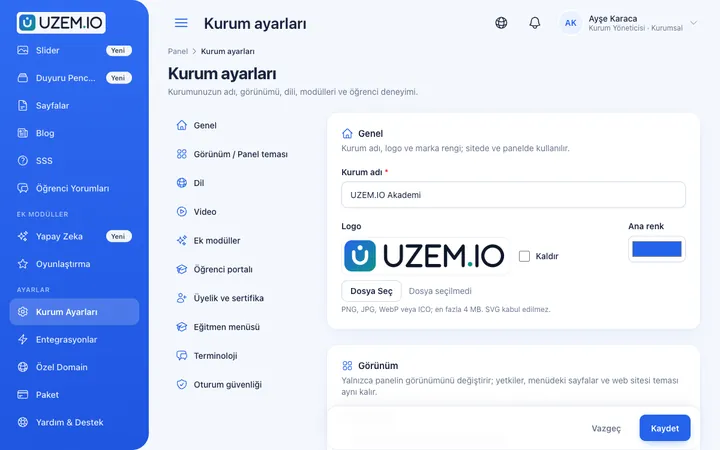
White Label / Branding
Present your academy entirely under your own brand with your logo, colors, fonts and choice of theme.
WhatsApp Contact Button
Add a WhatsApp contact button to your storefront site and, if you like, the learner dashboard, so visitors can start writing to you with a single tap.
Reporting
Report on course progress, video viewing, exams, assignments, certificates, live sessions and sales; export to CSV.

Security and Access
Control who accesses your academy and from where with two-factor authentication, a single-session rule, watermarked and signed video playback, and sign-in and account sharing reports.
Try this setup in your own academy
No credit card required; explore a dashboard set up with sample content right away.
How does it work?
-
Connect payment methods
Connect your PayTR or iyzico account and, if you like, add your bank transfer details.
-
Price your products
Set prices for courses and books and publish them in the storefront.
-
Create a campaign
Define coupon codes and set their usage conditions.
-
Manage orders
Track orders, bank transfer approvals and refunds from the dashboard.
Sample courses
- Paid Online Course A program sold in the storefront, made up of video lessons, assignments and a certificate.
- Live Weekend Workshop A paid workshop held on Zoom, with recordings made available to participants.
- Course and Book Bundle A companion book that can be purchased together with the course.
Orders and sales on record
The order list shows payment status, the coupon used and refund details. You can follow sales data in reports and export it as CSV. Financial records are kept unchanged; refunds are processed as separate records.
Frequently asked questions
The 5 most frequently asked questions.
Can't find the answer you're looking for?
Browse the help center or write your question to us.
Which payment methods are supported?
You can accept card payments via PayTR and iyzico, and also accept payment by bank transfer.
Whose account do payments go to?
Payments are collected through your own PayTR or iyzico account; the agreement for these accounts is between you and the payment provider.
Can we create coupons?
Yes. You can create coupons with a discount type, amount, usage limit and validity dates.
How are refunds handled?
Refunds are processed through the related order and kept as a separate record in the order history.
Can we sell books?
Yes. You can sell your books alongside your courses through the storefront and cart.
Industries using this solution
Set up your academy today
- No credit card details required
- Automatic setup
- You can connect your domain later