






Corporate & commercial
From the warehouse to the road, the same safety rules on every shift
Logistics teams work three shifts, in different warehouses and often behind the wheel; gathering everyone in the same classroom is nearly impossible. With UZEM, break warehouse and driving safety training into short video lessons, verify it with an exam and record it by warehouse, fleet or dispatch team.
- 8 units
- 6 categories
- 3 sample courses
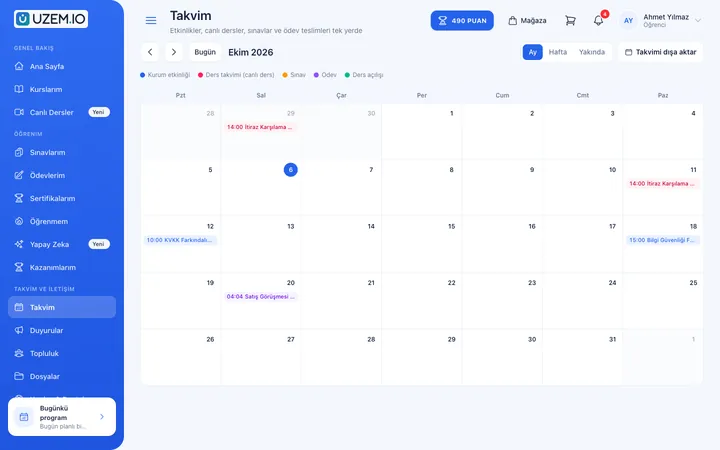
How do you track training for shift-based, dispersed teams?
In logistics, some employees work three shifts in the warehouse, some are behind the wheel and some are at customer sites; temporary staff are added in peak periods. Running safety briefings with a sign-in sheet does not show who actually understood, and makes collecting records for audits hard. With UZEM, you assign training to warehouse and team units, spread it across shift breaks in short lessons, verify it with a quiz and keep the record in one place.

- Lessons that fit the shift Lessons of a few minutes are completed with each employee’s own account during a break or while waiting for loading.
- Assignment by warehouse Warehouse safety goes to warehouses and safe driving to the Fleet; everyone sees only the training for their own job.
- Safety verified by quiz A quiz with a passing score and questions drawn from the question pool shows that the safety rule has been understood.
- Reaching the field by SMS You send bulk SMS to drivers and warehouse teams through your own Netgsm or Mutlucell account.
- One version of each instruction Current instructions and checklists sit in the files area, so outdated versions do not circulate in warehouses.
- Fast start for temporary staff Staff added to a warehouse in peak season are automatically enrolled in orientation and safety training.
- Audit-ready records Completion date, quiz score and certificate are pulled into a single list with a warehouse or team filter.
Industry challenges and solutions
Problem
Gathering shift-based warehouse teams and drivers on the road for training at the same time is impossible.
Solution
Training is broken into video lessons of a few minutes; each employee completes them with their own account between shifts, and drivers while the vehicle is parked.
Problem
New warehouse staff enter forklift traffic before learning the safety rules.
Solution
Warehouse Safety training is assigned to the warehouse; new staff are enrolled on the day they are added, and the training does not count as completed until they pass the quiz with a passing score.
Problem
Records of who received the OHS induction are pulled from different spreadsheets during customer audits.
Solution
Completion date, quiz score and certificate are recorded for every employee and pulled into a single list with a warehouse or team filter.
Problem
Changes to route, dispatch or stock count procedures reach the field late.
Solution
The change is turned into a short lesson and assigned to the relevant team; people are notified by notification, email and your own SMS sender name.
Problem
Nobody knows which version of an instruction is the official one in the warehouses.
Solution
Current instructions and checklists are kept in the academy’s files area; everyone downloads the same version.
Problem
Safety videos are opened and closed, and it is unclear whether they were understood.
Solution
Watch time is recorded; in the quiz that follows, questions are drawn randomly from the pool, making it harder to pass by memorization.
Who uses it?
Warehouse operations staff
Learns receiving, slotting, picking and packing steps, and safe lifting and rack loading rules.
Forklift and pallet jack operator
Reviews pre-use checks, load center and what to watch for on pedestrian walkways; takes an internal knowledge quiz.
Fleet driver
Learns pre-trip vehicle checks, load securing, fatigue management and rules for communicating with customers at delivery.
Dispatch and planning specialist
Follows the shipping document routine, the communication flow for route changes and delay notification steps.
Warehouse lead / shift supervisor
As unit manager, tracks safety training for staff in their warehouse and directs those who failed the quiz at the start of the shift.
Supply chain and field operations team
Follows current instructions on supplier communication, process standards and rules for working at customer sites.
Use cases
- Warehouse safety program Assign lessons on rack loading, pedestrian and vehicle traffic, personal protective equipment and safe lifting to each warehouse separately.
- Fleet driver safety training Assign fatigue management, load securing and incident reporting topics to the Fleet unit and track quiz results by driver.
- Warehouse and shift orientation Cover shift patterns, warehouse layout, emergency exits and communication channels for new staff before their first shift.
- Procedure change announcement Communicate a new stock count or dispatch procedure to the relevant teams with a short lesson and quiz, and notify them by SMS.
- Extra staff before peak season Add temporary staff who join during campaign periods to the warehouse, and let orientation and safety training be assigned automatically.
Features you'll use
Organization Units
Build your departments, branches, regions and stores as a unit tree; assign training to units and let managers follow their own units in read-only mode.

Video Training
Publish your video lessons through a secure video infrastructure and record viewing progress for each lesson.

Exams
Measure learning with timed exams and quizzes; you decide the passing score, attempts, question shuffling and result visibility.

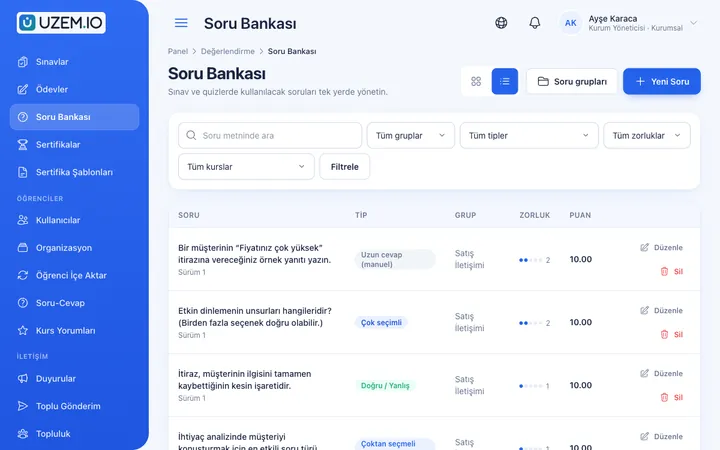
Question Bank
Prepare your questions once with groups, difficulty levels and explanations, then reuse them across different exams.
Certificates
Automatically issue certificates in your own design, verifiable by QR code, to everyone who completes a course.

Reporting
Report on course progress, video viewing, exams, assignments, certificates, live sessions and sales; export to CSV.

SMS Notifications
Connect your Netgsm or Mutlucell account and send SMS to your learners under your own approved sender name, in line with İYS consent rules.

Notifications
Deliver events such as announcements, exam results and assignment grades through in-app notifications and email; send bulk messages.
Files
Add lesson notes, handouts, forms and guides to a course or to the whole academy, so learners reach the current document in one place.
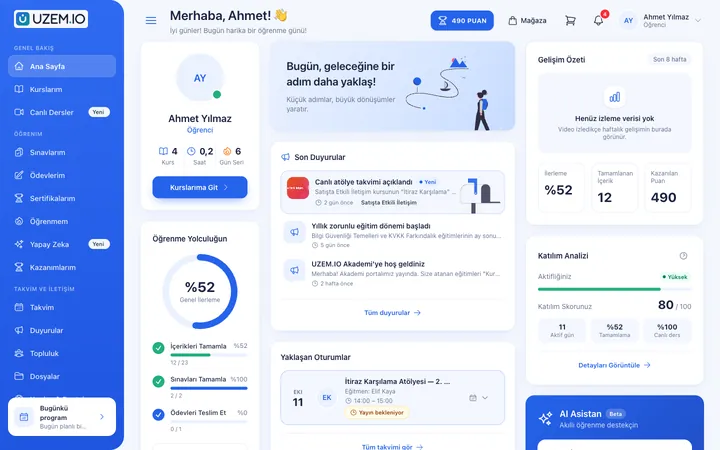
Course and Program Management
Organize your courses into programs and lessons; bring video, text, PDF, files, exams and live sessions together in a single flow.

This structure comes ready with your academy
No credit card required; explore a dashboard set up with sample content right away.
How your academy is prepared
When you open an account with this industry, the structure below is set up as a draft; you adjust everything to fit your organization.
8 units · 0 categories · 3 sample courses
Warehouses and operations teams in separate units
Under Headquarters, each warehouse is its own unit, alongside the Dispatch, Fleet, Field Operations, Planning and Supply Chain teams. You assign safe driving training only to the Fleet and warehouse safety only to warehouses; when you assign the OHS induction to Headquarters, everyone is covered. New staff added to a warehouse are automatically enrolled in the training assigned to that warehouse.
Sample unit tree
Sample structure: Headquarters → Sample Warehouse 1 / Sample Warehouse 2 / Dispatch / Fleet / Field Operations / Planning / Supply Chain
- Warehouse Safety Rules for racking, in-warehouse traffic and material handling safety; ends with a quiz taken before entering the warehouse.
- Safe Driving Pre-trip checks, load securing and fatigue management basics.
- OHS Basic Induction Core occupational health and safety concepts for logistics employees; adapted with your OHS specialist.
- Daily Forklift Checks Start-of-shift checks, load center, and maneuvering on ramps and in narrow aisles.
- Shipping Documents and Delivery Receipts Document routine, damage checks at delivery and steps to follow in case of a dispute.
- Manual Handling and Safe Lifting Correct posture, weight limits and team lifting.
Measure and document learning
- At least one of the sample courses comes with a short quiz; you edit the questions in the question bank.
- You set the passing score, number of attempts and question shuffling.
- Those who complete receive a certificate verifiable by QR code; the template comes ready.
- You open assignments for hands-on work and grade the submissions.
Which warehouse, which driver is behind?
See each warehouse’s and the fleet’s completion status for safety training, quiz scores and certificates. A warehouse lead sees only their own warehouse; Headquarters compares all warehouses. Before a customer audit, export the list for any warehouse or team and add it to your file.
- Course tracking report by warehouse Shows each warehouse’s completion status in Warehouse Safety training; the warehouse lead closes gaps at the start of the shift.
- Safe driving exam results Lists fleet drivers’ quiz scores; you revisit the training with drivers who scored low.
- Warehouse staff certificate report Before a customer audit, provides a CSV file showing which warehouse employees hold an internal training certificate, with dates.
- Sign-in log report Shows when field teams last signed in to the academy; you notify drivers who have not signed in for a long time by SMS.
Your logistics academy opens with this structure: Under Headquarters, Sample Warehouse 1 and Sample Warehouse 2, along with Dispatch, Fleet, Field Operations, Planning and Supply Chain units, come ready. Warehouse, OHS, Fleet Safety, Dispatch, Process Standards and Orientation categories are defined. Warehouse Safety, Safe Driving and OHS Basic Induction are added as drafts; you publish them after reviewing the content with your OHS specialist.
Rollout steps
-
Define warehouses and teams
Replace the sample warehouses with your own, and make warehouse leads and the fleet supervisor unit managers.
-
Place staff in their warehouse
Import your staff list via CSV and add each employee to their warehouse or team.
-
Assign safety training
Assign warehouse safety to warehouses, safe driving to the Fleet and the OHS induction to Headquarters.
-
Close gaps at the start of the shift
Track completion and quiz results by warehouse, and remind those who are behind by SMS or announcement.
Solutions for this industry
- Mandatory / Compliance Training If you replan KVKK, information security, OHS and internal policy training every year: assign it, verify completion with an exam, and keep a CSV record of who took which training.
- Branch / Unit-Based Training Bring your branch, store, region and department structure into the academy: assign training to a unit, enroll newcomers automatically, and let each manager see only their own unit’s status.
- Onboarding / Orientation Instead of explaining the same things to every new hire, schedule the first week: lessons unlock day by day, short quizzes confirm understanding, and managers follow the process.
- Employee Training If training is scattered across emails, folders and class lists: gather all employee training in one corporate academy, assign it to people or units, and see who completed it in the report.
- Certificate Programs Combine training, exams and certification in one flow: you set the success criteria, the certificate is generated automatically, and third parties verify its authenticity with a QR code.
Frequently asked questions
The 8 most frequently asked questions.
Can't find the answer you're looking for?
Browse the help center or write your question to us.
When and where do drivers watch the training?
The academy opens in a phone browser and requires an internet connection. We recommend that drivers watch lessons only while the vehicle is parked, during a break or while waiting for loading.
Can a forklift operator certificate be issued through UZEM?
No. UZEM issues certificates showing that internal training has been completed; professional qualification certificates and licenses are issued by authorized bodies.
Who prepares OHS training content?
Sample content is a starting draft. The accuracy and regulatory compliance of the content are the responsibility of your organization and your OHS specialist; UZEM publishes, measures and records the training.
Can we send SMS to field staff?
Yes. By connecting your own Netgsm or Mutlucell account, you can send bulk SMS to employees or to participants of a specific course.
Do seasonal and temporary staff use licenses?
Only while they are active. A user you deactivate at the end of the season does not use a license, and their training records are kept.
How do our warehouse instructions and training videos get into the academy?
You upload videos shot in the warehouse and at the vehicle from the dashboard and add them to lessons; instructions, checklists and sample delivery receipts are added to the relevant course as PDFs or files. You enter safety quiz questions into the question bank. You can import your staff list and warehouse-team structure via CSV; ready-made lesson packages cannot be imported.
What determines the price of a logistics academy?
Plans are tiered by the number of users you can keep active at the same time; instructor and academy admin accounts do not use licenses. You can review current plans on the Pricing page and upgrade your plan when your capacity needs grow.
Is there a connection to our warehouse management system or fleet tracking software?
No, we do not offer ready-made connections to enterprise systems such as warehouse management, fleet tracking or HR. You export the staff list from those systems as CSV and import it. To reach the field you can use a Netgsm or Mutlucell SMS connection, and Zoom for live briefings with remote warehouses.
Industries in the same group
Set up your academy for Logistics and Transportation today
- No credit card details required
- Automatic setup
- You can connect your domain later