




Education
Keep enrolling even when your classroom is full
Publish your courses with prices on a site under your own domain; students pay and start the same day. Bring evening and weekend groups into the same program with live sessions, and out-of-town students with recorded lessons.
- 5 units
- 5 categories
- 3 sample courses

At a course center, enrollment, lessons and payments should move at the same pace
At course centers, enrollment periods are short, groups are large and student profiles vary: the working professional who cannot make the evening group and the person who wants to join from another city both expect the same program. Phone enrollments, cash payments and paper practice tests waste time and lose enrollments. With UZEM you publish courses with prices on your own site, take payments online and run students through live sessions, recorded videos and practice exams in a single flow.

- Enrollment on your own site The course catalog, landing pages and prices are published on the storefront under your own domain, and students enroll through the site.
- Card and bank transfer payments Accept card payments with your own PayTR or iyzico account, and open enrollment by approving bank transfer notices from the dashboard.
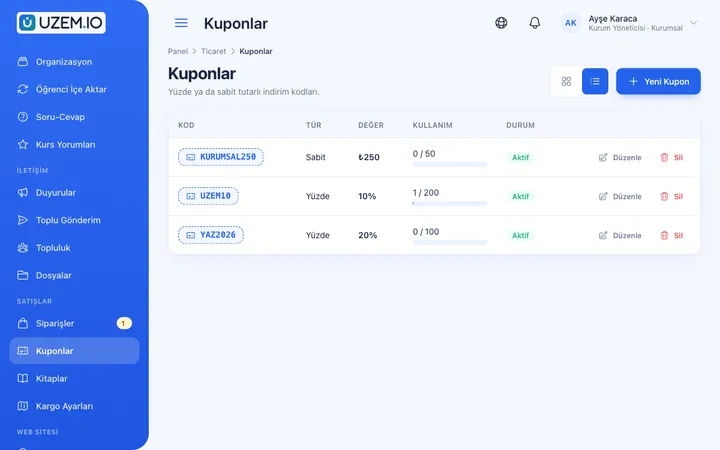
- Campaign coupons Create percentage or fixed-amount coupon codes with usage limits and expiry dates for early enrollment periods.
- Recordings for those who miss class The evening group's live session is added to the lesson as a Zoom recording, so a student who cannot attend that evening watches it later.
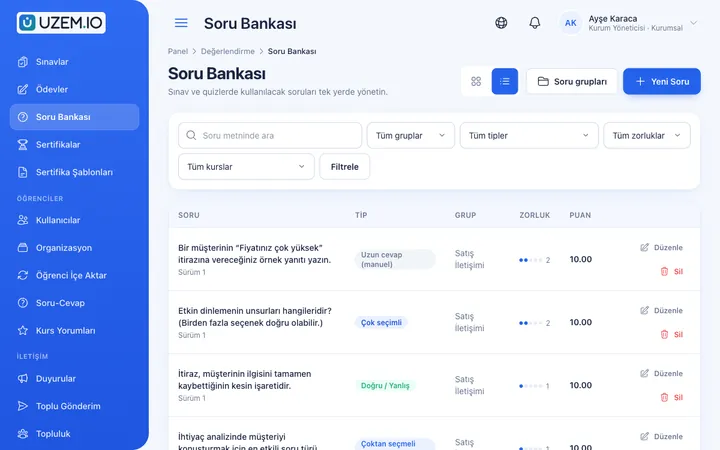
- Practice exams from the question bank Create timed practice exams from your question bank, give each student different questions and have scores calculated automatically.
- Course certificates with QR codes A certificate is generated automatically when a student finishes the course; employers scan the QR code to verify it.
- Quick contact via WhatsApp The WhatsApp button on the storefront lets prospects with questions message your number in one tap before enrolling.
Industry challenges and solutions
Problem
Physical classroom capacity limits new enrollments.
Solution
Open the same program to an online group with live Zoom sessions and recorded videos, so capacity no longer depends on the number of classrooms.
Problem
Enrollments are tracked by phone and payments by photos of receipts.
Solution
When a student pays by card from the cart, enrollment opens instantly; approve bank transfer notices in one click, and every order is kept in the history.
Problem
Campaigns such as early enrollment and sibling discounts are calculated by hand.
Solution
Create a coupon code for the campaign; choose a percentage or fixed discount, set how many times it can be used and its end date, and close it early if needed.
Problem
A student's level only becomes clear at the end of the term.
Solution
Run a monthly level test with shuffled questions from the question pool and track score progress student by student.
Problem
Make-up lessons for missed classes fall on instructors' extra hours.
Solution
The Zoom recording is added to the lesson flow; a student who leaves work late watches that evening's lesson the next day.
Problem
Prospects browsing the site cannot find anyone to ask.
Solution
Add a WhatsApp contact button to the storefront so prospects can message your admissions advisor in one tap, with your working hours shown on the button.
Who uses it?
Course center owner
Sets course prices and seasonal campaigns, and tracks in reports how much each program sells and how students are progressing.
Instructor
Teaches live sessions to the evening or weekend group, adds recordings and topic videos to lessons and enters practice exam questions into the question bank.
Admissions and front desk
Answers prospects who come through the WhatsApp button, approves bank transfer notices and places students in the right group.
Branch manager
Tracks attendance and exam results for the evening and weekend groups at their branch, without access to content or prices.
Student
Buys the course on the site, watches recordings of missed lessons, sees their level through practice exams and downloads their certificate on completion.
Corporate client
A company that sends employees to your course receives regular reports from you on its group's attendance and exam results.
Use cases
- Online foreign language course Open your language program to an online group as well, with level-based video lessons, weekly live speaking sessions and an end-of-term exam.
- Practice exam package for sale Sell strategy lessons and practice exams as a separate product, creating an extra revenue line from your exam prep students.
- Vocational certificate course Offer courses in areas such as bookkeeping, graphic design or software that progress through videos, practical assignments and a final exam.
- Recordings for in-person groups Record the lessons taught in class and make them available to rewatch, so students can review the topic at home.
- Group training for companies Add a company's employees as a separate group, then export attendance and exam results and share them with the company.
- Student community Open discussion topics in the community area for a conversation club or exam group, so students can ask questions and help each other.
Features you'll use
Course Sales
Sell courses and books from your own academy with a cart, orders, PayTR, iyzico or bank transfer payments, and refunds.

Course Storefront
Manage your academy's public website with a course catalog, course landing pages, sliders, pop-ups, a blog and FAQs.

Coupons
Create percentage or fixed-amount discount coupons, and keep your promotions under control with usage limits and validity dates.
Live Training
Schedule live sessions inside your courses with the Zoom integration; attendance is recorded and session recordings are added to the course as video lessons.
Video Training
Publish your video lessons through a secure video infrastructure and record viewing progress for each lesson.

Exams
Measure learning with timed exams and quizzes; you decide the passing score, attempts, question shuffling and result visibility.

Question Bank
Prepare your questions once with groups, difficulty levels and explanations, then reuse them across different exams.
Certificates
Automatically issue certificates in your own design, verifiable by QR code, to everyone who completes a course.

WhatsApp Contact Button
Add a WhatsApp contact button to your storefront site and, if you like, the learner dashboard, so visitors can start writing to you with a single tap.
Custom Domain
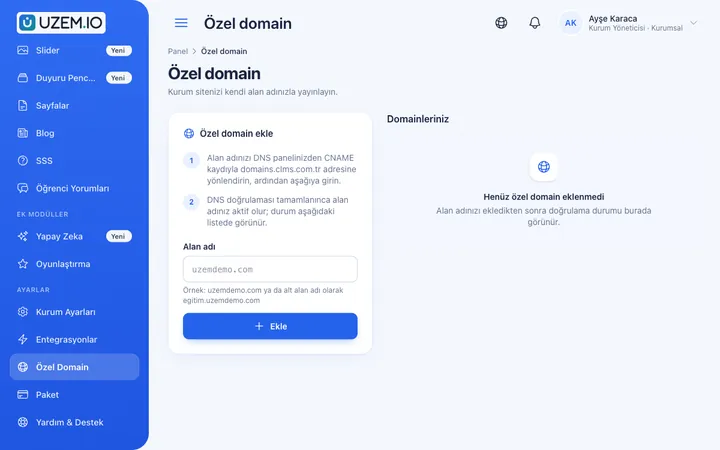
Publish your academy on your own domain, with verification and SSL certificate handled automatically.
Security and Access
Control who accesses your academy and from where with two-factor authentication, a single-session rule, watermarked and signed video playback, and sign-in and account sharing reports.

This structure comes ready with your academy
No credit card required; explore a dashboard set up with sample content right away.
How your academy is prepared
When you open an account with this industry, the structure below is set up as a draft; you adjust everything to fit your organization.
5 units · 0 categories · 3 sample courses
Branches, groups and online students
Define your branches as units, with groups such as evening and weekend beneath them, and gather students who buy online in a separate group. When you assign a course to a branch, all groups under it are covered, and the branch manager sees only their own students. A student who buys on the site is enrolled in the course directly once payment is complete.
Sample unit tree
Sample structure: Sample Course Center → Main Branch (Evening Group, Weekend Group) / Online Students
- English Conversation Club Not being afraid of mistakes, everyday phrases, the weekly live session routine and making use of recordings.
- Practice Exam Package Managing time, reading questions carefully, a practice exam and updating your study plan afterward.
- Bookkeeping Certificate Course A vocational course covering core concepts, document types and account tracking, ending with a practical assignment.
- Effective Presentation Techniques Short video lessons and a recorded presentation assignment in the personal development category.
- German A1 Weekend Group Saturday live sessions, lesson recordings, unit tests and an end-of-level exam.

Measure and document learning
- At least one of the sample courses comes with a short quiz; you edit the questions in the question bank.
- You set the passing score, number of attempts and question shuffling.
- Those who complete receive a certificate verifiable by QR code; the template comes ready.
- You open assignments for hands-on work and grade the submissions.
From sales to certificates at a glance
See how much each course earns, students' lesson viewing progress, practice exam scores and certificates issued. Have attendance lists for corporate clients prepared as CSV.
- Earnings report by course Shows sales for each course and group package during the period; used when deciding which programs to run again.
- Student progress report Lists how much of the recorded lessons students have watched and where they are in the course; the front desk uses it to call students who are behind.
- Practice exam performance report Shows groups' practice exam scores and pass status, so instructors can identify topics that need a review lesson.
- Student certificate report Lists students who received certificates during the period with dates; attendance lists for corporate clients are prepared as CSV.
- Student sign-in records Shows the dates students signed in to the platform, helping you spot enrollments that paid but never started.
Your course center is online: Under Sample Course Center we set up the Main Branch with Evening and Weekend groups, plus the Online Students group. Alongside the Foreign Languages, Exam Prep, Vocational Training, Personal Development and Certificate categories, sample courses English Conversation Club, Practice Exam Package and Bookkeeping Certificate Course are ready. Add a price and place a course on the storefront to start selling right away.
Rollout steps
-
Launch your course site
Set your course center's logo, colors and domain, and add program, instructor and price details to course pages.
-
Set up payments and campaigns
Enter your course center's PayTR or iyzico account details, write bank transfer instructions and create a coupon code for the term opening.
-
Prepare groups and the calendar
Add branch groups as units and enter live session times in the course, so sessions appear on students' calendars automatically.
-
Track sales and success
Regularly check the earnings report, student progress, practice exam results and certificates issued.
Solutions for this industry
- Course Sales Sell courses, live training and books from your own storefront: cart, coupons, payment via PayTR, iyzico or bank transfer, and order management in one dashboard.
- Launch an Online Academy Quickly launch an online academy on your own domain and under your own brand, without setting up servers, a software team or a separate payment system.
- Live Training Management If Zoom links, attendance lists and recordings are scattered everywhere: schedule live sessions inside the course, record attendance automatically and add the session recording to the lesson.
- Certificate Programs Combine training, exams and certification in one flow: you set the success criteria, the certificate is generated automatically, and third parties verify its authenticity with a QR code.
- Student Training Bring lessons, assignments, exams and live classes together on a single student platform for schools, course centers and universities; see where every student stands in the progress report.
Frequently asked questions
The 8 most frequently asked questions.
Can't find the answer you're looking for?
Browse the help center or write your question to us.
How is enrollment opened when a student pays by bank transfer?
The student sees the bank transfer instructions and submits a payment notice. When you approve it in the dashboard, they are enrolled in the course, and the order is kept on record.
Can we run an early enrollment campaign?
Yes. Create a coupon code for the early enrollment period and set its end date to the close of enrollment; you can also limit it to a set number of the first enrollments.
Can we sell several courses as a bundle?
Yes. With the group course type you can offer, for example, a topic lessons course and a practice exam course in a single bundle.
Can students join lessons from their phones?
Yes. Students can watch recorded lessons and take practice exams in their phone browser, and join live sessions from the same place.
Is the certificate we issue an official document?
The certificate documents that the student finished your course, and anyone can verify it with the QR code on it. The authority to issue officially approved documents depends on your organization's permits and the applicable regulations.
Do students keep using a license after the course ends?
No. A student you deactivate does not count toward licenses; only active students are included. When they enroll in a new level, you reactivate their account and their earlier certificates remain. You choose a plan based on how many students your center keeps active at the same time; capacity options are on the Pricing page.
How do we upload our existing lesson videos, worksheets and question archive?
Upload recorded lesson videos from the dashboard and attach worksheets and handouts to the relevant lesson as PDFs or files. Enter practice questions into the question bank once and reuse them across practice exams; you can import your current student list with a CSV file. Ready-made course packages cannot be imported from another system.
Is there a connection to our bookkeeping or enrollment software?
We do not offer a ready-made connection to the bookkeeping and enrollment software course centers use; you import the student list via CSV and export the sales breakdown from the earnings report as CSV. Ready-made connections for your course center are PayTR and iyzico for payments, Zoom for live sessions, Netgsm and Mutlucell for student SMS, and the WhatsApp contact button.
Industries in the same group
Set up your academy for Course Centers today
- No credit card details required
- Automatic setup
- You can connect your domain later