





Services & hospitality
A training record as orderly as a flight plan
Assign theoretical briefing training for pilots, cabin crew, ground handling and technical teams to units; measure it with exams drawn from the question bank, and track certificate dates and completion status in reports.
- 7 units
- 6 categories
- 3 sample courses

Organizing recurrent training across scattered bases and changing rotations
In aviation, pilots, cabin crew, ground handling and technical staff work at different bases on different rotations, so recurrent training, procedure changes and briefings never reach everyone at the same time. A UZEM academy brings theoretical training, live briefings and exams together in one place and records who completed what and when. Licensing and approved training processes remain with the authority and approved organizations.

- Access regardless of rotation Crew members sign in from their hotel with a browser; an unfinished video resumes where they left off next time.
- Procedure change notices Add the changed procedure to the course and keep the relevant teams informed with notifications and announcements.
- Briefing calendar Schedule live briefings and recurrent sessions on the calendar, and add the Zoom recording to the course for later viewing.
- Exams from a question pool Measure theoretical recurrent training with shuffled exams drawn from the question bank.
- Station-level view A station manager sees only their own station's staff; flight crew results stay hidden from them.
- Certificate date tracking Track the issue dates of internal certificates in reports and plan upcoming recurrent training yourself.
- Digital record of theory training Every employee's completed theory training and exam results are recorded and can be exported as CSV for your internal checks.
Industry challenges and solutions
Problem
Flight and shift schedules make it hard to gather teams in a classroom.
Solution
Publish theory content as video lessons; live briefing recordings are also added to the course for later viewing.
Problem
Exam results and completion records are kept in different spreadsheets.
Solution
Exam scores, completions and certificate dates sit together per person and can be exported with a team or station filter.
Problem
The same exam questions circulating among crews weaken assessment.
Solution
Build exams that draw different questions from the question bank on every attempt, shuffle the options and set a passing score.
Problem
Procedure changes cannot be announced to all teams quickly.
Solution
Add the revised lesson to the course and announce it to the relevant units; crew members see the notice in the academy and by email.
Problem
Orientation for new staff varies by station.
Solution
Assign the common organization orientation to the top unit; new people are enrolled automatically whichever station they join.
Who uses it?
Pilots
Complete operations manual changes, procedure bulletins and crew resource management theory outside their flight schedule.
Cabin crew
Refresh the theory of safety demonstrations, in-cabin emergencies and passenger communication with videos and exams.
Ground handling
Stay current on apron safety, passenger services and baggage processes with short, shift-friendly training.
Maintenance technicians
Complete training on human factors, foreign object damage (FOD) awareness and documentation discipline.
Flight operations and operations control
Follow procedure changes and briefings on irregular operations scenarios.
Training department
Manages theory training and the question bank, keeps the full picture that crew leads cannot see on one screen, and transfers records to the organization's training files.
Use cases
- Theory part of recurrent training Run the theory portion of periodic recurrent training on the platform; hands-on training and simulator work stay in your existing processes.
- Security awareness Assign aviation security and safety culture training for all employees to units and track completion.
- Human factors training Cover topics such as fatigue, communication and situational awareness with videos and case studies.
- Organization orientation Present the organization structure, safety policy and reporting culture in sections spread over the first weeks.
- Procedure bulletin briefings Add a newly issued bulletin as a short lesson and confirm it was read and understood with a few-question quiz.
Features you'll use
Course and Program Management
Organize your courses into programs and lessons; bring video, text, PDF, files, exams and live sessions together in a single flow.

Video Training
Publish your video lessons through a secure video infrastructure and record viewing progress for each lesson.

Exams
Measure learning with timed exams and quizzes; you decide the passing score, attempts, question shuffling and result visibility.

Question Bank
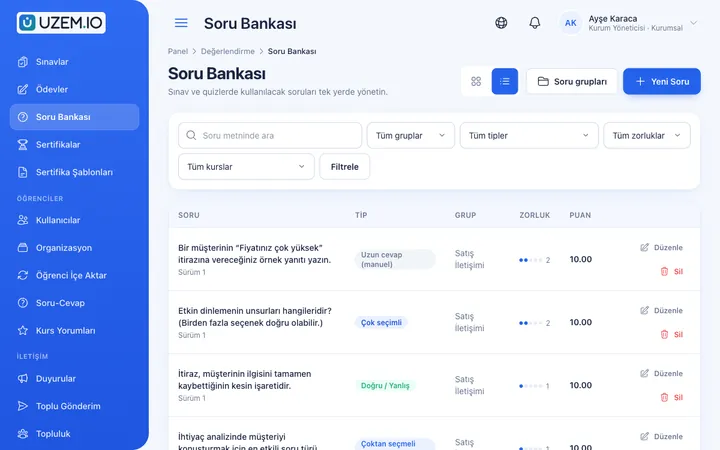
Prepare your questions once with groups, difficulty levels and explanations, then reuse them across different exams.
Certificates
Automatically issue certificates in your own design, verifiable by QR code, to everyone who completes a course.
Live Training
Schedule live sessions inside your courses with the Zoom integration; attendance is recorded and session recordings are added to the course as video lessons.

Class Calendar
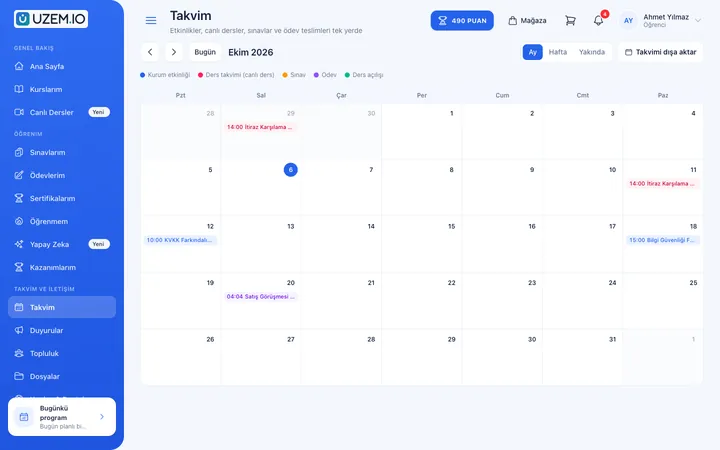
Show live sessions, events and key dates together in each learner's own calendar.
Organization Units
Build your departments, branches, regions and stores as a unit tree; assign training to units and let managers follow their own units in read-only mode.

Reporting
Report on course progress, video viewing, exams, assignments, certificates, live sessions and sales; export to CSV.

Notifications
Deliver events such as announcements, exam results and assignment grades through in-app notifications and email; send bulk messages.

Security and Access
Control who accesses your academy and from where with two-factor authentication, a single-session rule, watermarked and signed video playback, and sign-in and account sharing reports.
This structure comes ready with your academy
No credit card required; explore a dashboard set up with sample content right away.
How your academy is prepared
When you open an account with this industry, the structure below is set up as a draft; you adjust everything to fit your organization.
7 units · 0 categories · 3 sample courses
Flight, ground and technical teams in separate units
Add Pilots, Cabin Crew, Ground Handling, Technical, Operations and Administrative teams to the unit tree; if you operate at several stations, create station units under Ground Handling, for example. When you assign a lesson to Ground Handling, every station is covered, and each station manager sees only their own team's status.
Sample unit tree
Sample structure: Sample Aviation → Pilots / Cabin Crew / Ground Handling / Technical / Operations / Administrative
- Aviation Security Awareness Restricted area rules, ID badge use and reporting suspicious situations; completed with an exam.
- Introduction to Human Factors The error chain, fatigue, communication and how teamwork affects safety.
- Organization Orientation Organization structure, safety policy and reporting culture.
- Safety Reporting Culture Why occurrence and hazard reporting matters, and the non-punitive reporting approach.
- Apron Safety Basics Vehicle movements, foreign object checks and working safely around aircraft.
Measure and document learning
- At least one of the sample courses comes with a short quiz; you edit the questions in the question bank.
- You set the passing score, number of attempts and question shuffling.
- Those who complete receive a certificate verifiable by QR code; the template comes ready.
- You open assignments for hands-on work and grade the submissions.
Training status by team
See each employee's completed training, exam scores and certificate dates by unit or station. The breakdown is prepared as CSV, which you can use to transfer data into your organization's own training records system.
- Recurrent training completion by team Filter the course tracking report by the cabin crew or ground handling unit to list staff who have not finished recurrent training.
- Procedure exam results The exam performance report shows, by unit, staff who scored below the passing grade on a procedure change exam.
- Certificate issue dates The certificate report shows when internal certificates were issued, helping you plan recurrent training on time.
- Briefing instructor hours The instructor live session hours report summarizes the duration of live briefings and recurrent sessions instructors delivered during the period.
- Staff sign-in records Sign-in records help you spot staff who have not entered the academy for a long time because of rotations.
Your aviation academy is ready: Under Sample Aviation we have set up Pilots, Cabin Crew, Ground Handling, Technical, Operations and Administrative units, plus Orientation, Security, Operations, Technical, CRM / Human Factors and Emergency categories. You can start by adapting the sample trainings Aviation Security Awareness (with an exam), Introduction to Human Factors and Organization Orientation to your own manuals.
Rollout steps
-
Set up your teams
Add flight, ground, technical, operations and administrative units, and stations as sub-units if needed.
-
Prepare the question bank
Load your training department's questions into the question bank by topic.
-
Assign and schedule training
Assign courses to units and add live briefings to the calendar.
-
Report on records
Track completion, exam and certificate status by unit and station.
Solutions for this industry
- Employee Training If training is scattered across emails, folders and class lists: gather all employee training in one corporate academy, assign it to people or units, and see who completed it in the report.
- Mandatory / Compliance Training If you replan KVKK, information security, OHS and internal policy training every year: assign it, verify completion with an exam, and keep a CSV record of who took which training.
- Certificate Programs Combine training, exams and certification in one flow: you set the success criteria, the certificate is generated automatically, and third parties verify its authenticity with a QR code.
- Onboarding / Orientation Instead of explaining the same things to every new hire, schedule the first week: lessons unlock day by day, short quizzes confirm understanding, and managers follow the process.
- Branch / Unit-Based Training Bring your branch, store, region and department structure into the academy: assign training to a unit, enroll newcomers automatically, and let each manager see only their own unit’s status.
Frequently asked questions
The 9 most frequently asked questions.
Can't find the answer you're looking for?
Browse the help center or write your question to us.
Does training delivered with UZEM provide official license or authorization validity?
No. UZEM is a training management platform; licenses, authorizations and approved training documents are issued through the processes of the authority and approved training organizations. The platform records internal training; your organization assesses whether it meets the requirements of your approved programs.
Can we require a training to be watched for a minimum amount of time?
There is no minimum duration rule. To verify learning, we recommend adding an exam with a passing score at the end of the lesson.
Can simulator or hands-on training be done on the platform?
No. The platform is suited to theory training, live briefings, exams and record tracking; hands-on training runs through your existing processes.
Can station managers see only their own teams?
Yes. A station manager sees their own station's employees and cannot access the results of other stations or flight crews.
Can flight crews access training while away from base?
Yes, from anywhere with an internet connection. They can sign in to the academy from their hotel using a phone, tablet or laptop browser, and videos resume where they left off.
Are staff warned automatically when a certificate expires?
There is no automatic renewal reminder. You can track certificate dates in reports and send announcements and notifications to the relevant unit.
How do we bring over our existing training manuals and presentations?
Upload your training videos, attach manual sections and briefing notes to lessons as PDFs or files, and enter recurrent exam questions into the question bank. You can bulk import the staff list with a CSV file. Importing ready-made course packages from outside is not supported.
Do we pay a license for every pilot and cabin crew member?
Licenses count active learners only; instructors, admins and staff you deactivate do not use a license. Plans are offered by active learner capacity; you can find the right capacity and current prices on the Pricing page.
Can it connect to our crew planning or personnel management system?
We do not offer a ready-made connection to your crew planning, maintenance tracking or human resources systems; you import staff via CSV. Live briefings run on Zoom, and notification SMS messages are sent with your Netgsm or Mutlucell account.
Set up your academy for Aviation today
- No credit card details required
- Automatic setup
- You can connect your domain later