









Assessment & tracking
In all plansReporting
Report on course progress, video viewing, exams, assignments, certificates, live sessions and sales; export to CSV.
Industries that benefit from this feature
- Corporate Companies
- Holdings and Groups of Companies
- Sales and Marketing Teams
- Retail and Store Chains
- Franchise and Dealer Networks
- Logistics and Transportation
- Industry and Manufacturing
- Banking and Finance

Show with data how well your training works
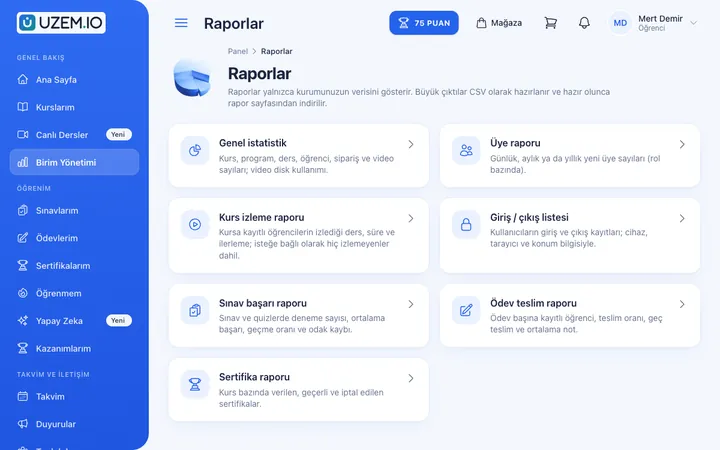
Demonstrating the return on training investment requires participation, progress and achievement data. UZEM reports this data under several headings: overview, members, course viewing, exam results, assignments, certificates, instructor live session hours, sign-in records, video traffic and earnings. Reports can be filtered and exported to CSV; large exports are prepared in the background.
- The full picture in one place No need to compile data from different modules separately.
- Meeting-ready data Export filtered reports to CSV and use them in your own spreadsheets.
- A dashboard that stays fast Large exports are prepared in the background while you keep working.
- Account sharing awareness The account sharing report helps you spot suspicious use of the same account from multiple places.
What can you do?
-
Learning reports
Course viewing, exam results, assignments and certificates.
-
User reports
Member list, sign-in records and account sharing indicators.
-
Live session and video reports
Instructor live session hours and video traffic.
-
Sales reports
An earnings report for academies that sell courses.
-
Queued CSV export
Export requests are processed in the background and the file is downloaded when ready; download links expire after a limited time.
Sample screens
Real screens from the admin, instructor and learner side.
Report list

Admin dashboard home screen
Unit manager's report screen
Before and after
Before
Different spreadsheets are merged by hand for the end-of-term report.
Next
The report is filtered and exported to CSV in one click.
Before
The dashboard freezes while large data sets are exported.
Next
Exports are prepared in the background and downloaded when ready.
Frequently asked questions
The 4 most frequently asked questions.
Can't find the answer you're looking for?
Browse the help center or write your question to us.
In which format can I export reports?
Reports are exported as CSV, which you can open in common spreadsheet programs.
How are large reports prepared?
Export requests are processed in the background; you download the file from the dashboard when it is ready.
Can unit managers see reports?
If organization units are in use, unit managers see only data filtered to their own units, in read-only mode.
Are reports real-time?
Reports in the dashboard show current data; an exported file contains the data as of the moment the request was processed.
Solutions that use this feature
- Employee Training If training is scattered across emails, folders and class lists: gather all employee training in one corporate academy, assign it to people or units, and see who completed it in the report.
- Partner / Dealer Training If your dealers and partners learn about product changes late and incompletely: use a separate academy that carries your brand to deliver knowledge to every location at once, at the same quality.
- Product Training If product knowledge is explained differently to every team: deliver the same content to sales, support, dealer and field teams at the same time, and verify it was learned with an exam.
- Sales Team Training If it takes weeks for the field team to be ready when a new product launches: quickly update and measure your sales team’s knowledge with short video lessons, exams and a leaderboard.
- Mandatory / Compliance Training If you replan KVKK, information security, OHS and internal policy training every year: assign it, verify completion with an exam, and keep a CSV record of who took which training.
- Course Sales Sell courses, live training and books from your own storefront: cart, coupons, payment via PayTR, iyzico or bank transfer, and order management in one dashboard.
- Certificate Programs Combine training, exams and certification in one flow: you set the success criteria, the certificate is generated automatically, and third parties verify its authenticity with a QR code.
- Branch / Unit-Based Training Bring your branch, store, region and department structure into the academy: assign training to a unit, enroll newcomers automatically, and let each manager see only their own unit’s status.
- Continuing Professional Development Help professionals stay current throughout their careers by gathering seminars, courses and certificate programs in one development academy, with attendance history kept on each person’s record.
Industries that benefit from this feature
- Corporate Companies
- Holdings and Groups of Companies
- Sales and Marketing Teams
- Retail and Store Chains
- Franchise and Dealer Networks
- Logistics and Transportation
- Industry and Manufacturing
- Banking and Finance
- Insurance
- Real Estate and Brokerage Networks
- Healthcare / Hospitals / Clinics
- Pharmaceuticals
- Medical Devices
- Cosmetics / Beauty
- Aviation
- Tourism / Hotels / Restaurants / Cafes
- Educational Institutions / Schools
- University
- Publishing
- NGOs, Associations and Foundations
- Professional Chambers and Associations
- Public Institutions / Municipalities
Features in the same category
Set up your academy today
- No credit card details required
- Automatic setup
- You can connect your domain later