










Training & engagement
In all plansAnnouncements
Publish announcements to your whole academy or to specific courses, so important information does not get lost in email and chat groups.
Industries that benefit from this feature
- Corporate Companies
- Sales and Marketing Teams
- Retail and Store Chains
- Industry and Manufacturing
- Banking and Finance
- Insurance
- Healthcare / Hospitals / Clinics
- Tourism / Hotels / Restaurants / Cafes
Important information where learners look
Updates such as a changed session time, a newly published course or the start of a term can get lost in inboxes and chat groups. UZEM announcements are published inside your academy; learners see them when they sign in and are also notified.
- One official channel Learners know where to find the latest information.
- Targeted communication Publish an announcement to the whole academy or only to participants of the relevant course.
- Archived information Past announcements stay in the academy, so people who join later can read them too.
What can you do?
-
Academy and course announcements
Create general or course-specific announcements.
-
Notification support
Published announcements can be delivered by in-app notification and email.
-
Pinned announcements
Pin important announcements to the top of the list so they are not missed.
-
Comments and questions
Learners can comment under an announcement, and questions are answered in the same thread.
Sample screens
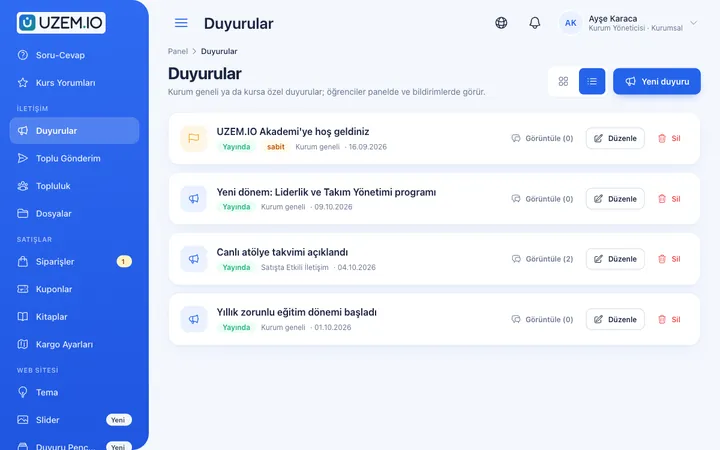
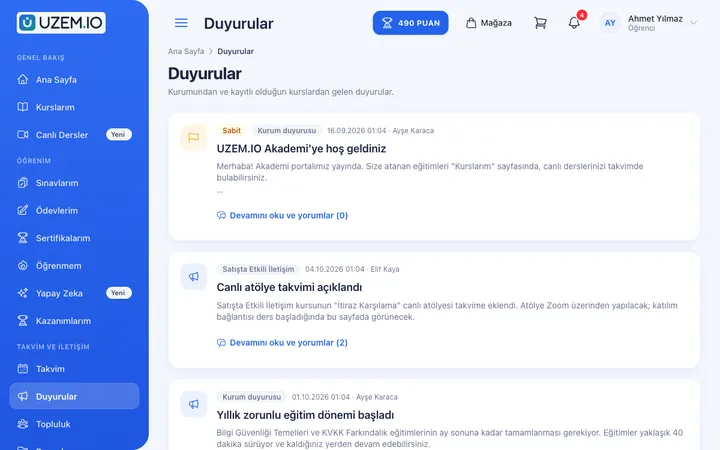
Real screens from the admin, instructor and learner side.
Announcements
Announcements seen by the learner
Before and after
Before
Announcements are scattered across chat groups, and nobody knows if everyone saw them.
Next
Announcements are published in the academy and backed by notifications.
Before
Learners who join later miss earlier information.
Next
The announcement archive is always available in the academy.
Frequently asked questions
The 3 most frequently asked questions.
Can't find the answer you're looking for?
Browse the help center or write your question to us.
Can I make an announcement for just one course?
Yes. You can publish an announcement academy-wide or to the participants of a specific course.
How do learners find out about an announcement?
Announcements appear in the academy and are delivered by in-app notification or email, depending on notification settings.
Can instructors publish announcements?
Depending on the permissions you grant, instructors can publish announcements for their own courses.
Solutions that use this feature
- Employee Training If training is scattered across emails, folders and class lists: gather all employee training in one corporate academy, assign it to people or units, and see who completed it in the report.
- Onboarding / Orientation Instead of explaining the same things to every new hire, schedule the first week: lessons unlock day by day, short quizzes confirm understanding, and managers follow the process.
- Partner / Dealer Training If your dealers and partners learn about product changes late and incompletely: use a separate academy that carries your brand to deliver knowledge to every location at once, at the same quality.
- Customer Training Cut down the “how do I use this” questions reaching your support team: open a branded training center that teaches customers your product with video lessons, short quizzes and certificates.
- Product Training If product knowledge is explained differently to every team: deliver the same content to sales, support, dealer and field teams at the same time, and verify it was learned with an exam.
- Member Training Offer seminars, courses and announcements to association, chamber and foundation members from one address; record attendance and completion, and open courses for a fee if you like.
- Student Training Bring lessons, assignments, exams and live classes together on a single student platform for schools, course centers and universities; see where every student stands in the progress report.
- Mandatory / Compliance Training If you replan KVKK, information security, OHS and internal policy training every year: assign it, verify completion with an exam, and keep a CSV record of who took which training.
- Live Training Management If Zoom links, attendance lists and recordings are scattered everywhere: schedule live sessions inside the course, record attendance automatically and add the session recording to the lesson.
- Branch / Unit-Based Training Bring your branch, store, region and department structure into the academy: assign training to a unit, enroll newcomers automatically, and let each manager see only their own unit’s status.
Industries that benefit from this feature
- Corporate Companies
- Sales and Marketing Teams
- Retail and Store Chains
- Industry and Manufacturing
- Banking and Finance
- Insurance
- Healthcare / Hospitals / Clinics
- Tourism / Hotels / Restaurants / Cafes
- Educational Institutions / Schools
- NGOs, Associations and Foundations
- Public Institutions / Municipalities
Features in the same category
Set up your academy today
- No credit card details required
- Automatic setup
- You can connect your domain later