









Platform & brand
In all plansCourse Storefront
Manage your academy's public website with a course catalog, course landing pages, sliders, pop-ups, a blog and FAQs.
Industries that benefit from this feature
- Real Estate and Brokerage Networks
- Cosmetics / Beauty
- University
- Course Centers
- Publishing
- NGOs, Associations and Foundations

Your academy's face to the world
Visitors first meet your academy on its storefront site. The UZEM course storefront includes a home page, course catalog, course landing pages, company pages, a blog and frequently asked questions. You highlight campaigns and announcements with sliders and pop-ups. All content is managed from the organization dashboard, so you do not need to build a separate website.
- No separate website needed Your marketing site and training platform live in one place.
- From visitor to learner A seamless path from the course page to the cart and enrollment.
- Easy to keep up to date You update campaigns, announcements and content yourself from the dashboard.
What can you do?
-
Course catalog and course pages
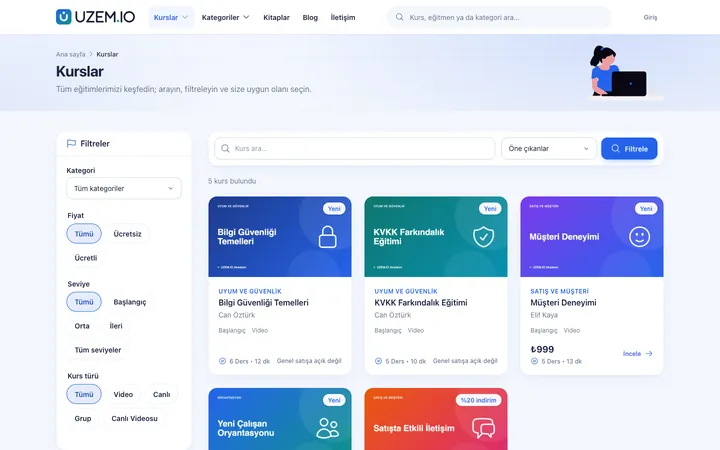
A catalog organized by category; course pages with images, descriptions, curriculum and pricing.
-
Sliders and pop-ups
A home page slider and campaign pop-ups.
-
Pages, blog and FAQs
Company pages, blog posts and categorized frequently asked questions.
-
Course reviews
Learner course reviews, with the ability to reply and hide.
-
Theme consistency
The storefront follows your chosen theme and brand settings.
Sample screens
Real screens from the admin, instructor and learner side.
Academy storefront
Course catalog on the storefront
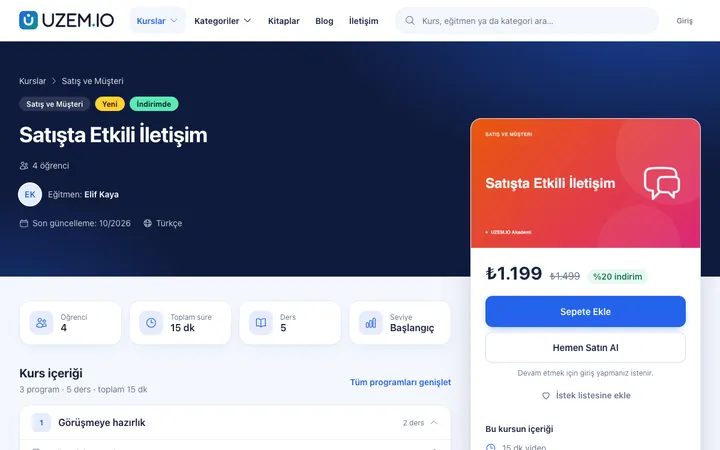
Course page on the storefront
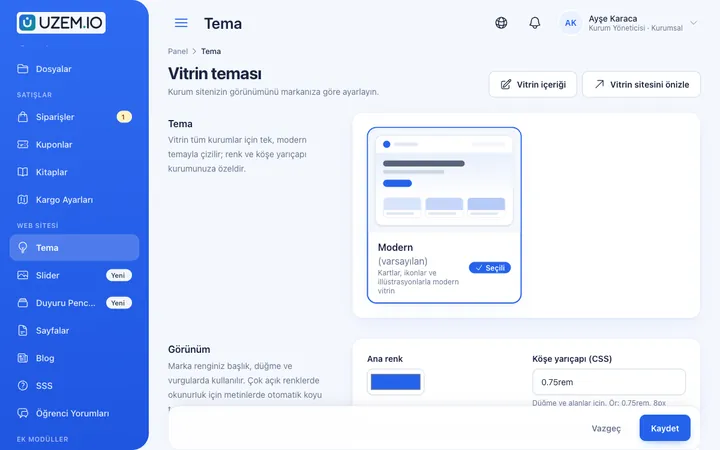
Storefront theme settings
Before and after
Before
The marketing site and training platform are separate, so information is updated in two places.
Next
Course information lives in one place; the storefront and platform use the same data.
Before
A web agency is engaged for every campaign announcement.
Next
Sliders and pop-ups go live from the dashboard in minutes.
Frequently asked questions
The 3 most frequently asked questions.
Can't find the answer you're looking for?
Browse the help center or write your question to us.
Can we turn off the storefront?
Yes. In private portal mode, the storefront is turned off and only the sign-in screen is shown.
Can we add a blog and pages?
Yes. Company pages, blog posts and FAQs are managed from the organization dashboard.
Is the storefront mobile-friendly?
Yes. The storefront has a responsive web interface that displays properly on phones and tablets.
Solutions that use this feature
- Customer Training Cut down the “how do I use this” questions reaching your support team: open a branded training center that teaches customers your product with video lessons, short quizzes and certificates.
- Member Training Offer seminars, courses and announcements to association, chamber and foundation members from one address; record attendance and completion, and open courses for a fee if you like.
- Launch an Online Academy Quickly launch an online academy on your own domain and under your own brand, without setting up servers, a software team or a separate payment system.
- Course Sales Sell courses, live training and books from your own storefront: cart, coupons, payment via PayTR, iyzico or bank transfer, and order management in one dashboard.
- Certificate Programs Combine training, exams and certification in one flow: you set the success criteria, the certificate is generated automatically, and third parties verify its authenticity with a QR code.
Industries that benefit from this feature
Features in the same category
Set up your academy today
- No credit card details required
- Automatic setup
- You can connect your domain later