






What do you want to achieve?
Branch / Unit-Based Training
Bring your branch, store, region and department structure into the academy: assign training to a unit, enroll newcomers automatically, and let each manager see only their own unit’s status.
Suitable industries
- Corporate Companies
- Holdings and Groups of Companies
- Retail and Store Chains
- Franchise and Dealer Networks
- Logistics and Transportation
- Industry and Manufacturing
- Banking and Finance
- Real Estate and Brokerage Networks

Let your org chart become your training structure
In a multi-branch organization, not every training suits everyone; store staff and head office employees have different needs. In UZEM you define your regions, branches, stores and departments as a unit tree. When you assign a course to a unit, its sub-units are included too, and people added to the unit later are enrolled automatically. Unit managers see only their own units’ data, read-only.
Problems and solutions
Problem
Training is assigned person by person, and newcomers get missed.
Solution
Training is assigned to the unit; new people added to the unit are enrolled automatically.
Problem
Branch managers ask headquarters about their team’s status.
Solution
Unit managers see their own unit and sub-unit data on read-only screens.
Problem
Overall reports do not show differences at branch level.
Solution
Reports are filtered by unit, making differences between branches visible.
Problem
Making a region-specific announcement is hard.
Solution
Announcements and notifications deliver targeted updates to the relevant units.
Who is it for?
Retail chains
Businesses organized by stores and regions that need to train store staff regularly.
Multi-branch organizations
Organizations serving through a branch network, such as banks, insurers and healthcare providers.
Holding companies
Groups that want to manage multiple companies and departments under a single academy.
Regional and branch managers
Managers who want to see their own unit’s training status directly.
Use cases
- Store staff training Assign the same product and service training to all stores.
- Region-specific training Deliver campaign or process training only to the branches in one region.
- Department-specific programs Offer different training catalogs to departments at head office.
- Branch opening preparation Assign the core program to a new branch’s team before opening.
Features used
Organization Units
Build your departments, branches, regions and stores as a unit tree; assign training to units and let managers follow their own units in read-only mode.
Course and Program Management
Organize your courses into programs and lessons; bring video, text, PDF, files, exams and live sessions together in a single flow.

Reporting
Report on course progress, video viewing, exams, assignments, certificates, live sessions and sales; export to CSV.

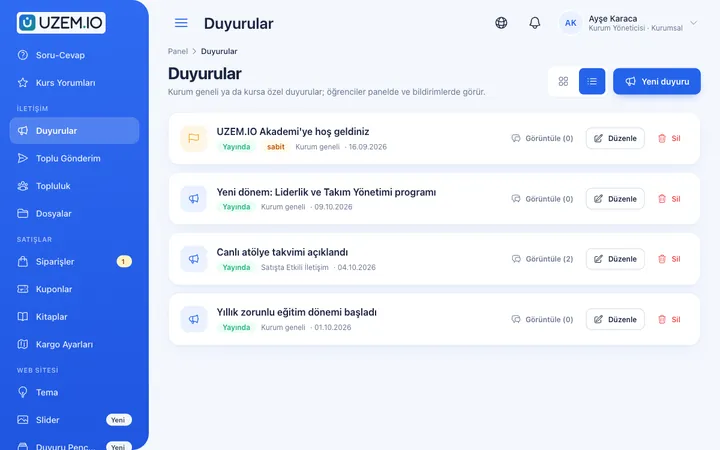
Announcements
Publish announcements to your whole academy or to specific courses, so important information does not get lost in email and chat groups.
Notifications
Deliver events such as announcements, exam results and assignment grades through in-app notifications and email; send bulk messages.

Video Training
Publish your video lessons through a secure video infrastructure and record viewing progress for each lesson.

Exams
Measure learning with timed exams and quizzes; you decide the passing score, attempts, question shuffling and result visibility.

Certificates
Automatically issue certificates in your own design, verifiable by QR code, to everyone who completes a course.

Try this setup in your own academy
No credit card required; explore a dashboard set up with sample content right away.
How does it work?
-
Build the unit tree
Define your regions, branches, stores and departments hierarchically.
-
Place users
Add employees to their units and designate unit managers.
-
Assign training to units
Assign courses to a unit; sub-units and newcomers are included automatically.
-
Report by unit
Filter completion and exam results by unit and export them.
Sample courses
- Store Welcome Standards Steps for greeting, guiding and seeing off customers.
- Register and Return Procedures Correctly applying register opening and closing and return processes.
- Branch Operations Handbook Daily operations checklists and common situations.
- Regional Campaign Briefing Campaign training assigned only to the relevant region.
Each unit has its own view
Reports are filtered by unit and sub-unit. Headquarters sees the entire network, while unit managers see only their own scope, read-only. Results can be exported as CSV.
Frequently asked questions
The 4 most frequently asked questions.
Can't find the answer you're looking for?
Browse the help center or write your question to us.
How many levels can the unit tree have?
You can nest units as needed, for example region, branch and department.
Can unit managers assign training?
Unit managers see their own units’ data read-only; assignment and content management stay with academy admins.
What happens if an employee changes branches?
When you move the employee to their new unit, they are automatically enrolled in the training assigned to it; previous training records are kept.
Can assignment rules be based on criteria other than units?
Automatic assignment works on the unit structure. For other cases, you can assign courses to users manually.
Industries using this solution
- Corporate Companies
- Holdings and Groups of Companies
- Retail and Store Chains
- Franchise and Dealer Networks
- Logistics and Transportation
- Industry and Manufacturing
- Banking and Finance
- Real Estate and Brokerage Networks
- Healthcare / Hospitals / Clinics
- Pharmaceuticals
- Aviation
- Tourism / Hotels / Restaurants / Cafes
- Educational Institutions / Schools
- University
- NGOs, Associations and Foundations
- Public Institutions / Municipalities
Set up your academy today
- No credit card details required
- Automatic setup
- You can connect your domain later