







Education
Let learning continue after the bell rings
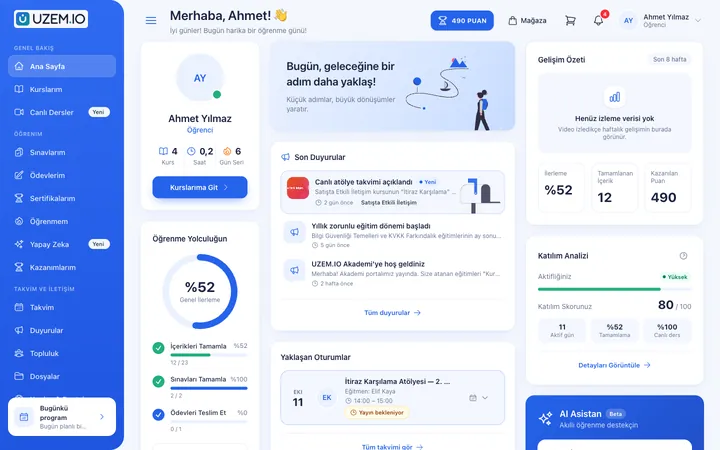
Teachers explain the topic in class or in a live session, and the recording and worksheet are added to the lesson the same day. Track assignment submissions, practice exams before written tests and each class section's progress from one screen.
- 7 units
- 5 categories
- 3 sample courses
When school learning is not limited to class time
At school, the topic a teacher explains is often reduced to notebook notes once students get home, and absent students miss it entirely. Collecting assignments on paper and leaving pre-test review to individual teachers makes it hard to see which class section is falling behind. With UZEM, each lesson's recording, worksheet, assignment and practice exam sit in the same course, and school leadership tracks progress by class section in reports.

- Access to missed lessons Students who are sick or absent open the live session recording and worksheet from the lesson page and continue where they left off.
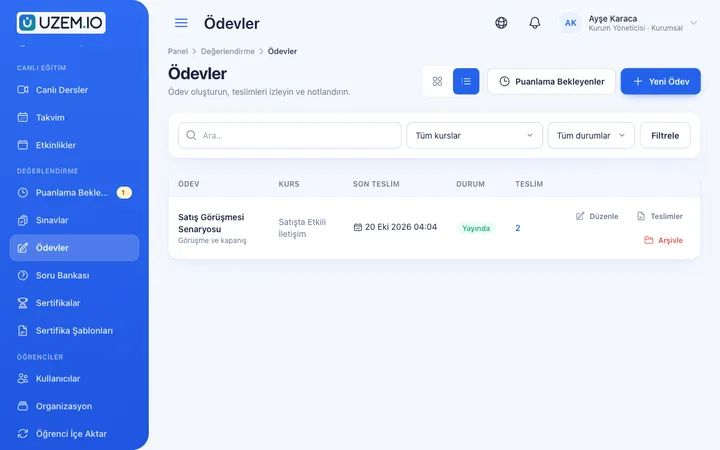
- Digital assignment submission Students upload assignments as text or files, and teachers enter the score and feedback on the same screen.
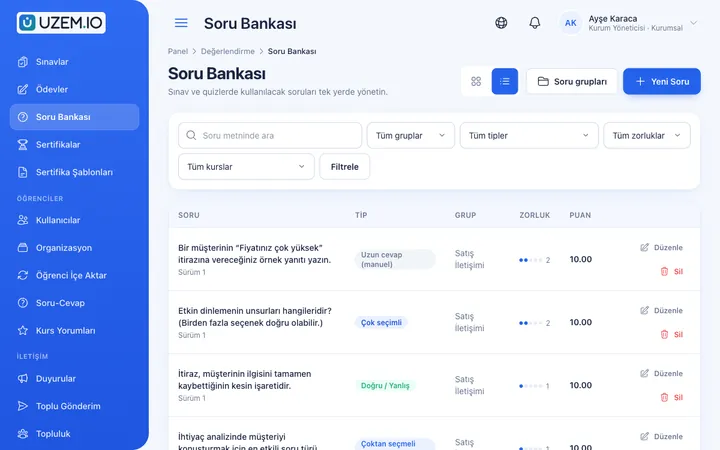
- Department question bank Subject teachers enter questions once by topic and difficulty and reuse them in exams for different class sections.
- Automatic class enrollment When you assign a course to a class section such as 9-A, students added to that section are enrolled automatically.
- Visibility for homeroom teachers A homeroom teacher monitors only their own class section's assignment and lesson completion data, read-only.
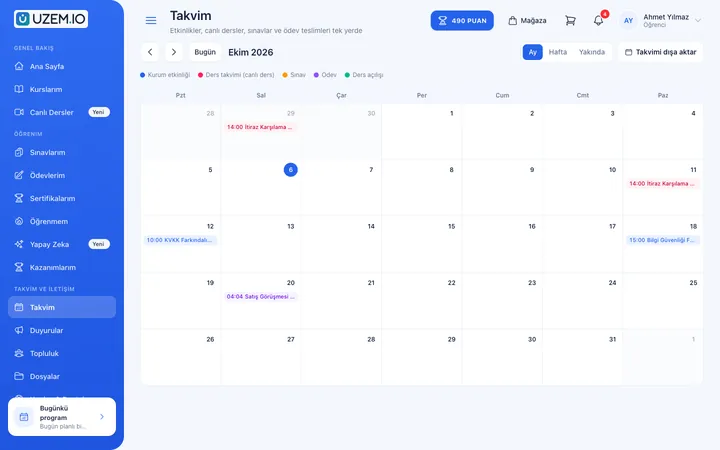
- The school calendar in one place Live sessions and assignment due dates appear on the student's calendar; announcements are published school-wide or to a single course.
- Practice before written tests In timed practice exams each student gets different questions from the pool with shuffled options, and you choose when results are released.
Industry challenges and solutions
Problem
Students who are sick or absent miss the topic entirely.
Solution
The recording of the live Zoom session is added to the relevant lesson, so students watch the same explanation later, from where they left off.
Problem
Assignments get lost in messaging groups and email.
Solution
Give the assignment on the platform with a due date; students upload their files, you set the late submission rule, and teachers enter scores and feedback in the same place.
Problem
Every teacher writes written test and practice questions from scratch.
Solution
Collect questions by topic and difficulty in the department question bank, and use random selection from the pool and option shuffling in exams.
Problem
A class section falling behind is only noticed at report card time.
Solution
Track unit completion rates, missing assignments and practice exam scores with a section filter during the term, and let homeroom teachers see their own section.
Problem
Live session times and exam dates are announced on different channels.
Solution
Live sessions appear on students' calendars automatically; remind them of important dates with pinned announcements and email notifications.
Problem
Getting used to the platform eats up the first weeks of a new term.
Solution
Assign the platform orientation to the Students unit so every enrolled student finds the short guide on first sign-in.
Who uses it?
Principal and vice principals
Track lesson completion, assignment submissions and practice exam results by level and class section, spotting classes that need intervention early in the term.
Subject teachers
Add topic videos and worksheets, teach live on Zoom when needed, and grade assignments with written feedback.
Homeroom teacher
As the unit manager of their class section, sees read-only which students have not submitted assignments and which lessons they left unfinished.
Department heads
Group the subject's shared question pool by unit and learning outcome so teachers can build exams that measure the same outcomes.
Guidance counseling
Assigns content on effective studying and test anxiety to the relevant classes and reaches students with pinned announcements.
Students
Watch recordings of missed live sessions, upload assignments as files, take practice exams and see their results on their own dashboard.
Use cases
- A digital extension of the classroom Gather the summary video, worksheet and practice assignment for the topic covered in class on the same lesson page.
- Written test and practice exam prep Offer topic reviews and practice exams generated from the question bank in the Exam Prep category, and compare results by class.
- Days of distance learning When students cannot come to school, move the timetable to live sessions; recordings stay in the archive until the end of the term.
- Professional development beyond the staff room Assign training for teachers to the Teachers unit, keeping seminar recordings and assessment notes in one place.
- Study hall and make-up program Open extra live study sessions for specific class sections and see from the attendance record how long each student stayed in every session.
Features you'll use
Course and Program Management
Organize your courses into programs and lessons; bring video, text, PDF, files, exams and live sessions together in a single flow.

Live Training
Schedule live sessions inside your courses with the Zoom integration; attendance is recorded and session recordings are added to the course as video lessons.

Video Training
Publish your video lessons through a secure video infrastructure and record viewing progress for each lesson.

Assignments
Give assignments with due dates; learners submit text or files, and instructors grade them with scores and feedback.
Exams
Measure learning with timed exams and quizzes; you decide the passing score, attempts, question shuffling and result visibility.

Question Bank
Prepare your questions once with groups, difficulty levels and explanations, then reuse them across different exams.
Class Calendar
Show live sessions, events and key dates together in each learner's own calendar.
Organization Units
Build your departments, branches, regions and stores as a unit tree; assign training to units and let managers follow their own units in read-only mode.

Reporting
Report on course progress, video viewing, exams, assignments, certificates, live sessions and sales; export to CSV.

Announcements
Publish announcements to your whole academy or to specific courses, so important information does not get lost in email and chat groups.
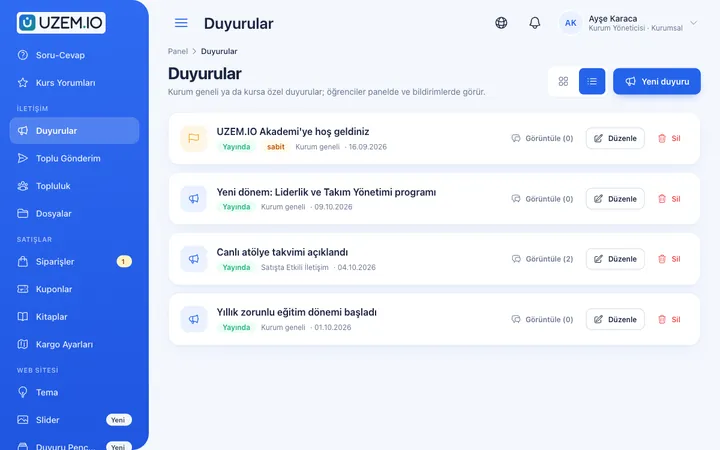
This structure comes ready with your academy
No credit card required; explore a dashboard set up with sample content right away.
How your academy is prepared
When you open an account with this industry, the structure below is set up as a draft; you adjust everything to fit your organization.
7 units · 0 categories · 3 sample courses
Levels, grades and class sections
Set up your school as a unit tree by level, grade and class section. When you assign a course to the Grade 9 unit, every section under it is covered; a newly enrolled student is enrolled in those courses as soon as they are added to their section. Keep teaching and administrative staff in separate branches so teacher development training is open only to them.
Sample unit tree
Sample structure: Sample School → Leadership / Teachers / Students (Grade 9 → 9-A) / Administrative
- Effective Study Techniques A weekly study plan, reducing distractions, spaced repetition and a short assessment quiz.
- Platform Orientation A short guide explaining how students reach their courses, live sessions, assignment submission and exams.
- Effective Teaching in Remote Lessons For teachers: interaction in live sessions, making short videos and planning assignments and exams together.
- Grade 9 Math: Sets Unit Topic videos, a worksheet, an assignment with a due date and a short end-of-unit test.
- Written Test Practice Exam Questions selected from the department question bank pool, a time limit and results released on a set date.
Measure and document learning
- At least one of the sample courses comes with a short quiz; you edit the questions in the question bank.
- You set the passing score, number of attempts and question shuffling.
- Those who complete receive a certificate verifiable by QR code; the template comes ready.
- You open assignments for hands-on work and grade the submissions.
Which class section is behind in which course?
See each student's lesson completion, video viewing, assignment submission status and exam scores with a grade or section filter. Request the breakdown school leadership needs as CSV; the file is prepared in the background and downloaded from the dashboard.
- Course tracking report by class section Shows how much of the lesson videos each student watched and where they are in the course with a section filter such as 9-A or 9-B; used to prepare for guidance meetings.
- Assignment submission report Lists assignments not yet submitted or awaiting grading by course and section, so teachers see whom to remind.
- Practice exam results report Ranks student scores and pass status on pre-test practice exams; downloaded as CSV to discuss topics to review at department meetings.
- Teacher live session hours Shows how much live teaching each teacher did on Zoom during the term, so you can check whether make-up lessons are spread evenly across sections.
- Student sign-in records Shows when students last signed in to the platform, so homeroom teachers notice early a student who has not signed in for a long time.
Your school platform is ready: Under Sample School we set up Leadership, Teachers, Students (with Grade 9 and section 9-A) and Administrative units, plus Lessons, Live Training, Exam Prep, Teacher Development and Orientation categories. Sample courses Effective Study Techniques (with a short quiz), Platform Orientation and Effective Teaching in Remote Lessons are waiting for you along with a welcome announcement. Start by adding your own grades and class sections.
Rollout steps
-
Define grades and class sections
Duplicate the ready-made Grade 9 and 9-A structure for your own levels and sections, and make homeroom teachers unit managers.
-
Have departments prepare content and questions
Subject teachers upload videos and worksheets for the first units, and department heads fill the question bank.
-
Add students to their class sections
Bulk create student accounts via CSV and place them in their sections; courses assigned to the section and the orientation open automatically.
-
Track during the term
Monitor assignment submissions, practice exam results and lesson completion rates by class section, and plan study sessions for the classes that need them.
Solutions for this industry
- Student Training Bring lessons, assignments, exams and live classes together on a single student platform for schools, course centers and universities; see where every student stands in the progress report.
- Live Training Management If Zoom links, attendance lists and recordings are scattered everywhere: schedule live sessions inside the course, record attendance automatically and add the session recording to the lesson.
- Branch / Unit-Based Training Bring your branch, store, region and department structure into the academy: assign training to a unit, enroll newcomers automatically, and let each manager see only their own unit’s status.
- Employee Training If training is scattered across emails, folders and class lists: gather all employee training in one corporate academy, assign it to people or units, and see who completed it in the report.
- Launch an Online Academy Quickly launch an online academy on your own domain and under your own brand, without setting up servers, a software team or a separate payment system.
Frequently asked questions
The 8 most frequently asked questions.
Can't find the answer you're looking for?
Browse the help center or write your question to us.
Can parents sign in to the platform?
There is no separate parent role. The platform is designed for students, teachers and school leadership; communication with parents needs to continue through your school's existing channels.
How is cheating limited in online exams?
There is no camera or screen proctoring feature. You can design your exams with settings such as different questions from the pool for each student, question and option shuffling, time limits and delayed result release.
Who grades open-ended questions?
Essay questions are graded by the teacher, and the student is notified of the result once the score is entered. Multiple-choice questions are graded automatically.
Can students join lessons from their phones?
Yes. Students sign in through the browser to upload assignments and take exams, and join live sessions via the link on the lesson page.
Do graduating students stop counting toward the license?
Yes. Only active students use a license; when you deactivate a student who graduates or transfers, they no longer count, and their course and exam history stays in your school's records. You can compare plans with capacity matching the number of students your school keeps active at the same time on the Pricing page.
Can we use the platform with our school's domain and logo?
Yes. You can connect a subdomain such as learn.yourschool.k12.tr and present the platform with your school's identity using your logo and colors.
How do our teachers' existing lesson videos and worksheets move to the platform?
Upload ready-made lesson videos from the admin dashboard and attach PDF worksheets and presentations to the relevant lesson as files. Written test and practice questions go into the department question bank; you can import the student list from a CSV file with name, email and optional phone columns. Importing ready-made course packages from another system is not available.
Does it connect to e-Okul or our school management software?
We do not offer a ready-made connection to your school management software or e-Okul; you import students and the class section structure with a CSV file. Ready-made connections schools can use are Zoom for live sessions, Netgsm or Mutlucell for bulk SMS to students, and the WhatsApp contact button on the school site.
Industries in the same group
Set up your academy for Educational Institutions / Schools today
- No credit card details required
- Automatic setup
- You can connect your domain later