




Healthcare
Let your consultants explain the new collection before it hits the shelf
Show product ingredients, recommendation logic by skin type and application techniques in close-up videos. Broadcast live to every store on launch day, add the recording to the course and track which stores are ready in reports.
- 7 units
- 5 categories
- 3 sample courses

Fast-changing collections, scattered points of sale
In cosmetics, every season brings new products, ingredients and application techniques, and store consultants, dealers and estheticians must explain them accurately to customers in a short time. Having trainers visit points of sale one by one is both costly and slow. A UZEM academy brings close-up application videos, live launches and badge-based progress under one roof, and you can also sell your training to salons if you wish.

- Close-up application videos Show makeup and skincare techniques with adaptive streaming videos; playback continues even on a weak connection.
- Motivation with points and badges Consultants who complete lessons earn points and badges, and the leaderboard creates friendly competition between stores.
- Stores and dealers kept separate Stores, dealers and estheticians are separate units; each sees only the collection training assigned to it.
- Course sales to salons Sell your application training on the storefront, receive payments into your own PayTR or iyzico account and create coupons.
- Live collection launch Introduce new season products to all points at once on Zoom, and add the recording to the course for later viewing.
- A look tailored to your brand The academy opens with your brand's logo and colors, so consultants train in your brand's environment.
- Application training document Estheticians who finish application training receive a document bearing your brand's name that can be verified with a QR code.
Industry challenges and solutions
Problem
Launches are frequent and fast; trainers cannot reach every store in time.
Solution
Deliver launch training to all stores at once with videos and a live Zoom broadcast; the recording stays in the course.
Problem
Application techniques cannot be explained in writing.
Solution
Show the application order step by step with close-up video lessons, then reinforce it with a short exam.
Problem
Store staff turnover is high, and every new consultant has to be trained from scratch.
Solution
Assign skincare basics to the store unit; a new consultant added to the store is enrolled in the training from day one.
Problem
Messaging at dealers drifts away from headquarters' voice.
Solution
Add dealers to the same academy as units and assign them the same content to keep the brand voice consistent.
Problem
Training given to professional practitioners needs to be documented.
Solution
Give estheticians who pass the exam a certificate that can be verified by QR code.
Problem
Professional training for salons generates no revenue, only cost.
Solution
Offer this training as paid courses on your brand's storefront; accept card or bank transfer payments and create coupons for trade shows and campaigns.
Who uses it?
Brand training manager
Prepares content around the launch calendar, assigns it to stores and dealers, and tracks on one screen who is ready before the collection hits the shelf.
Beauty consultant
Learns product ingredients, the right product matching and after-sale usage tips through short videos while the store is quiet.
Dealer and authorized point of sale
Perfumery, pharmacy corner or distributor staff are trained with the same content as headquarters, keeping the brand's messaging consistent at every point.
Esthetician
Professional practitioners learn treatment room protocols, application order and hygiene steps through video lessons and exams, then receive a certificate.
Regional sales representative
Learns the positioning of new products and the talking points to pass on to the team during store visits.
Brand instructor
Supports hands-on training with live sessions, adds recordings to the course and evaluates participants' exams.
Use cases
- New product launch Prepare the launch course in advance, broadcast live on launch day and track the readiness report by store.
- Beauty consultant orientation Present the brand story, product families and store standards to new consultants in sequential sections.
- Esthetician certificate program Teach treatment room protocols with video lessons and exams, and give successful participants a certificate.
- Paid professional training Offer training for salon owners and independent practitioners for sale under your own brand.
- Training race between stores Consultants who complete lessons and exams earn points and badges; during launch periods the leaderboard creates friendly competition between stores.
Features you'll use
Video Training
Publish your video lessons through a secure video infrastructure and record viewing progress for each lesson.

Course and Program Management
Organize your courses into programs and lessons; bring video, text, PDF, files, exams and live sessions together in a single flow.

Live Training
Schedule live sessions inside your courses with the Zoom integration; attendance is recorded and session recordings are added to the course as video lessons.

Organization Units
Build your departments, branches, regions and stores as a unit tree; assign training to units and let managers follow their own units in read-only mode.

Certificates
Automatically issue certificates in your own design, verifiable by QR code, to everyone who completes a course.

Gamification
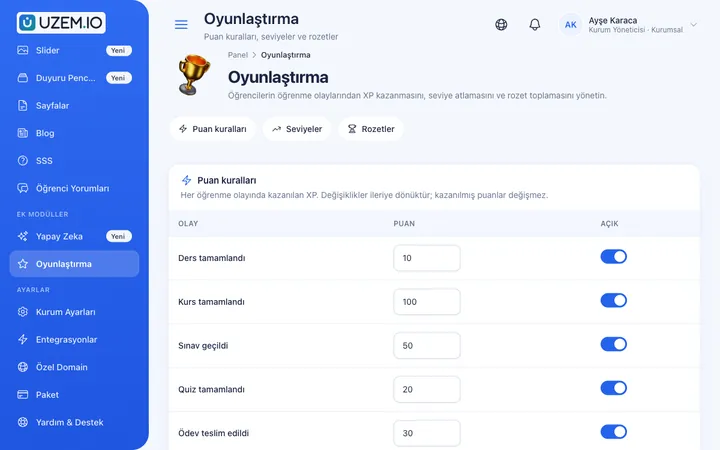
Use points, badges, levels and leaderboards to make steady learner effort visible and motivating.
Reporting
Report on course progress, video viewing, exams, assignments, certificates, live sessions and sales; export to CSV.

White Label / Branding
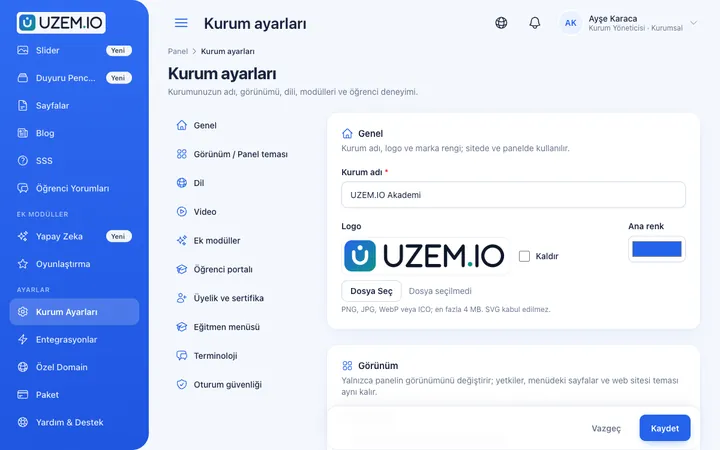
Present your academy entirely under your own brand with your logo, colors, fonts and choice of theme.
Course Storefront
Manage your academy's public website with a course catalog, course landing pages, sliders, pop-ups, a blog and FAQs.
Course Sales
Sell courses and books from your own academy with a cart, orders, PayTR, iyzico or bank transfer payments, and refunds.

This structure comes ready with your academy
No credit card required; explore a dashboard set up with sample content right away.
How your academy is prepared
When you open an account with this industry, the structure below is set up as a draft; you adjust everything to fit your organization.
7 units · 0 categories · 3 sample courses
From headquarters to the store, from the dealer to the treatment room
Set up Headquarters, Stores, Dealers, Estheticians, Sales and Instructors units, and add each store as a sub-unit under Stores, grouped by region if you like. When you assign launch training to the Stores unit, all stores are covered; a store manager sees only their own team's completion status.
Sample unit tree
Sample structure: Sample Cosmetics → Headquarters / Stores / Dealers / Estheticians / Sales / Instructors
- Skincare Basics Skin types, a basic care routine and recommending products in the right order; ends with a short exam.
- New Product Launch The new collection's key ingredients, target customer and in-store talking points.
- In-Store Customer Experience Greeting, understanding needs, offering testers and after-sale recommendations.
- Treatment Room Hygiene and Preparation Preparing the area before treatment, cleaning equipment and informing the client.
- Explaining the Ingredient List to Customers How to explain the ingredient list on the packaging to customers in plain language.
Measure and document learning
- At least one of the sample courses comes with a short quiz; you edit the questions in the question bank.
- You set the passing score, number of attempts and question shuffling.
- Those who complete receive a certificate verifiable by QR code; the template comes ready.
- You open assignments for hands-on work and grade the submissions.

Which store is ready for the launch?
During launch week, see course completion and exam results by store, region and dealer, and download the list as CSV to send stores that are behind to the regional representative.
- Collection training progress report Filter the course tracking report by store or dealer unit to see points of sale that have not finished the new season training.
- Salon course sales The earnings report shows, by course, the revenue from training you sold to salons and independent estheticians.
- Esthetician certificate report The certificate report lists estheticians who completed the brand application training and received a document.
- Consultant and dealer member list The members report lets you export consultant, dealer and salon users registered in the academy and compare them with your own lists.
Your beauty academy is ready: Under Sample Cosmetics we created Headquarters, Stores, Dealers, Estheticians, Sales and Instructors units, plus Product, Application Techniques, Launch, Sales and Customer Experience categories. Sample trainings Skincare Basics (with an exam), New Product Launch and In-Store Customer Experience are ready, and gamification comes switched on. Start by adding your logo and your first product video.
Rollout steps
-
Set up the store and dealer network
Add stores and dealers to the unit tree and make store managers unit managers.
-
Upload core product training
Turn your existing product videos and visuals into courses and add short exams.
-
Set up the launch calendar
Add live sessions for upcoming launches to the calendar and send announcements.
-
Measure readiness
Track the completion rate by store in reports before the launch.
Solutions for this industry
- Product Training If product knowledge is explained differently to every team: deliver the same content to sales, support, dealer and field teams at the same time, and verify it was learned with an exam.
- Partner / Dealer Training If your dealers and partners learn about product changes late and incompletely: use a separate academy that carries your brand to deliver knowledge to every location at once, at the same quality.
- Sales Team Training If it takes weeks for the field team to be ready when a new product launches: quickly update and measure your sales team’s knowledge with short video lessons, exams and a leaderboard.
- Customer Training Cut down the “how do I use this” questions reaching your support team: open a branded training center that teaches customers your product with video lessons, short quizzes and certificates.
- Course Sales Sell courses, live training and books from your own storefront: cart, coupons, payment via PayTR, iyzico or bank transfer, and order management in one dashboard.
- Certificate Programs Combine training, exams and certification in one flow: you set the success criteria, the certificate is generated automatically, and third parties verify its authenticity with a QR code.
Frequently asked questions
The 9 most frequently asked questions.
Can't find the answer you're looking for?
Browse the help center or write your question to us.
Is launch training assigned to stores automatically?
There is no launch-based automatic assignment rule. You assign the launch course to the relevant region or store unit, and sub-units inherit the assignment automatically.
Do close-up application videos play clearly?
Videos are delivered with adaptive streaming: they play in high quality on a good connection, and quality is reduced to keep playback going when the connection weakens.
Can we sell our training to salons?
Yes. You can offer your courses for sale on the storefront, accept payments with your own PayTR or iyzico account or by bank transfer, and create coupons.
Is the esthetician certificate an official document?
No. The document proves that the esthetician finished your brand's application training; its authenticity is checked by scanning the QR code on it. It does not replace a professional qualification certificate.
Can a consultant watch lessons on their phone when there are no customers?
Yes. The academy opens in a phone browser; a consultant can finish a section while the store is quiet and continue the rest later from where they left off.
Can our training include advice on skin health?
You prepare the content. Giving general information is common in cosmetics consulting; we recommend that your training stress referring customers to a specialist in cases that require medical judgment.
How do we bring our training videos and product catalogs into the academy?
Upload ready-made application videos, attach product catalogs and ingredient lists to lessons as PDFs or files, and enter product knowledge questions into the question bank. You can bulk add consultant and dealer users with a CSV file. Ready-made course packages cannot be imported from other platforms.
Do temporary consultants hired for a campaign keep using licenses?
No. Temporary consultants you deactivate after the campaign do not count toward licenses, and records of the training they completed are kept. Plans are tiered by the number of learners kept active at the same time; current prices are on the Pricing page.
Is there a connection to our point-of-sale system or loyalty program?
We do not offer a ready-made connection to your point-of-sale, loyalty or human resources systems; you import consultants via CSV. The academy uses Zoom for live launches, PayTR and iyzico for course sales, and Netgsm and Mutlucell for bulk SMS; a WhatsApp contact button can also be added to the storefront.
Industries in the same group
Set up your academy for Cosmetics / Beauty today
- No credit card details required
- Automatic setup
- You can connect your domain later