










Sales & management
In all plansOrganization Units
Build your departments, branches, regions and stores as a unit tree; assign training to units and let managers follow their own units in read-only mode.
Industries that benefit from this feature
- Corporate Companies
- Holdings and Groups of Companies
- Sales and Marketing Teams
- Retail and Store Chains
- Franchise and Dealer Networks
- Logistics and Transportation
- Industry and Manufacturing
- Banking and Finance

Let your academy mirror your organization
In large, distributed organizations, managing training person by person is not sustainable. With organization units, you define your departments, branches, regions and stores as a nested tree. When you assign a course to a unit, everyone in that unit and all its sub-units is enrolled; people added to the unit later are enrolled automatically too. Unit managers see only their own units' data, in read-only mode.
- No more assignment busywork Assign once to a unit instead of to hundreds of people one by one.
- Newcomers are not missed People added to a unit are enrolled in its assigned training automatically.
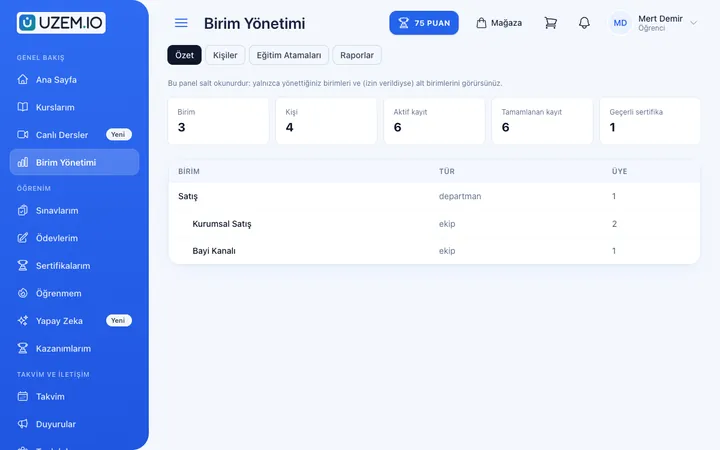
- Managers see their own team Unit managers follow their units without requesting reports from headquarters.
- Data scope is protected A unit manager cannot access other units' data.
What can you do?
-
Unit tree
Define departments, branches, regions and stores hierarchically.
-
Assignment to units and sub-units
When you assign a course to a unit, its sub-units are included too.
-
Automatic enrollment
New unit members are enrolled in assigned courses automatically.
-
Read-only unit managers
Unit managers track progress in the units they oversee but cannot make changes.
-
Reports filtered by unit
View and export completion and exam results by unit.
Sample screens
Real screens from the admin, instructor and learner side.
Organization units
Unit manager's unit summary
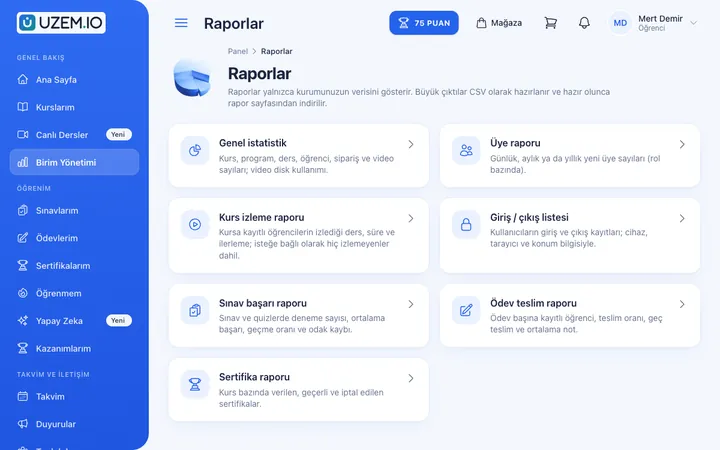
Unit manager's report screen
Before and after
Before
Training is assigned by hand for every new employee.
Next
Employees added to a unit are enrolled in training automatically.
Before
Branch managers ask headquarters about their team's status.
Next
Branch managers follow their own units on read-only screens.
Before
Reports show the whole organization as one table.
Next
Reports are filtered by unit.
Frequently asked questions
The 4 most frequently asked questions.
Can't find the answer you're looking for?
Browse the help center or write your question to us.
What can unit managers do?
Unit managers see the training data of people in their units and sub-units in read-only mode; content and assignment management stays with academy admins.
Can automatic assignment follow other rules?
Automatic assignment works only based on the unit structure. In other cases you can assign courses to people manually or in bulk.
What happens if someone changes units?
When a person moves to a new unit, they are enrolled in the courses assigned to that unit; records of the training they completed are kept.
Is there a ready-made unit structure for my industry?
When the academy is set up, a sample unit structure suited to your industry can be suggested; you then adjust it to your own organization.
Solutions that use this feature
- Employee Training If training is scattered across emails, folders and class lists: gather all employee training in one corporate academy, assign it to people or units, and see who completed it in the report.
- Onboarding / Orientation Instead of explaining the same things to every new hire, schedule the first week: lessons unlock day by day, short quizzes confirm understanding, and managers follow the process.
- Partner / Dealer Training If your dealers and partners learn about product changes late and incompletely: use a separate academy that carries your brand to deliver knowledge to every location at once, at the same quality.
- Product Training If product knowledge is explained differently to every team: deliver the same content to sales, support, dealer and field teams at the same time, and verify it was learned with an exam.
- Sales Team Training If it takes weeks for the field team to be ready when a new product launches: quickly update and measure your sales team’s knowledge with short video lessons, exams and a leaderboard.
- Mandatory / Compliance Training If you replan KVKK, information security, OHS and internal policy training every year: assign it, verify completion with an exam, and keep a CSV record of who took which training.
- Branch / Unit-Based Training Bring your branch, store, region and department structure into the academy: assign training to a unit, enroll newcomers automatically, and let each manager see only their own unit’s status.
Industries that benefit from this feature
- Corporate Companies
- Holdings and Groups of Companies
- Sales and Marketing Teams
- Retail and Store Chains
- Franchise and Dealer Networks
- Logistics and Transportation
- Industry and Manufacturing
- Banking and Finance
- Insurance
- Real Estate and Brokerage Networks
- Healthcare / Hospitals / Clinics
- Pharmaceuticals
- Medical Devices
- Cosmetics / Beauty
- Aviation
- Tourism / Hotels / Restaurants / Cafes
- Educational Institutions / Schools
- University
- Publishing
- NGOs, Associations and Foundations
- Public Institutions / Municipalities
Features in the same category
Set up your academy today
- No credit card details required
- Automatic setup
- You can connect your domain later