









Training & engagement
In all plansCommunity
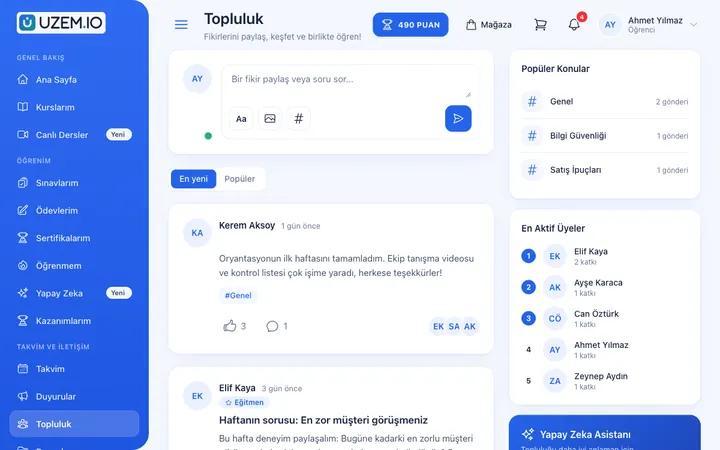
Open a community space where your learners ask questions under topics, share experiences and help each other.
Industries that benefit from this feature
- Holdings and Groups of Companies
- Real Estate and Brokerage Networks
- NGOs, Associations and Foundations

Learning does not stop when the lesson ends
Learners often learn from each other too. But when conversations stay in external chat groups, knowledge gets lost and leaves your academy. The UZEM community space offers a place to share inside your academy, with posts, comments and likes organized under topics.
- Stronger academy engagement Learners come back to the academy not only for lessons but also to engage with the community.
- Lighter instructor workload Other learners can answer frequently asked questions too.
- Knowledge stays in the academy Shared experiences remain in the community space for good.
What can you do?
-
Topics
Keep the community organized by splitting it into topics.
-
Posts and comments
Learners share posts and keep the discussion going in comments.
-
Likes
Helpful posts rise to the top through likes.
-
Moderation
Admins keep the community tidy by hiding or removing inappropriate posts and comments.
Sample screens
Real screens from the admin, instructor and learner side.
Community management
Learner's community feed
Before and after
Before
Learner conversations are scattered across external chat groups.
Next
Discussions live in the academy's community space, organized by topic.
Before
The same questions reach the instructor again and again.
Next
Questions are answered in the community, and newcomers can see them too.
Frequently asked questions
The 3 most frequently asked questions.
Can't find the answer you're looking for?
Browse the help center or write your question to us.
Who can see the community space?
The community is open to users signed in to your academy; outside visitors cannot see it.
Can I turn off the community?
Yes. You can turn the community module on or off as needed.
How are inappropriate posts handled?
Admins can hide or remove inappropriate posts and comments; users can edit and delete their own posts.
Solutions that use this feature
- Customer Training Cut down the “how do I use this” questions reaching your support team: open a branded training center that teaches customers your product with video lessons, short quizzes and certificates.
- Member Training Offer seminars, courses and announcements to association, chamber and foundation members from one address; record attendance and completion, and open courses for a fee if you like.
- Continuing Professional Development Help professionals stay current throughout their careers by gathering seminars, courses and certificate programs in one development academy, with attendance history kept on each person’s record.
Industries that benefit from this feature
Features in the same category
Set up your academy today
- No credit card details required
- Automatic setup
- You can connect your domain later