










Features
What does the platform do? Every capability you can use in UZEM today, from setting up training to measuring it, from sales to your brand.
1 feature
AI
Lets learners ask about course content and gives the training team drafting and summary support.
- AI Assistant An AI assistant that lets learners ask questions about course content and gives your training team draft suggestions for content.
4 features
Content & video
Set up the course, publish video securely, unlock lessons over time, share documents.
- Course and Program Management Organize your courses into programs and lessons; bring video, text, PDF, files, exams and live sessions together in a single flow.
- Video Training Publish your video lessons through a secure video infrastructure and record viewing progress for each lesson.
- Drip Content Unlock lessons on the days you choose, counted from each learner's enrollment date, so content is absorbed step by step.
- Files Add lesson notes, handouts, forms and guides to a course or to the whole academy, so learners reach the current document in one place.
8 features
Training & engagement
Keep engagement going with live sessions, calendar, announcements, community, gamification and notifications.
- Live Training Schedule live sessions inside your courses with the Zoom integration; attendance is recorded and session recordings are added to the course as video lessons.
- Announcements Publish announcements to your whole academy or to specific courses, so important information does not get lost in email and chat groups.
- Class Calendar Show live sessions, events and key dates together in each learner's own calendar.
- Community Open a community space where your learners ask questions under topics, share experiences and help each other.
- Gamification Use points, badges, levels and leaderboards to make steady learner effort visible and motivating.
- Notifications Deliver events such as announcements, exam results and assignment grades through in-app notifications and email; send bulk messages.
- SMS Notifications Connect your Netgsm or Mutlucell account and send SMS to your learners under your own approved sender name, in line with İYS consent rules.
- WhatsApp Contact Button Add a WhatsApp contact button to your storefront site and, if you like, the learner dashboard, so visitors can start writing to you with a single tap.
5 features
Assessment & tracking
Measure with exams, a question bank, assignments and certificates; see who is where with reports.
- Exams Measure learning with timed exams and quizzes; you decide the passing score, attempts, question shuffling and result visibility.
- Question Bank Prepare your questions once with groups, difficulty levels and explanations, then reuse them across different exams.
- Assignments Give assignments with due dates; learners submit text or files, and instructors grade them with scores and feedback.
- Certificates Automatically issue certificates in your own design, verifiable by QR code, to everyone who completes a course.
- Reporting Report on course progress, video viewing, exams, assignments, certificates, live sessions and sales; export to CSV.
3 features
Sales & management
Run your academy with course sales, coupons, a unit tree and active learner licensing.
- Course Sales Sell courses and books from your own academy with a cart, orders, PayTR, iyzico or bank transfer payments, and refunds.
- Coupons Create percentage or fixed-amount discount coupons, and keep your promotions under control with usage limits and validity dates.
- Organization Units Build your departments, branches, regions and stores as a unit tree; assign training to units and let managers follow their own units in read-only mode.
5 features
Platform & brand
An access-protected academy that runs with your own domain, brand, storefront and languages.
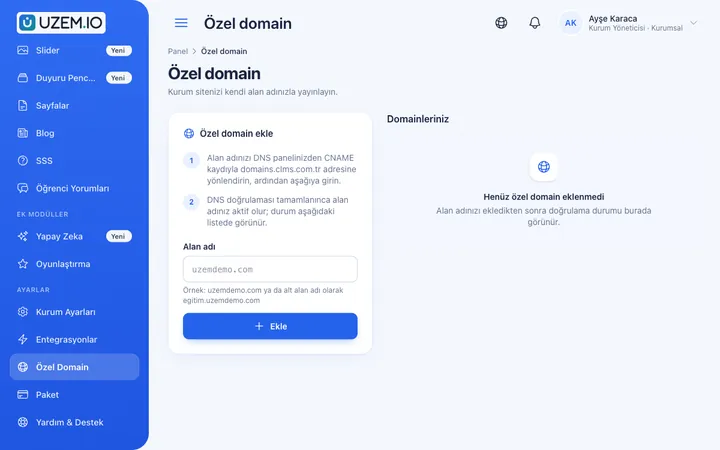
- Custom Domain Publish your academy on your own domain, with verification and SSL certificate handled automatically.
- White Label / Branding Present your academy entirely under your own brand with your logo, colors, fonts and choice of theme.
- Course Storefront Manage your academy's public website with a course catalog, course landing pages, sliders, pop-ups, a blog and FAQs.
- Multilingual Content Enable more than one language in your academy and prepare course, page and FAQ content for each language.
- Security and Access Control who accesses your academy and from where with two-factor authentication, a single-session rule, watermarked and signed video playback, and sign-in and account sharing reports.
Set up your academy today
- No credit card details required
- Automatic setup
- You can connect your domain later