






Corporate & commercial
Bring scattered employee training together in one corporate academy
No more orientation decks in a folder, security training in an email attachment and attendance lists in a spreadsheet. With UZEM, assign training to your departments, deliver it with videos and live sessions, and measure it with exams; Human Resources and department managers see who completed what from the same place.
- 8 units
- 6 categories
- 4 sample courses

Why does training tracking get harder as departments grow?
In corporate companies, the same training has to reach both a newly hired specialist and a manager with years of tenure, and every department has its own work calendar. When training is split across classrooms, email and shared folders, who completed what only becomes clear at period end, counted by hand. A UZEM academy is built on your department tree: you assign once, progress is recorded automatically, and HR and department managers look at the same data.

- One assignment per department Assign training to a department once; employees who join that department later are enrolled automatically.
- Measured awareness Finish KVKK and information security training with an exam that has a passing score, so you know the topic was understood.
- Managers get their own view Department managers follow their teams' progress read-only without asking HR for a list.
- Recorded briefings Internal sessions held on Zoom appear on the calendar, and their recordings are added to the course as lessons.
- Verifiable certificates Certificates issued for completed training can be checked on the verification page with a QR code.
- An academy with your brand With your logo, colors and custom domain, the academy looks to employees like the company's own training portal.
- No licenses for leavers When you deactivate an employee who leaves, their license is freed and their training history stays on record.
Industry challenges and solutions
Problem
Who completed mandatory training is compiled from emails before internal or customer audits.
Solution
Completion date, exam score and certificate details are recorded for every employee; pull the list with a department filter and keep it as a CSV file.
Problem
The orientation presentation is delivered from scratch with every hiring wave.
Solution
The orientation program is built once and assigned to departments; new employees are enrolled the day they are added to their department, and lessons unlock across their first days.
Problem
Department managers ask HR for lists to learn their teams' training status.
Solution
As a unit manager, each manager sees only their own department's progress on a read-only screen.
Problem
Information security training was watched, but nobody knows whether it was understood.
Solution
Add an exam with a passing score generated from the question bank; training is not counted as complete for employees who do not pass.
Problem
The same briefing is held again and again for teams on different floors and in different cities.
Solution
The session runs once on Zoom, appears on the calendar and records attendance time; those who miss it watch the recording inside the course.
Problem
It is unclear which version of policy and procedure documents is current.
Solution
The current document is attached as a file to the relevant training or to the whole academy, and changes are communicated with an announcement.
Who uses it?
HR and learning and development specialist
Moves the annual training plan into the academy: builds the catalog, assigns training to departments and exports completion and certificate lists at period end.
New employee
Learns the company structure, ways of working and whom to contact for what through the orientation program in the first week, without asking the same questions one by one.
Department manager
Monitors the training status of their own department, such as Finance, Operations or Marketing, as a unit manager without requesting separate lists from HR.
IT and information security lead
Prepares content on passwords, phishing and device security, delivers it to the whole company with a single assignment and sees who passed the exam.
New and aspiring manager
Completes modules on goal setting, feedback and meeting management at their own pace, together with live sessions and their recordings.
Internal instructor
An experienced employee is set up as an instructor, covers topics such as the budgeting process or reporting in live sessions, and the recordings become permanent lessons.
Use cases
- First 30 days orientation Deliver company introduction, first-week checklist and communication culture lessons in a program that unlocks day by day from the enrollment date.
- Annual KVKK and information security period Assign both trainings to Head Office, share the deadline in an announcement and see in reports who is falling behind by department.
- Manager development program Support goal, feedback and meeting management modules with monthly live sessions, and add the session recordings to the same course as lessons.
- Rolling out a new internal system or process When a new approval flow or internal software goes live, bring everyone to the same point with short screen recording videos and an assessment quiz.
- In-house expertise library Set up experienced employees as instructors and turn topics such as purchasing, contract management or proposal writing into permanent lessons.
Features you'll use
Course and Program Management
Organize your courses into programs and lessons; bring video, text, PDF, files, exams and live sessions together in a single flow.

Organization Units
Build your departments, branches, regions and stores as a unit tree; assign training to units and let managers follow their own units in read-only mode.
Video Training
Publish your video lessons through a secure video infrastructure and record viewing progress for each lesson.

Exams
Measure learning with timed exams and quizzes; you decide the passing score, attempts, question shuffling and result visibility.

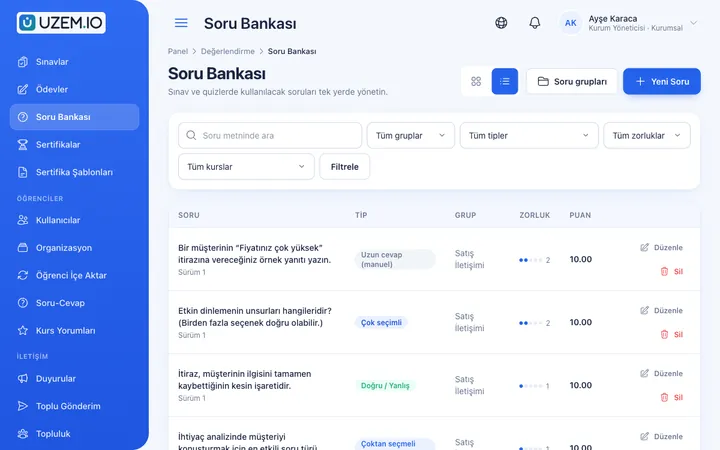
Question Bank
Prepare your questions once with groups, difficulty levels and explanations, then reuse them across different exams.
Certificates
Automatically issue certificates in your own design, verifiable by QR code, to everyone who completes a course.

Reporting
Report on course progress, video viewing, exams, assignments, certificates, live sessions and sales; export to CSV.

Live Training
Schedule live sessions inside your courses with the Zoom integration; attendance is recorded and session recordings are added to the course as video lessons.

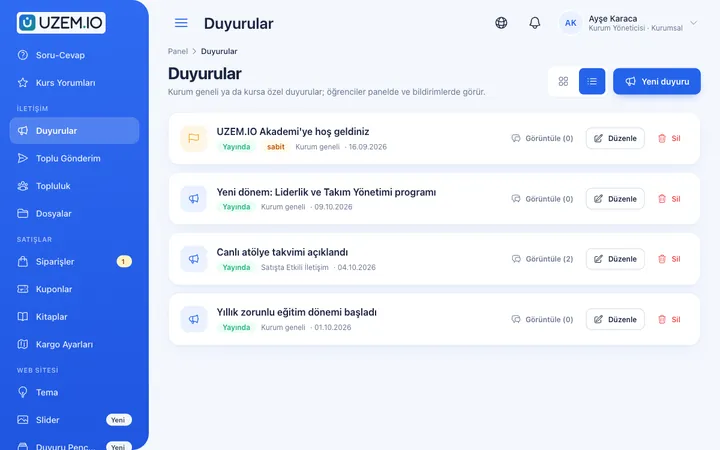
Class Calendar
Show live sessions, events and key dates together in each learner's own calendar.
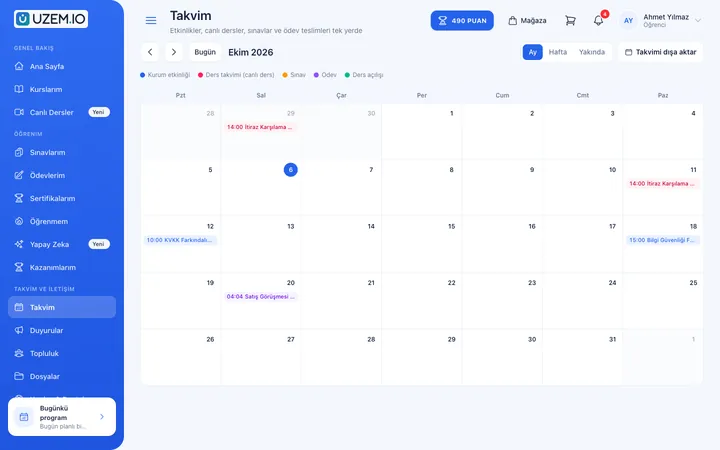
Announcements
Publish announcements to your whole academy or to specific courses, so important information does not get lost in email and chat groups.
This structure comes ready with your academy
No credit card required; explore a dashboard set up with sample content right away.
How your academy is prepared
When you open an account with this industry, the structure below is set up as a draft; you adjust everything to fit your organization.
8 units · 0 categories · 4 sample courses
Head office and your departments in one tree
Head Office sits at the top, with the Human Resources, Sales, Marketing, Operations, Finance, Technical / IT and Management departments beneath it. When you assign KVKK awareness to Head Office, all departments are covered; sales-specific training goes only to the Sales department. Employees added to a department later are enrolled automatically in the training assigned to it.
Sample unit tree
Sample structure: Head Office → Human Resources / Sales / Marketing / Operations / Finance / Technical and IT / Management
- New Employee Orientation Organization structure, department responsibilities, a first-week checklist and shared work culture; a short assessment at the end.
- Information Security Basics Strong passwords, screen and device security, recognizing phishing emails and the steps to follow when in doubt.
- KVKK Awareness What personal data is, the data you handle in daily work, safe sharing and reporting a suspected breach.
- Manager Development Program Setting clear goals, prioritizing, giving constructive feedback and running productive meetings.
- Occupational Health and Safety in the Office Ergonomics, office risks and the steps to follow in an emergency; content is adapted with your occupational safety specialist.
- Internal Correspondence and Email Etiquette Writing clear emails, passing requests between departments and sharing status clearly when handing work over.
Measure and document learning
- At least one of the sample courses comes with a short quiz; you edit the questions in the question bank.
- You set the passing score, number of attempts and question shuffling.
- Those who complete receive a certificate verifiable by QR code; the template comes ready.
- You open assignments for hands-on work and grade the submissions.
Where is each department in the annual plan?
Human Resources sees the whole company, while a department manager sees only their own team. Track, per training, who started, who finished, what they scored on the exam and whether their certificate was issued. Large exports are prepared in the background and downloaded from the dashboard when ready.
- Course tracking report by department Shows every employee's progress in orientation or annual KVKK training with a department filter, so a team falling behind stands out at a glance.
- Information security exam results Lists who passed or failed the information security test and their scores, so you can plan a repeat session for low-scoring departments.
- Certificate report When internal audit asks, export as CSV which employee holds which training certificate, with dates.
- Internal instructor live session hours Shows the duration of live sessions led by internal instructors, making the effort behind the manager development program visible.
Your corporate academy opens with this structure: Under Head Office, the Human Resources, Sales, Marketing, Operations, Finance, Technical / IT and Management departments come ready, along with Orientation, Mandatory Training, Professional Development, Leadership, KVKK & Compliance and OHS categories. New Employee Orientation, Information Security Basics, KVKK Awareness and Manager Development Program are added as drafts; two of them include a short assessment quiz. A welcome announcement is also published.
Rollout steps
-
Review the department tree
Adjust the ready-made Head Office and department structure to your own org chart and make department managers unit managers.
-
Add employees to their departments
Invite employees one by one or bulk import them via CSV, placing each in the department they work in.
-
Adapt the sample training
Update the draft orientation, information security and KVKK training with your own policies, publish them and assign them to the relevant departments.
-
Close the period with a report
Check each department's remaining gaps, send a deadline reminder in an announcement and add the completed list to your annual training file.
Solutions for this industry
- Employee Training If training is scattered across emails, folders and class lists: gather all employee training in one corporate academy, assign it to people or units, and see who completed it in the report.
- Onboarding / Orientation Instead of explaining the same things to every new hire, schedule the first week: lessons unlock day by day, short quizzes confirm understanding, and managers follow the process.
- Mandatory / Compliance Training If you replan KVKK, information security, OHS and internal policy training every year: assign it, verify completion with an exam, and keep a CSV record of who took which training.
- Continuing Professional Development Help professionals stay current throughout their careers by gathering seminars, courses and certificate programs in one development academy, with attendance history kept on each person’s record.
- Branch / Unit-Based Training Bring your branch, store, region and department structure into the academy: assign training to a unit, enroll newcomers automatically, and let each manager see only their own unit’s status.
- Live Training Management If Zoom links, attendance lists and recordings are scattered everywhere: schedule live sessions inside the course, record attendance automatically and add the session recording to the lesson.
Frequently asked questions
The 9 most frequently asked questions.
Can't find the answer you're looking for?
Browse the help center or write your question to us.
Can the finance manager see the Sales department's training data?
No. A unit manager sees only the data of the department they are responsible for and its sub-units, if any, read-only.
Do we need to add new hires to each training separately?
No. Assign the training to the department once; everyone added to the department later is enrolled in that training automatically.
Does UZEM prepare the KVKK and information security content?
The content that comes with the academy is a starting draft. Adapting it to your policies and ensuring its accuracy are your organization's responsibility; UZEM provides the infrastructure for publishing, assigning, measuring and recording.
Do we have to give up classroom training entirely?
No. You can keep your in-person training and run pre-work videos, follow-up exams and attendance records from the academy.
Do we keep paying for employees who leave?
No. When you deactivate a departing employee, they no longer use a license, but their training history stays on record; licensing is based on the number of active users.
Can the academy appear with our company's brand?
Yes. It opens with your logo, colors and custom domain; if you prefer, you can turn off the public storefront and show only the employee sign-in.
How do we bring over our existing training videos and presentations?
Upload your videos from the admin dashboard and add them to lessons; presentations, policy documents and PDFs are attached to the relevant training as files. Enter your exam questions into the question bank and group them by topic. You can import the employee list with a CSV file and build the department tree via CSV as well; importing content in ready-made course package formats is not available.
How is the academy's price determined by our headcount?
Plans are tiered by the number of employees you can keep active at the same time; you can see current plans and prices on the Pricing page. Instructor and admin accounts do not use a license. If you need high capacity company-wide, you can request a custom quote from us.
Can it connect to our HR software or payroll system?
No, we do not offer a ready-made connection to enterprise systems such as human resources and payroll. You can export the employee list from these systems as CSV and import it into the academy. For internal live sessions you can use Zoom, and for bulk SMS to employees a Netgsm or Mutlucell connection.
Industries in the same group
Set up your academy for Corporate Companies today
- No credit card details required
- Automatic setup
- You can connect your domain later