









Assessment & tracking
In all plansCertificates
Automatically issue certificates in your own design, verifiable by QR code, to everyone who completes a course.
Industries that benefit from this feature
- Corporate Companies
- Holdings and Groups of Companies
- Sales and Marketing Teams
- Retail and Store Chains
- Franchise and Dealer Networks
- Logistics and Transportation
- Industry and Manufacturing
- Banking and Finance

Issuing certificates is no longer a separate job
Preparing certificates one by one takes time and invites mistakes. In UZEM, you design a certificate template once and attach it to a course. When a learner completes the course, the certificate is generated automatically and can be downloaded as a PDF. Each certificate has its own verification code and QR code, so employers or third parties can check its authenticity on the verification page.
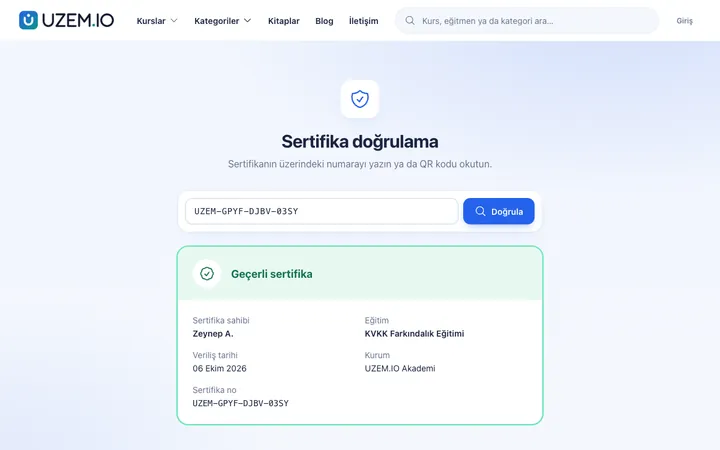
- Automatic certification The certificate is generated as soon as the course is completed, so nobody has to wait.
- Verifiable trust The QR code and verification code show that the certificate was issued by your academy.
- A professional look With your logo, background, signature and signer details, your certificates carry your brand.
- You stay in control When needed, you can issue a certificate manually or revoke it with a reason.
What can you do?
-
Template design
Edit the title, text, background, signature image and signer details.
-
Automatic issuing on completion
The certificate is generated when the course is completed; exams with a passing score can count toward completion.
-
QR code and verification page
Every certificate has a unique code and a public verification page.
-
Manual issuing and revocation
Admins can issue a certificate manually or revoke it with a reason; a revoked certificate shows as invalid on verification.
-
Certificate report
List and export all issued certificates.
Sample screens
Real screens from the admin, instructor and learner side.
Certificate templates
Public certificate verification page
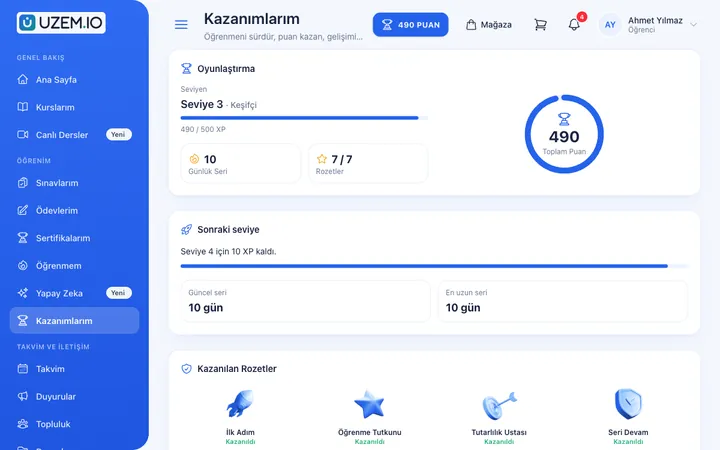
Learner's achievements
Before and after
Before
Certificates are made one by one in a design tool and sent by email.
Next
The certificate is generated on course completion, and the learner downloads it from the academy.
Before
People call to ask whether a certificate is genuine.
Next
They scan the QR code and check it on the verification page.
Frequently asked questions
The 4 most frequently asked questions.
Can't find the answer you're looking for?
Browse the help center or write your question to us.
When is a certificate issued?
If a certificate template is attached to the course, the certificate is generated automatically when the learner completes the course.
Does a learner who fails an exam get a certificate?
If the exam is a lesson in the course and has a passing score, the course is not completed and no certificate is generated until the exam is passed.
Can we take back a certificate issued by mistake?
Yes. You can revoke the certificate with a reason; the verification page then shows it as invalid.
Do certificates replace official documents?
Certificates are documents issued by your academy. Cases that require official recognition depend on the rules of the relevant authorities.
Solutions that use this feature
- Employee Training If training is scattered across emails, folders and class lists: gather all employee training in one corporate academy, assign it to people or units, and see who completed it in the report.
- Onboarding / Orientation Instead of explaining the same things to every new hire, schedule the first week: lessons unlock day by day, short quizzes confirm understanding, and managers follow the process.
- Partner / Dealer Training If your dealers and partners learn about product changes late and incompletely: use a separate academy that carries your brand to deliver knowledge to every location at once, at the same quality.
- Customer Training Cut down the “how do I use this” questions reaching your support team: open a branded training center that teaches customers your product with video lessons, short quizzes and certificates.
- Member Training Offer seminars, courses and announcements to association, chamber and foundation members from one address; record attendance and completion, and open courses for a fee if you like.
- Mandatory / Compliance Training If you replan KVKK, information security, OHS and internal policy training every year: assign it, verify completion with an exam, and keep a CSV record of who took which training.
- Launch an Online Academy Quickly launch an online academy on your own domain and under your own brand, without setting up servers, a software team or a separate payment system.
- Certificate Programs Combine training, exams and certification in one flow: you set the success criteria, the certificate is generated automatically, and third parties verify its authenticity with a QR code.
- Branch / Unit-Based Training Bring your branch, store, region and department structure into the academy: assign training to a unit, enroll newcomers automatically, and let each manager see only their own unit’s status.
- Continuing Professional Development Help professionals stay current throughout their careers by gathering seminars, courses and certificate programs in one development academy, with attendance history kept on each person’s record.
Industries that benefit from this feature
- Corporate Companies
- Holdings and Groups of Companies
- Sales and Marketing Teams
- Retail and Store Chains
- Franchise and Dealer Networks
- Logistics and Transportation
- Industry and Manufacturing
- Banking and Finance
- Insurance
- Real Estate and Brokerage Networks
- Healthcare / Hospitals / Clinics
- Pharmaceuticals
- Medical Devices
- Cosmetics / Beauty
- Aviation
- Tourism / Hotels / Restaurants / Cafes
- University
- Course Centers
- NGOs, Associations and Foundations
- Professional Chambers and Associations
- Public Institutions / Municipalities
Features in the same category
Set up your academy today
- No credit card details required
- Automatic setup
- You can connect your domain later