Skip to content
UZEM

SET UP YOUR ONLINE ACADEMY

Your training, under your own brand publish and sell.

Live sessions, video courses, learner management and course sales on one platform. Go live under your own brand without setting up a server.

  • No credit card required
  • No setup needed
  • You can use your own domain
UZEM admin dashboard: sales, learner progress, program builder and upcoming live sessions
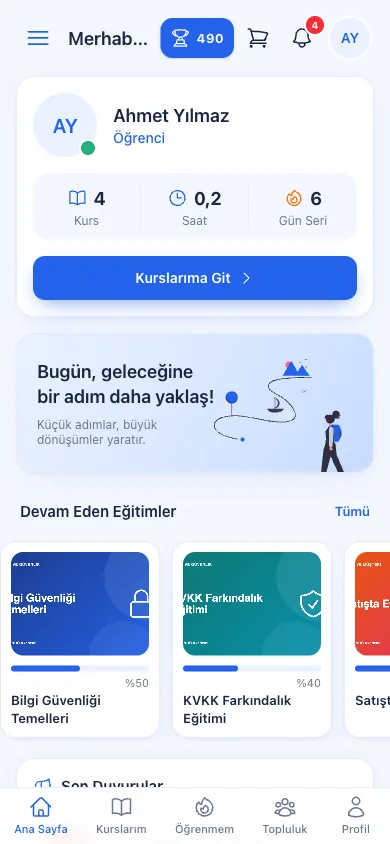
The learner portal on a phone
  • Online academy
  • Live session
  • Video training
  • E-commerce
  • Exam
  • Certificate
  • AI Assistant
  • Reporting

One platform

Everything you need for online learning

Instead of separate tools, payment pages and video services, manage courses, lessons, learners and sales from one dashboard.

Course management screen

Course management

Organize your courses into categories; bring video, PDF, file and link lessons together in the same course.
Explore

See the product up close

A separate, simple screen for each role

Admins, instructors and learners work in the same academy, but each sees only what they need.
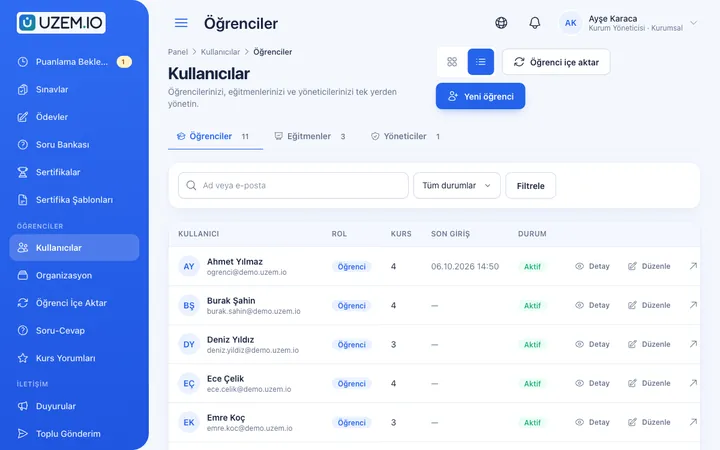
Course list and course management in the admin dashboard

Your whole academy on one screen

  • Manage courses, categories, learners and instructors from the same dashboard
  • Add learners in bulk via CSV and assign them to courses
  • Track sales, learner and license status on the home page
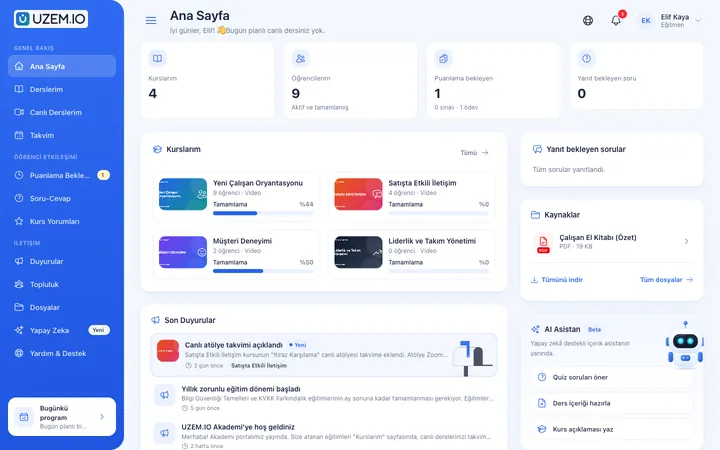
Instructor dashboard: lessons, assessments and live sessions

Instructors focus only on their own work

  • Sees only their own courses, learners and live sessions
  • Grades pending exams and assignments, answers learner questions
  • Starts the live stream from the dashboard with one click
Learner portal: my courses, upcoming live sessions and announcements

The learner's day on one page

  • Returns to their course with one click
  • Sees upcoming live sessions and announcements
  • Accesses their certificates and recommended content
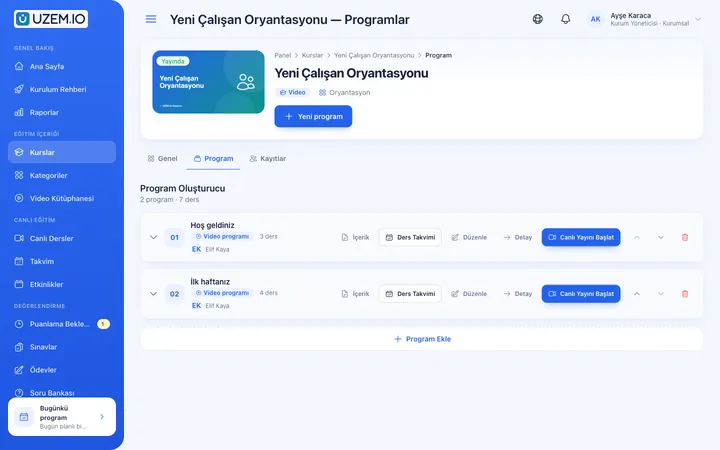
Lesson screen: video player and course content list

A distraction-free lesson screen

  • Video resumes from the exact second you left off
  • Automatically moves to the next lesson when a lesson ends
  • Note-taking, questions and lesson files on the same screen
Live session operations screen: today's and upcoming sessions

Today's live sessions under control

  • See today's and upcoming sessions in one list
  • Start the stream; track attendance and duration
  • Add recordings to the course as lessons
Reports screen: earnings, members, video traffic and course viewing reports

Base your decisions on data

  • Earnings, member, course viewing and exam reports are ready
  • See learners who never watched, too
  • Have large reports prepared as CSV in the background

Domain

Go live at your own address

Your learners reach your academy from your address. Use one of two options; switch to the other at any time.

Option A

Your own domain

Connect a domain you own, or a subdomain, with a DNS record; the SSL certificate is prepared automatically.

  • www.siteniz.com
Option B

Your dedicated store address

If you don't have a domain, a ready address with the name you chose at sign-up opens right away.

  • siteniz.uzem.io

Create your academy first, and connect your domain later.

How does it work?

You don't need to buy anything to get started

Open your academy for free, add your content and go live when you're ready.

  • No payment or card details are requested at sign-up
  • Free trial period
  • Switch to the plan that suits you when you're ready
  1. Step 1: Create for free

    Enter your name, email and academy address. Verify the code, and your academy is set up automatically.

  2. Step 2: Make it your own

    Add your logo and colors, and upload your first course and lessons.

  3. Step 3: Add your learners

    Invite learners or import them in bulk via CSV; if you'll be selling, connect your payment account.

  4. Step 4: Go live

    Open your academy to your learners at your dedicated address or on your own domain.

Take a closer look

Designed for everyone, from those who teach to those who learn

Live training

Your live sessions are scheduled, your recordings are in your course

Plan sessions in advance in the Lesson Calendar. When it's time, the instructor starts the stream from the dashboard, and learners see in their portal that the stream is live and join with one click.
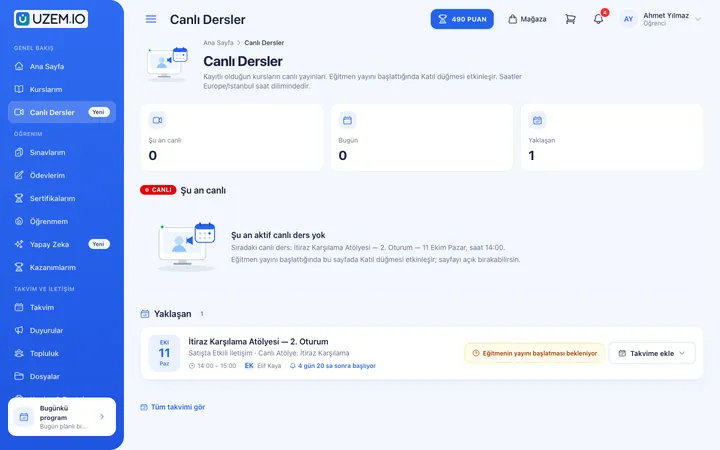
  • One-click streaming with Zoom
  • Scheduled sessions with calendar and reminders
  • Attendance and instructor lesson duration report
  • Adding lesson recordings to the course as lessons
More about Live training
Live sessions list and join button in the learner portal
Admin live session operations screen

Video training

Your videos are protected, and progress is truly measured

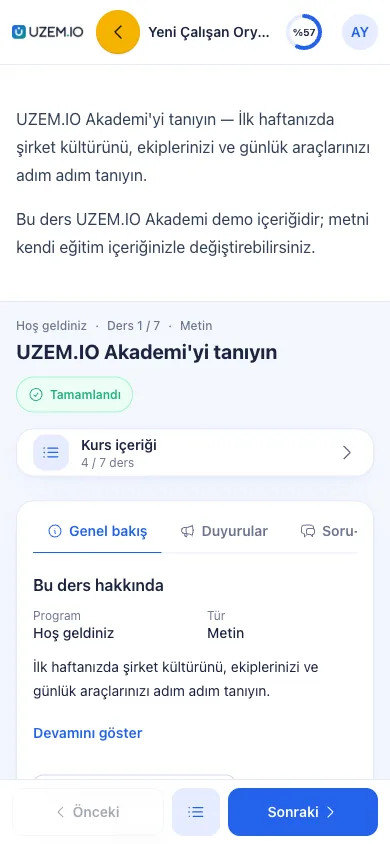
Your videos are hosted on secure video infrastructure. The player records how much the learner has watched and completes the lesson accordingly.
  • A moving, learner-specific watermark
  • Real watch time and progress tracking
  • Resume where you left off and auto-play the next lesson
  • Sequential programs and locked lessons
  • Smooth viewing on phones too
More about Video training
Video player and lesson list on the lesson screen
The lesson player on a phone

Learner experience

Your learners know what to do and when

The learner portal brings courses, upcoming live sessions and announcements together in one place; the calendar shows everything day by day.
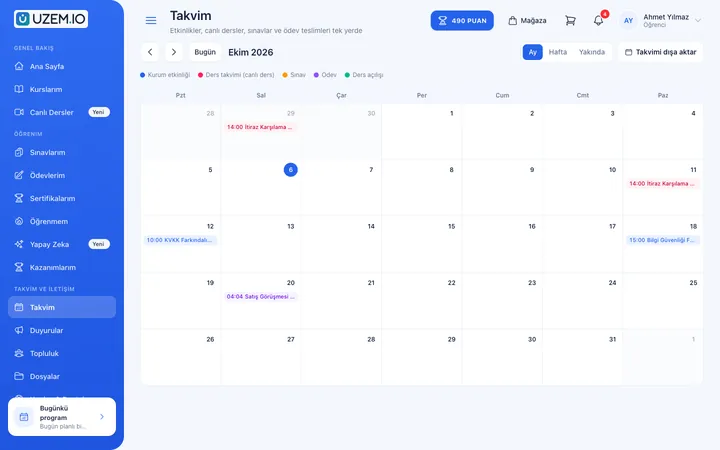
  • My courses and resume where you left off
  • Live sessions and personal calendar
  • Announcements and certificates
  • AI assistant and recommended content
More about Learner experience
Learner home page: progress, announcements and upcoming sessions
Learner calendar

Instructor experience

Your instructors focus on teaching, not administration

The instructor dashboard shows only the instructor's own courses. Items pending grading, learner questions and today's live sessions are on the first screen.

  • Exams and assignments pending grading
  • Learner Q&A and course reviews
  • Publishing announcements and starting live sessions
More about Instructor experience
Instructor home page: courses, items pending grading and announcements

Organization management

Every setting of your academy is under your control

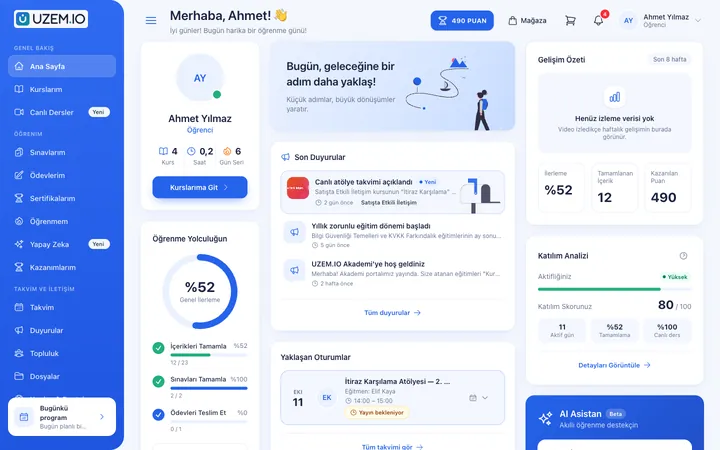
Manage users, courses and programs, sales and your brand from the same admin dashboard. You decide which modules are turned on.

  • Users, roles and learner licenses
  • Course and program management
  • Sales, reporting and integrations
  • Brand, domain, plan and quota tracking
  • Turning modules such as community and gamification on and off
More about Organization management
Programs, instructors and lesson schedule within a course

White-label

Your academy. Your brand.

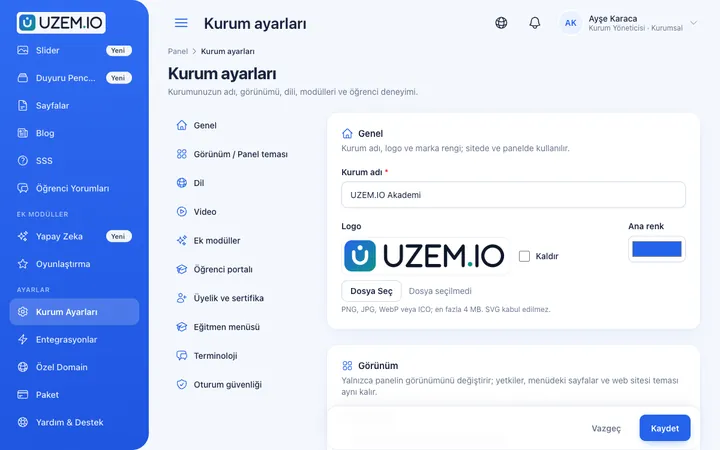
Your learners see your name, not the platform's. Every surface, from the storefront to the lesson screen, carries your corporate identity.

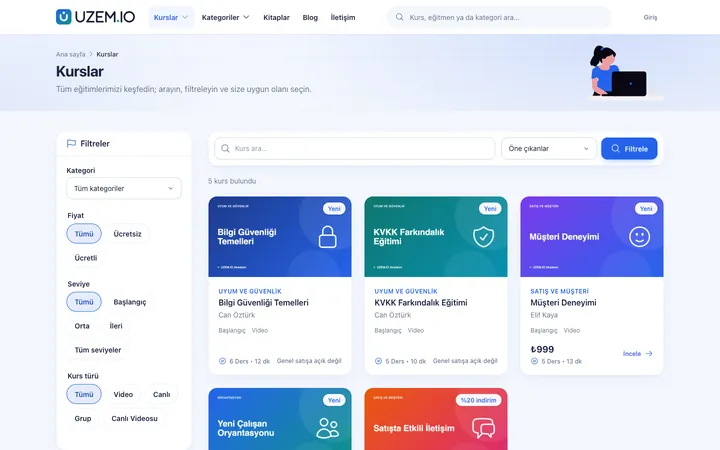
  • LogoYour logo in the admin dashboard, on the storefront and in the learner portal.
  • Color and themeChoose one of the ready-made storefront themes and apply your colors.
  • DomainYour academy is live on your own domain or a dedicated address.
  • Course storefrontThe course catalog, course detail pages, blog and FAQ pages are ready.
  • Learner portalEven when your learners sign in, they see only your brand.
The organization storefront's home page: hero, featured courses and categories
Course catalog on the organization's storefront
Try your brand color:

Course sales

From visitor to learner, sales ready end to end

You don't need a separate e-commerce site. Payments go to your own PayTR or iyzico account; you can also receive bank transfer payment notifications.

  1. Catalog Your courses on a storefront organized by category
  2. Course details Content, instructor and pricing details
  3. Cart Multiple courses and coupons
  4. Order Order record and summary
  5. Payment PayTR, iyzico or bank transfer
  6. Learner access The course unlocks when the order is approved
  7. Sales tracking Earnings and order reports
Sales screen: orders, payment statuses and earnings summary

Open your store

Choose a name and your store comes with its own address

  1. CHOOSE AN ACADEMY NAME
  2. YOUR STORE ADDRESS IS READY
  3. ADD YOUR COURSES
  4. GO LIVE
Create my academy for free
A live academy storefront: siteniz.uzem.io

Reporting

Who watched, who completed, how much you sold

Ready-made reports show the state of your academy without guesswork. You have large lists prepared as CSV and download them.

  • Learners and members
  • Active users and sign-ins
  • Sales and earnings
  • Course completion
  • Live session durations
  • Attendance
  • CSV export
Explore reports
Reports screen: general statistics, earnings, members, video traffic and course viewing reports

AI Assistant

A guide for learners, a helper for your team

The AI assistant built into your academy answers learners' questions and speeds up your team's content preparation.

  • Learner AI assistantLearners ask questions about lesson topics day or night and get instant answers.
  • AI assistant for your teamInstructors and admins quickly draft course descriptions, lesson content and quiz questions.
  • Content suggestionsRecommends next courses based on the courses the learner is enrolled in and the choices of similar learners.
See AI features
Learner AI assistant chat screen

Integrations

The services you use are connected to your academy

You connect your payment account from the dashboard, and payments go directly to you. Live session, SMS and email infrastructure works together with your academy.

Live training

  • Zoom

Video

  • Secure video infrastructure

AI

  • Google Gemini
  • Groq
  • Mistral AI
  • OpenRouter
  • Anthropic Claude

Payment

  • PayTR
  • iyzico
  • Bank transfer

SMS

  • Netgsm
  • Mutlucell
  • İYS consent check

Email

  • SMTP

Security

  • Cloudflare Turnstile

Domain

  • Custom domain
  • Automatic SSL

Who is it for?

Fits whatever model you teach with

Course centers

Complement your classroom lessons with live sessions and recorded videos; run assignments, exams and announcements from one place.

Online academies

Sell your courses on your own storefront, and let your learners start as soon as they pay.

Corporate training

Assign training to your employees in bulk, have them complete it in sequence and see in reports who is where.

Independent instructors

Sell courses under your own name without building a technical team; spend your time on content and your learners.

Education providers

Manage term-based programs, your instructor staff and learner performance in one dashboard; issue verifiable certificates.

Distance learning brands

Protect your video content with watermarking and view tracking, and scale with your plan as your learner base grows.

Plans

Start free, choose your plan as you grow

Opening your academy is free. When your trial ends, you continue with the plan that fits your number of learners and the features you need.

Başlangıç

₺4,900 / mo

VAT excluded

  • 50 learner licenses
  • Sınırsız eğitmen
  • Video ders barındırma
  • Duyuru panosu
  • CSV ile toplu öğrenci içe aktarma
  • E-posta bildirimleri
Most popular

Standart

₺7,900 / mo

VAT excluded

  • 150 learner licenses
  • Başlangıç paketindeki her şey
  • Öncelikli destek
  • Daha yüksek aktif öğrenci kapasitesi

Profesyonel

₺12,900 / mo

VAT excluded

  • 500 learner licenses
  • Standart paketindeki her şey
  • Büyüyen akademiler için en yüksek paket kapasitesi

Kurumsal

Get a quote

  • Profesyonel paketindeki her şey
  • Sınırsız öğrenci
  • Özel SLA
  • Özel entegrasyon desteği

Compare all plans and features

FAQ

Frequently asked questions

Answers to the most frequently asked questions before you start.

Is it paid to create my online academy?

No. You create your academy for free, and no payment is taken during sign-up. During the free trial, you can try the platform with your own content. When you want to continue, you choose the plan that suits you.

Do you ask for credit card details at sign-up?

No, we don't. The sign-up form asks for your name, email, phone, academy address and password; your account is verified with a code sent to your email.

Do I need technical knowledge to set it up?

No need. After verification your academy is set up automatically, and you enter your admin dashboard with one click. You don't deal with servers, software installation or updates.

Can I use my own domain?

Yes. You point an address like academy.yourcompany.com or www.youracademy.com with a DNS record and connect it from the dashboard; the SSL certificate is prepared automatically. Your custom domain allowance depends on your plan.

What if I don't have a domain?

A dedicated store address like siteniz.uzem.io, using the name you chose at sign-up, is available right away.

Can I connect my domain later?

Yes. You can start with your dedicated address and add your own domain whenever you like. Your courses, learners and settings stay exactly as they are.

Can I sell my courses?

Yes. Your courses are listed on your storefront; learners order using the cart and coupons, and pay by card or bank transfer through your own PayTR or iyzico account. Access opens automatically once payment is confirmed.

Can I run live sessions?

Yes. You plan your live sessions from the calendar, the instructor starts the stream with Zoom from the dashboard, and learners join from their own portal. Session recordings can be added to the course as lessons.

How are my videos protected?

Your videos are hosted on secure video infrastructure and watermarked with the viewing learner's details. Watch time, progress and suspicious account sharing are reported.

How many learners can I add?

The number of active learners is determined by the learner license quota in your plan. Each plan's quota is listed on its plan card; you can upgrade your plan as your needs grow.

Can I use my logo and organization colors?

Yes. You upload your logo and choose your colors and storefront theme. Your learners see your academy with your own brand.

Does it work on phones and tablets?

Yes. The learner portal, lesson player and admin dashboard work in phone and tablet browsers through a mobile-friendly web interface; there's no separate app to install.

Can I change my plan later?

Yes. On the Plan and Payment screen in the admin dashboard, you can choose your new plan and pay by card or bank transfer. Our team can also adjust your plan when needed.

Is my data kept separate from other organizations?

Yes. Each academy's courses, learners and sales belong only to that academy; no other organization can see this data. Dashboard access is limited by roles and permissions, and critical actions are logged.

Have another question? Browse the help center

Set up your online academy today

After a few minutes of sign-up, your academy is ready; you can add your first course and start inviting your learners right away.

  • No credit card required
  • No setup needed
  • You can use your own domain

Cookie preferences

Strictly necessary cookies are used for the site to work. Analytics and marketing cookies are enabled only with your consent. Cookie policy

Cookie categories

Are you sure?