










Assessment & tracking
In all plansAssignments
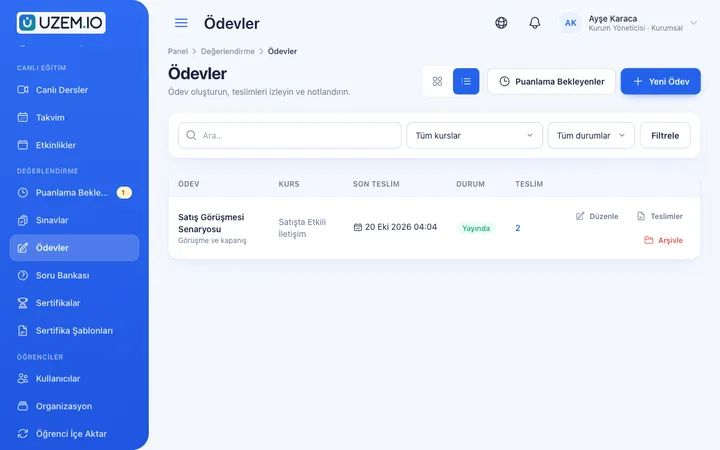
Give assignments with due dates; learners submit text or files, and instructors grade them with scores and feedback.
Industries that benefit from this feature
- Holdings and Groups of Companies
- Sales and Marketing Teams
- Educational Institutions / Schools
- University
An assignment workflow for hands-on topics
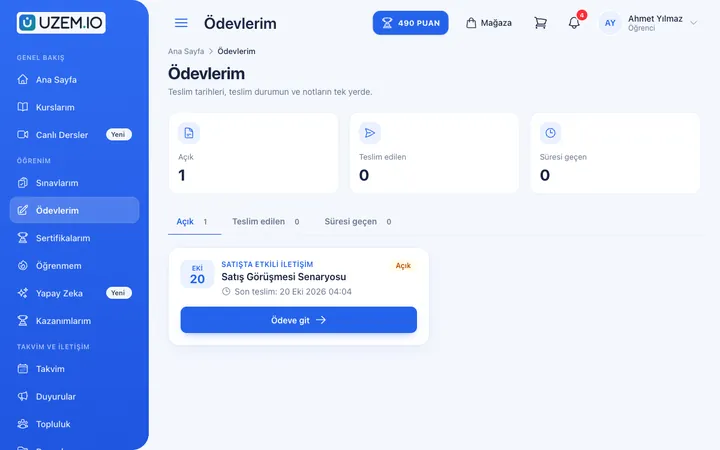
Some skills cannot be measured with test questions; they need a project, a report or a practical exercise. UZEM assignments are given inside the course. Learners see the instructions and any attachment, then write their work as text or upload a file. Instructors see submissions on a single screen, assign a score and write feedback.
- No more email back-and-forth Submissions are collected inside the course, so nobody has to hunt for attachments.
- Clear rules The due date, late submission policy and resubmission option are the same for everyone.
- Lasting feedback The instructor comment and score are stored with the submission.
What can you do?
-
Text and file submissions
Submit text, files or both; the number, size and extensions of files can be limited.
-
Dates and late submission rule
Set start and due dates and whether late submissions are accepted.
-
Resubmission
When allowed, learners can update and resubmit their work; versions are kept.
-
Score and passing score
Define the maximum score and the passing score, and grade with feedback.
Sample screens
Real screens from the admin, instructor and learner side.
Assignments in the admin dashboard
Learner's assignments and due dates
Before and after
Before
Assignments arrive by email, and it is unclear which version is final.
Next
Submissions stay in the course along with their versions.
Before
Late submissions are debated one by one.
Next
The late submission rule is set when the assignment is created and flagged automatically.
Frequently asked questions
The 3 most frequently asked questions.
Can't find the answer you're looking for?
Browse the help center or write your question to us.
Which files can learners upload?
For each assignment you can set the allowed file extensions, the maximum number of files and the file size.
Are late submissions accepted?
That depends on your setting; you can accept late submissions, limit them to a certain date or turn them off.
Are assignment results reported?
Yes. The assignment report lets you track submission and grading status and export it as CSV.
Solutions that use this feature
- Student Training Bring lessons, assignments, exams and live classes together on a single student platform for schools, course centers and universities; see where every student stands in the progress report.
- Certificate Programs Combine training, exams and certification in one flow: you set the success criteria, the certificate is generated automatically, and third parties verify its authenticity with a QR code.
Industries that benefit from this feature
Features in the same category
Set up your academy today
- No credit card details required
- Automatic setup
- You can connect your domain later