




Community & public sector
Make sure volunteers know what to do, and how, before they go into the field
Turn your mission, field rules and reporting chain into short video courses. A new volunteer starts orientation on the day they join, and the participation and certificate list you need for your grant report is ready too.
- 7 units
- 4 categories
- 3 sample courses

Training continuity for seasonal volunteer teams
In associations and foundations, training needs change constantly: volunteers come and go with projects, branches are in different cities and the person delivering training is often a volunteer too. Face-to-face orientation cannot be repeated for every new participant, and grant reports ask for proof of who received which training. The UZEM academy turns orientation into recorded lessons, separates branches and projects into units and makes completion data reportable.

- Same-day orientation When a new volunteer is added to their project’s unit, they are automatically enrolled in the assigned orientation course and can start right away.
- Separate space for branches Each branch and project is defined as its own unit; a branch manager sees only their own volunteers in read-only mode.
- QR-coded participation certificate Volunteers who finish training automatically receive a participation certificate in your association’s design, verifiable by QR code.
- Sharing among volunteers In the community area, volunteers share field experiences under topics and answer each other’s questions.
- Public courses You publish awareness courses for free on the storefront and track completion data for everyone who registers from the same dashboard.
- Multilingual content For projects serving people in different languages, you prepare course and page content separately for each language.
- No wasted licenses When you deactivate a volunteer whose project has ended, their license is freed; their training history stays on record without being deleted.
Industry challenges and solutions
Problem
Volunteers join on different dates throughout the year, and orientation is explained from scratch every time.
Solution
Prepare orientation once as a video course; everyone added to the Volunteers unit is enrolled automatically, and a short quiz confirms it was understood.
Problem
The grant-making body asks for evidence of training activities.
Solution
Export the completion, exam and certificate list filtered by project unit as CSV and add it to your interim and final reports.
Problem
Each branch sends volunteers into the field with different rules.
Solution
Assign field safety and reporting chain training to all branches from headquarters; branch managers see who is behind on their own screen.
Problem
Communication with members gets scattered across messaging groups.
Solution
Pin important announcements and send them with email notifications; members ask questions under the announcement or in the community area.
Problem
Beneficiaries who attend training expect a certificate.
Solution
Give those who complete training a participation certificate designed with your own template, bearing an authorized signature and verifiable by QR code.
Problem
Some beneficiaries speak a language other than Turkish.
Solution
Enable a second language such as Arabic or English in the academy and prepare training texts in that language too; right-to-left layout is supported for Arabic.
Who uses it?
Volunteer coordinator
Keeps orientation up to date, adds new volunteers to the Volunteers unit and checks who has finished training before going into the field.
Project team
Delivers training to the target group in grant- or donation-funded projects; uses participation, completion and certificate data in interim and final reports.
Branch managers
Track which training volunteers and members in their branch have finished and announce local events; they do not change headquarters’ content.
Volunteers
Learn the organization’s values, volunteer rights and responsibilities, communication with beneficiaries and field safety at their own pace.
Members
Follow activity and governance briefings, share experiences in the community area and register for the organization’s events from the calendar.
Staff
Paid employees complete training on personal data protection, transparency in donation processes and organizational policies.
Use cases
- Volunteer orientation A starter program that introduces the organization, explains rights and responsibilities and reinforces what to know before going into the field with a short quiz.
- Grant project training Run training for the project’s target group under the project unit and report participation at project close.
- Pre-field safety briefing Have everyone complete safety and reporting steps before working in a disaster area, doing street outreach or making home visits.
- Member briefing before the general assembly Present the activity report, bylaw changes and agenda items to members as video and files, and announce the meeting on the calendar.
- Free courses for the public Publish awareness courses in your field for free on the storefront; anyone who wants can register and start.
- Solidarity among volunteers Open topics in the community area for sharing field experiences; hide inappropriate posts through moderation.
Features you'll use
Course and Program Management
Organize your courses into programs and lessons; bring video, text, PDF, files, exams and live sessions together in a single flow.

Video Training
Publish your video lessons through a secure video infrastructure and record viewing progress for each lesson.

Organization Units
Build your departments, branches, regions and stores as a unit tree; assign training to units and let managers follow their own units in read-only mode.

Certificates
Automatically issue certificates in your own design, verifiable by QR code, to everyone who completes a course.

Community
Open a community space where your learners ask questions under topics, share experiences and help each other.
Announcements
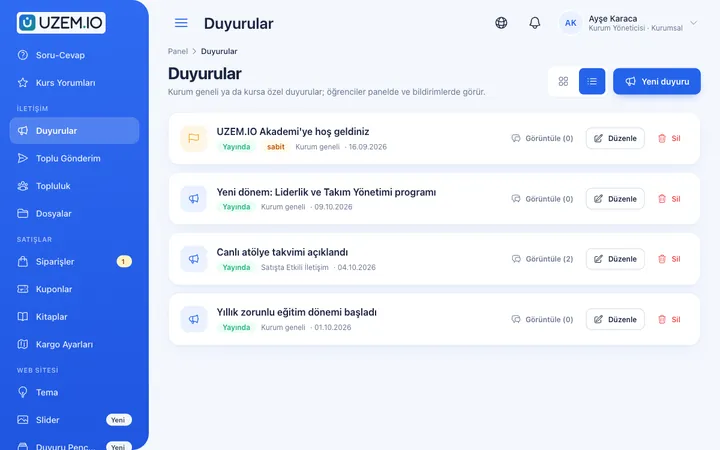
Publish announcements to your whole academy or to specific courses, so important information does not get lost in email and chat groups.
Live Training
Schedule live sessions inside your courses with the Zoom integration; attendance is recorded and session recordings are added to the course as video lessons.

Reporting
Report on course progress, video viewing, exams, assignments, certificates, live sessions and sales; export to CSV.

Multilingual Content
Enable more than one language in your academy and prepare course, page and FAQ content for each language.
Course Storefront
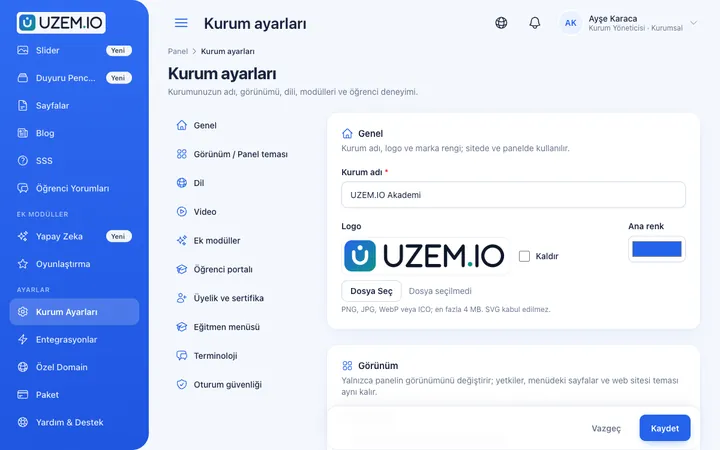
Manage your academy's public website with a course catalog, course landing pages, sliders, pop-ups, a blog and FAQs.

This structure comes ready with your academy
No credit card required; explore a dashboard set up with sample content right away.
How your academy is prepared
When you open an account with this industry, the structure below is set up as a draft; you adjust everything to fit your organization.
7 units · 0 categories · 3 sample courses
Headquarters, branches, projects and volunteer groups
Define your headquarters, branches and the projects you run as units; keep volunteers, members and staff in separate groups. When you assign orientation to the Volunteers unit, every new volunteer is automatically enrolled; when a project ends, that project’s unit and training records stay in place for reporting. As your number of branches grows, you can add each branch’s own volunteer team as a sub-unit under it.
Sample unit tree
Sample structure: Sample Association → Headquarters / Sample Branch / Sample Project / Volunteers / Members / Staff
- Volunteer Orientation Mission and values, volunteer rights and responsibilities, communication with beneficiaries and who reports what to whom; with a short quiz.
- Working Safely in the Field Pre-field checks, the never-work-alone rule, handling tense situations and post-activity reporting.
- Personal Data Protection Awareness The concept of personal data, the need-to-know principle, lists and files, and what to do when a problem is noticed.
- Dignified Communication with Beneficiaries A short course on non-stigmatizing language, privacy and consent when sharing photos.
- Transparency in Fundraising What to watch for in informing donors, record keeping and campaign communication.
Measure and document learning
- At least one of the sample courses comes with a short quiz; you edit the questions in the question bank.
- You set the passing score, number of attempts and question shuffling.
- Those who complete receive a certificate verifiable by QR code; the template comes ready.
- You open assignments for hands-on work and grade the submissions.

Participation data ready for your grant report
See which volunteer has finished orientation, how many people completed training in each project and which participation certificates were issued. Download the list filtered by project or branch unit as CSV and add it to your activity and project reports.
- Course tracking report by project Shows how many volunteers in the selected project finished orientation and who dropped out midway; the project coordinator builds the follow-up list from here.
- Participation certificate report Lists participation certificates issued during the period by date and person; the CSV file for grant and activity reports is exported from here.
- Briefing meeting attendance Shows participants’ join and leave times and time spent in the session for volunteer meetings held on Zoom.
- Volunteer list by branch Lists volunteers registered to branches in the members report; used to decide which accounts to deactivate before a new period.
Your organization’s academy is ready: Under Sample Association, we have set up Headquarters, Sample Branch, Sample Project, Volunteers, Members and Staff units, and Volunteer Orientation, Project, Professional Development and Awareness categories. Sample courses with short quizzes are also waiting for you: Volunteer Orientation, Working Safely in the Field and Personal Data Protection Awareness.
Rollout steps
-
Set up your structure
Replace the ready-made Headquarters, Sample Branch and Sample Project units with your own branches and projects, and assign branch managers.
-
Adapt the orientation
Add your own story, field rules and contact people to the sample Volunteer Orientation course.
-
Invite volunteers and members
Add people to the relevant group; assigned training appears in their lists, and newcomers follow the same path.
-
Document your impact
Export participation and certificate data by branch and project and use it in your activity reports.
Solutions for this industry
- Onboarding / Orientation Instead of explaining the same things to every new hire, schedule the first week: lessons unlock day by day, short quizzes confirm understanding, and managers follow the process.
- Member Training Offer seminars, courses and announcements to association, chamber and foundation members from one address; record attendance and completion, and open courses for a fee if you like.
- Branch / Unit-Based Training Bring your branch, store, region and department structure into the academy: assign training to a unit, enroll newcomers automatically, and let each manager see only their own unit’s status.
- Certificate Programs Combine training, exams and certification in one flow: you set the success criteria, the certificate is generated automatically, and third parties verify its authenticity with a QR code.
- Live Training Management If Zoom links, attendance lists and recordings are scattered everywhere: schedule live sessions inside the course, record attendance automatically and add the session recording to the lesson.
Frequently asked questions
The 8 most frequently asked questions.
Can't find the answer you're looking for?
Browse the help center or write your question to us.
Our number of volunteers changes seasonally; how is licensing calculated?
When you deactivate a volunteer whose season or project has ended, they no longer count toward your license; pricing is based only on active participants. When a volunteer returns, they are reactivated together with their training history. You can choose capacity that matches the number of volunteers your association keeps active at the same time from the plans on the Pricing page.
Can we get a participation list for a grant report?
Yes. You can filter completion, exam and certificate data by project unit and export it as CSV; the file is prepared in the background and downloaded from the dashboard.
Should we keep beneficiary information on the platform?
The platform is for training. We recommend not adding beneficiaries’ sensitive information to training content and using anonymized examples in case descriptions.
Can one branch see another branch’s volunteers?
No. A branch manager sees only people in their own branch and the groups below it, and cannot change the data.
Can we publish free public courses?
Yes. By publishing free courses on the storefront, you let participants register and start training, and you can track completion data in the same reports.
Can we send bulk messages to volunteers?
Yes. You can send bulk email to participants of selected courses. If you connect your own Netgsm or Mutlucell account, bulk SMS is also available.
How do we bring over our existing training presentations and videos?
You upload videos from previous orientations from the dashboard and attach field handbooks and forms to the relevant course as PDFs or files. Knowledge check questions are entered into the question bank; you can import your volunteer list from a CSV file with name and email columns.
Can it connect to our donation or member tracking system?
We do not offer a ready-made connection to donation and member tracking software; you can import volunteers and branch memberships via CSV. Ready-made connections available to associations are Zoom for briefing meetings, Netgsm and Mutlucell for bulk SMS to volunteers, and a WhatsApp contact button visitors can use to reach you.
Industries in the same group
Set up your academy for NGOs, Associations and Foundations today
- No credit card details required
- Automatic setup
- You can connect your domain later