






Who are you training?
Sales Team Training
If it takes weeks for the field team to be ready when a new product launches: quickly update and measure your sales team’s knowledge with short video lessons, exams and a leaderboard.
Suitable industries
- Sales and Marketing Teams
- Insurance
- Real Estate and Brokerage Networks
- Pharmaceuticals
- Medical Devices
- Cosmetics / Beauty

Short, focused training for teams with little time in the field
Sales teams spend most of their day with customers or on the road and rarely find time for long training. With UZEM you break sales training into short lessons. A rep completes a lesson between two visits, tests their knowledge with a short quiz and sees their progress through points and badges. Regional managers follow their teams’ status on their own screens.

Problems and solutions
Problem
Campaign and price changes reach teams late and in different forms.
Solution
Changes are delivered to all teams at once with a short lesson and an announcement.
Problem
Sales training gets squeezed into meeting days.
Solution
Content becomes short video lessons that reps watch on their phone browser whenever they have a moment.
Problem
Product knowledge varies from region to region.
Solution
Exams based on the question bank and reports filtered by region make the differences visible.
Problem
Motivation to take part in training is low.
Solution
Points, badges, levels and a leaderboard create healthy competition.
Who is it for?
Field sales teams
Reps who need to learn quickly between customer visits.
Regional and sales managers
Managers who want to see their team’s training status and knowledge level.
Sales operations and training teams
Units that need to explain campaign, pricing and process changes to teams quickly.
New sales reps
Newcomers who need to learn the products and sales process in a short time.
Use cases
- Sales techniques program Short lessons and case studies on needs analysis, handling objections and closing techniques.
- Campaign briefings Explain seasonal campaigns to teams with a short video and an exam.
- Weekly live sales meeting A live session on Zoom; those who cannot attend watch the recording.
- AI-assisted review Reps get quick refreshers by asking the AI assistant questions about course content.
Features used
Course and Program Management
Organize your courses into programs and lessons; bring video, text, PDF, files, exams and live sessions together in a single flow.
Video Training
Publish your video lessons through a secure video infrastructure and record viewing progress for each lesson.

Exams
Measure learning with timed exams and quizzes; you decide the passing score, attempts, question shuffling and result visibility.

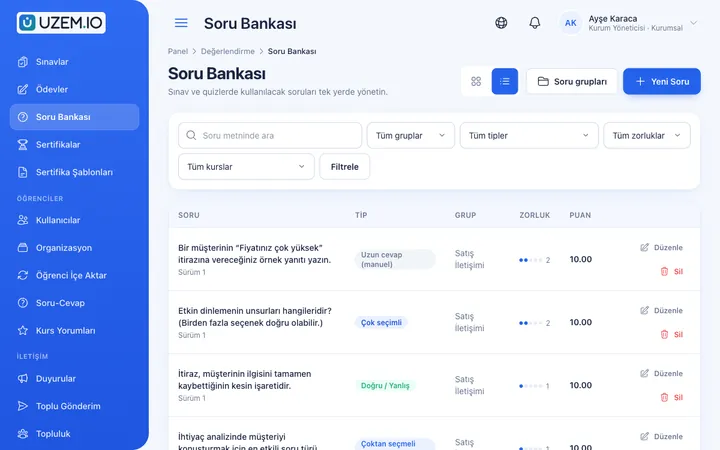
Question Bank
Prepare your questions once with groups, difficulty levels and explanations, then reuse them across different exams.
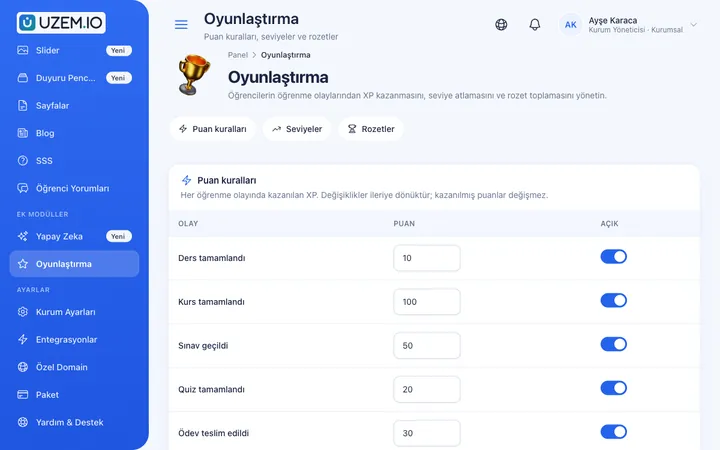
Gamification
Use points, badges, levels and leaderboards to make steady learner effort visible and motivating.
Live Training
Schedule live sessions inside your courses with the Zoom integration; attendance is recorded and session recordings are added to the course as video lessons.

Organization Units
Build your departments, branches, regions and stores as a unit tree; assign training to units and let managers follow their own units in read-only mode.

Reporting
Report on course progress, video viewing, exams, assignments, certificates, live sessions and sales; export to CSV.

AI Assistant
An AI assistant that lets learners ask questions about course content and gives your training team draft suggestions for content.

Try this setup in your own academy
No credit card required; explore a dashboard set up with sample content right away.
How does it work?
-
Set up the regional structure
Define sales regions and teams as units, and make regional managers unit managers.
-
Prepare short lessons
Break each topic into video lessons of a few minutes and build the question bank.
-
Turn on gamification
Enable points, badges and the leaderboard.
-
Track by region
Report completion and exam results by region.
Sample courses
- Needs Analysis and Asking the Right Questions Questioning techniques that uncover needs in customer conversations, with sample dialogues.
- Handling Objections Approaches to price, timing and competitor objections, with a short assessment quiz.
- Seasonal Campaign Briefing Campaign terms, target customer and frequently asked questions.
- Product Knowledge Exam An assessment generated from the question bank with a set passing score.
Knowledge level by region and by rep
Reports show each rep’s course progress and exam results; they can be filtered by region and exported as CSV. Regional managers see only their own teams’ data.
Frequently asked questions
The 4 most frequently asked questions.
Can't find the answer you're looking for?
Browse the help center or write your question to us.
Is the leaderboard visible to everyone?
You can manage gamification and the leaderboard in academy settings, turning them on or off as needed.
Can regional managers see other regions?
No. Unit managers see, read-only, only the data of the units and sub-units they are responsible for.
What does the AI assistant do?
Learners can ask questions about course content and get explanations. Usage is limited by the monthly quota defined in your plan.
Can reps access training from their phones?
Yes. UZEM offers a mobile-friendly web interface; you can sign in from a phone browser.
Industries using this solution
Set up your academy today
- No credit card details required
- Automatic setup
- You can connect your domain later