









Platform & brand
Depends on plan quotaCustom Domain
Publish your academy on your own domain, with verification and SSL certificate handled automatically.
Industries that benefit from this feature
- Holdings and Groups of Companies
- Franchise and Dealer Networks
- Medical Devices
- Course Centers
- Public Institutions / Municipalities
Your academy, at your address
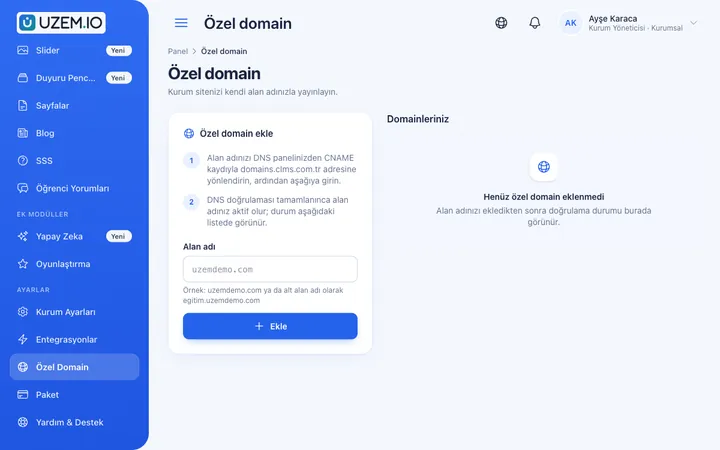
Every academy first opens on its own subdomain. When you want to fully reflect your brand, you can connect your own domain, such as academy.yourcompany.com. Connecting usually just means adding a single record to your DNS settings; verification and the SSL certificate are completed automatically.

- Consistent branding Learners and partners see your address.
- Secure connection The SSL certificate is provided and renewed automatically.
- Easy setup You do not need to manage servers or certificates.
What can you do?
-
Connect with a DNS record
Connect your subdomain with a single CNAME record.
-
Automatic verification and SSL
Once the domain is verified, the certificate is created automatically.
-
Domain count by plan
The number of domains you can connect is set by your plan.
-
Logged actions
Adding and removing domains is recorded in the audit log.
Sample screens
Real screens from the admin, instructor and learner side.
Custom domain setting
Storefront on your own domain
Before and after
Before
The academy address carries the platform's name.
Next
The academy is live on your own domain.
Before
The SSL certificate requires a separate process.
Next
The certificate is provided automatically.
Frequently asked questions
The 3 most frequently asked questions.
Can't find the answer you're looking for?
Browse the help center or write your question to us.
How do I connect my domain?
You add your domain in the dashboard and create the record shown at your DNS provider; verification and SSL are completed automatically.
Can I use my root domain (e.g. yourcompany.com)?
Root domains may need extra configuration depending on the method your DNS provider supports; using a subdomain is usually the easiest option.
Does the subdomain keep working?
Yes. Your academy's subdomain continues to work as well.
Solutions that use this feature
- Partner / Dealer Training If your dealers and partners learn about product changes late and incompletely: use a separate academy that carries your brand to deliver knowledge to every location at once, at the same quality.
- Customer Training Cut down the “how do I use this” questions reaching your support team: open a branded training center that teaches customers your product with video lessons, short quizzes and certificates.
- Launch an Online Academy Quickly launch an online academy on your own domain and under your own brand, without setting up servers, a software team or a separate payment system.
- Course Sales Sell courses, live training and books from your own storefront: cart, coupons, payment via PayTR, iyzico or bank transfer, and order management in one dashboard.
Industries that benefit from this feature
Features in the same category
Set up your academy today
- No credit card details required
- Automatic setup
- You can connect your domain later