



Who are you training?
Member Training
Offer seminars, courses and announcements to association, chamber and foundation members from one address; record attendance and completion, and open courses for a fee if you like.
Suitable industries
- NGOs, Associations and Foundations
- Professional Chambers and Associations

A training center that delivers value to members all year
For professional chambers, associations and unions, training is one of the most tangible benefits of membership. Yet seminars are often one-off events, recordings get lost and attendance certificates are prepared by hand. With UZEM you open an academy for your members that carries your organization’s name. Live seminars are announced on the calendar, their recordings stay in the archive, participants receive QR-verified certificates and members interact with each other in the community area.

Problems and solutions
Problem
Seminars only reach those who can attend, and recordings are not kept.
Solution
Live sessions run through the Zoom integration; recordings are archived in the academy and members can watch later.
Problem
Attendance certificates are prepared and sent one by one.
Solution
Certificates are generated automatically for members who complete the course; each can be verified by QR code.
Problem
Event announcements get lost in emails and messaging groups.
Solution
The training calendar, announcements and notifications are gathered in the academy; optional SMS notifications can be added too.
Problem
Interaction among members does not continue after training.
Solution
In the community area, members ask questions, share experiences and keep the discussion going after the training.
Who is it for?
Professional chambers and unions
Organizations that offer members regular professional updates and seminars.
Associations and foundations
Nonprofits that run training programs for their volunteers and members.
Federations and networks
Bodies that want to deliver shared training content to member organizations in different cities.
Training committees
Internal committees that prepare the training calendar and track attendance and certificates.
Use cases
- Professional update seminars Explain regulatory and practice changes in live seminars and archive the recordings.
- New member onboarding program A short program introducing new members to the organization’s structure, services and rights.
- Paid certificate programs Put paid, certified programs that are also open to non-members on sale through the storefront.
- Volunteer training Give volunteers what they need to know before an assignment with video lessons and short quizzes.
Features used
Course and Program Management
Organize your courses into programs and lessons; bring video, text, PDF, files, exams and live sessions together in a single flow.
Live Training
Schedule live sessions inside your courses with the Zoom integration; attendance is recorded and session recordings are added to the course as video lessons.

Video Training
Publish your video lessons through a secure video infrastructure and record viewing progress for each lesson.

Certificates
Automatically issue certificates in your own design, verifiable by QR code, to everyone who completes a course.

Community
Open a community space where your learners ask questions under topics, share experiences and help each other.

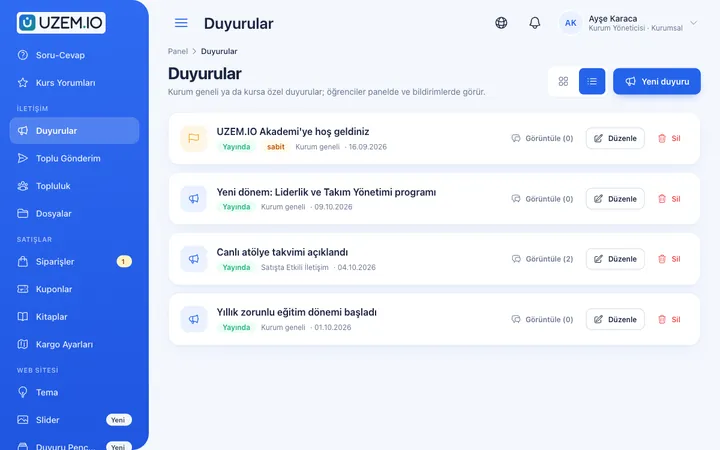
Announcements
Publish announcements to your whole academy or to specific courses, so important information does not get lost in email and chat groups.
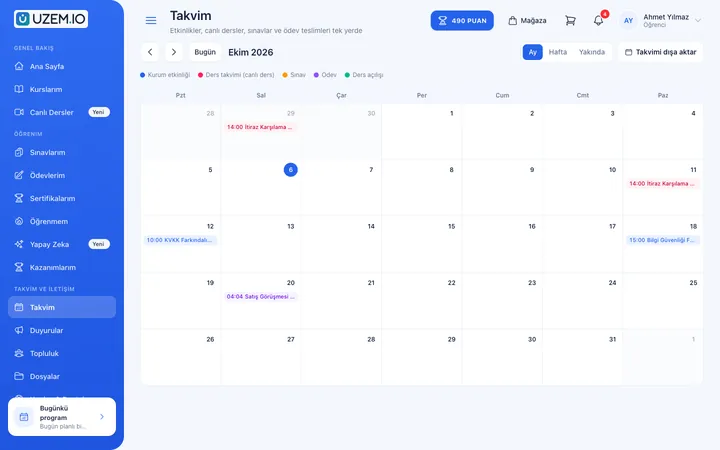
Class Calendar
Show live sessions, events and key dates together in each learner's own calendar.
Course Sales
Sell courses and books from your own academy with a cart, orders, PayTR, iyzico or bank transfer payments, and refunds.

Course Storefront
Manage your academy's public website with a course catalog, course landing pages, sliders, pop-ups, a blog and FAQs.

SMS Notifications
Connect your Netgsm or Mutlucell account and send SMS to your learners under your own approved sender name, in line with İYS consent rules.

Try this setup in your own academy
No credit card required; explore a dashboard set up with sample content right away.
How does it work?
-
Open the academy
Publish your academy with your organization’s logo and colors and invite your members.
-
Build the calendar
Add the year’s seminars and training to the calendar and share them through announcements.
-
Run the training
Hold live sessions and add recordings and materials to the relevant course.
-
Certify
Issue certificates to members who complete the training and report attendance data.
Sample courses
- Regulatory Updates Seminar A live overview of the latest regulations affecting the profession, with a Q&A segment.
- New Member Orientation The organization’s services, membership rights and obligations, and communication channels.
- Professional Ethics Principles of professional ethics, sample cases and a short assessment quiz.
- Working with Digital Tools A practical introduction to the digital tools used in professional work.
Attendance and certificate data in one place
Reports show which member attended which training, which courses they completed and which certificates they received. Export the data as CSV to use in board reports and annual activity reports.
Frequently asked questions
The 5 most frequently asked questions.
Can't find the answer you're looking for?
Browse the help center or write your question to us.
Can we sell training to non-members too?
Yes. You can publish your courses in the storefront as paid or free and open them to non-member participants as well.
How do live seminars work?
Live sessions are scheduled through the Zoom integration; participants join from the academy and recordings can be watched later.
How is a certificate’s authenticity verified?
The QR code on every certificate leads to a page confirming that it was issued by your academy.
Can we inform members by SMS?
Yes. SMS notifications are sent through supported providers and must be managed in line with commercial message consent rules.
Do inactive members use a license?
No. Only active learners count toward the license; deactivated members do not use one.
Industries using this solution
Set up your academy today
- No credit card details required
- Automatic setup
- You can connect your domain later