





Community & public sector
Stop trying to fit in-service training into a meeting hall
Plan every directorate's training on one platform; the clerk at a desk and the municipal officer in the field can each finish it at a time that suits their shift. Attendance and exam results are recorded automatically, and each director sees only their own unit.
- 6 units
- 6 categories
- 3 sample courses
In-service training for shift-based, dispersed staff
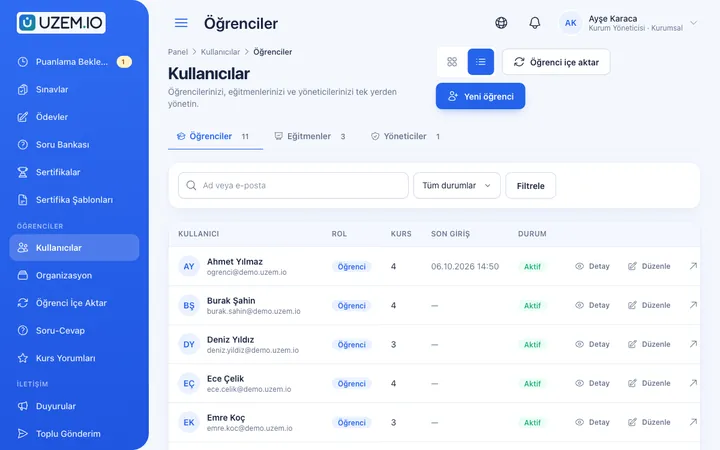
In municipalities and public institutions, staff work at desks, in the field and in shifts; gathering everyone in a hall at the same hour disrupts service and lowers attendance. The signature sheets and exam papers that prove training took place end up scattered across files. With UZEM you assign training by directorate, let staff complete it on their own time, and report attendance, exam and certificate records with a unit filter.

- Assignment by directorate When you assign a course to a unit such as the Municipal Police Directorate, staff added to that unit are enrolled automatically.
- Each director sees their own unit Each director monitors, read-only, the training data of their own directorate and its sub-units only.
- Training that fits shifts Field staff watch short videos in their phone browser; playback resumes where they left off.
- Measured with exams Set a timed exam and passing score at the end of in-service training, and decide when results become visible to staff.
- Staff certificate with your emblem Staff who complete training automatically receive a certificate bearing your organization's emblem, verifiable by QR code.
- Published on your own address The platform opens on your organization's domain with your emblem and colors; the SSL certificate is set up automatically.
- Announcements by SMS Send training announcements to staff as bulk SMS through your organization's Netgsm or Mutlucell account.
- Citizen courses kept separate Run courses open to citizens in a separate unit and category, so they never mix with staff training.
Industry challenges and solutions
Problem
In-service training attendance is kept on wet-signed sheets, and files are hunted down at audit time.
Solution
Lesson completion, exam and certificate records are created per person automatically; prepare the breakdown you need as a CSV with a directorate filter.
Problem
Gathering staff from different service buildings in one hall costs working hours.
Solution
Split training into short video lessons or run it live with Zoom; the session recording is linked to the lesson so on-duty staff can watch it later.
Problem
Directorates have to ask HR about their own staff's training status.
Solution
Make directors unit managers so they can monitor progress in their own directorate and sub-units without making changes.
Problem
A new circular or regulation reaches units late.
Solution
Prepare a short lesson explaining the change and pin the announcement to the top of the list; if your organization's SMS account is connected, send a bulk text message to the relevant staff.
Problem
Field teams have no time for desk-based training.
Solution
Break OHS topics into five-to-ten-minute videos; staff watch them in their phone browser and resume where they left off.
Problem
Employers question the authenticity of vocational course certificates.
Solution
Give citizens who complete a course a QR-coded certificate; employers can check its validity on the verification page.
Who uses it?
Human Resources and Training Directorate
Creates courses for the topics in the training plan, assigns them to directorates and prepares the organization-wide completion breakdown.
Directors and Section Chiefs
As unit managers, they see the training status of staff in their own directorate or section read-only and spot gaps before the period ends.
Office Staff
Complete training on topics such as communicating with citizens, regulatory changes and information security from their desks, splitting it up around their workload.
Field Teams
Municipal police, road maintenance and sanitation teams refresh their knowledge of risks and protective equipment with short videos and reinforce it with a short exam.
In-House Instructors
Hold live sessions across campuses, attach presentations and documents to lessons, and prepare exam questions.
Citizen Trainees
Join the municipality's vocational and awareness courses, watch lessons on their own time and receive a certificate when they finish.
Use cases
- Year-round in-service training calendar Create a course for each topic in the training plan, assign it to the relevant directorates and track completion month by month.
- Safety refreshers for field teams Explain field risks, near-miss reporting and protective equipment to road maintenance and municipal police teams with short videos and an exam.
- Earthquake and evacuation readiness Assign what to do during and after shaking, fire and evacuation duties to all staff; see who did not pass the exam in the report.
- Vocational training courses Run courses open to citizens in the Citizen Training branch and give graduates a verifiable certificate.
- Public awareness courses Publish free courses open to citizens on topics such as waste sorting, disaster preparedness or consumer rights.
- Live briefings across campuses Explain a new procedure to all directorates at once with Zoom, and add the recording to a lesson for those who could not attend.
Features you'll use
Organization Units
Build your departments, branches, regions and stores as a unit tree; assign training to units and let managers follow their own units in read-only mode.

Course and Program Management
Organize your courses into programs and lessons; bring video, text, PDF, files, exams and live sessions together in a single flow.

Video Training
Publish your video lessons through a secure video infrastructure and record viewing progress for each lesson.

Exams
Measure learning with timed exams and quizzes; you decide the passing score, attempts, question shuffling and result visibility.

Certificates
Automatically issue certificates in your own design, verifiable by QR code, to everyone who completes a course.

Reporting
Report on course progress, video viewing, exams, assignments, certificates, live sessions and sales; export to CSV.

Live Training
Schedule live sessions inside your courses with the Zoom integration; attendance is recorded and session recordings are added to the course as video lessons.

Announcements
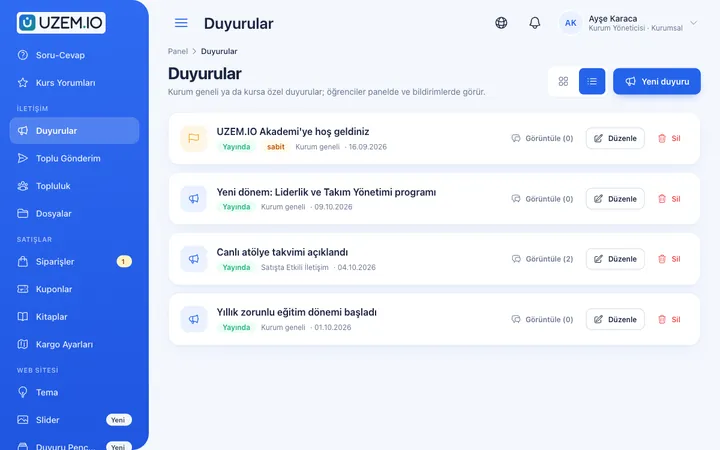
Publish announcements to your whole academy or to specific courses, so important information does not get lost in email and chat groups.
SMS Notifications
Connect your Netgsm or Mutlucell account and send SMS to your learners under your own approved sender name, in line with İYS consent rules.

Custom Domain
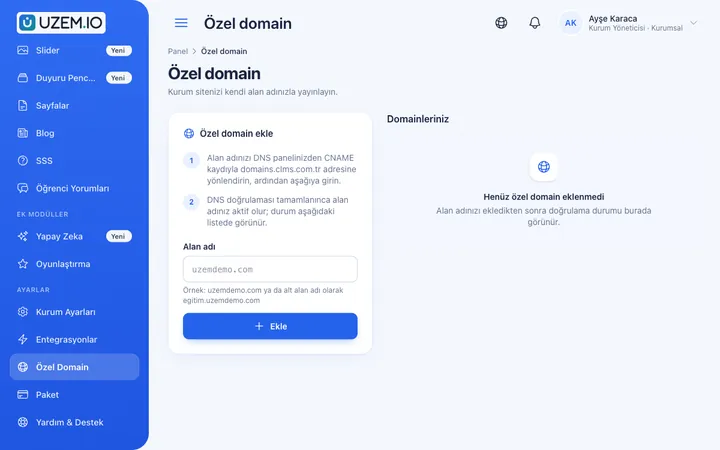
Publish your academy on your own domain, with verification and SSL certificate handled automatically.
Security and Access
Control who accesses your academy and from where with two-factor authentication, a single-session rule, watermarked and signed video playback, and sign-in and account sharing reports.
This structure comes ready with your academy
No credit card required; explore a dashboard set up with sample content right away.
How your academy is prepared
When you open an account with this industry, the structure below is set up as a draft; you adjust everything to fit your organization.
6 units · 0 categories · 3 sample courses
Municipality, directorate and unit hierarchy
Set up your organization as a unit tree at the directorate and unit level. Assign an emergency briefing to the top level and every directorate is covered; give field OHS training only to the Public Works and Municipal Police branches. New staff are enrolled in assigned training the moment they are added to their unit. Citizen courses sit in a separate branch, so they never mix with staff reports.
Sample unit tree
Sample structure: Sample Municipality → Public Works Directorate (Road Maintenance Unit) / Municipal Police Directorate / Human Resources and Training Directorate / Citizen Training
- In-Service Training – Communication in Public Service The importance of first contact, correct referral, communicating with an angry citizen and logging complaints; with an exam.
- Emergency Briefing What to do during and after shaking, recognizing a fire and evacuation duties; with an exam.
- OHS Briefing for Field Work Common field risks, near-miss incidents, personal protective equipment and stopping unsafe situations.
- Information Security for Public Employees Password security, suspicious emails and protecting information in official correspondence.
- Welcome to Our Municipality Institutional structure, directorate responsibilities and internal communication channels for newly appointed staff.
Measure and document learning
- At least one of the sample courses comes with a short quiz; you edit the questions in the question bank.
- You set the passing score, number of attempts and question shuffling.
- Those who complete receive a certificate verifiable by QR code; the template comes ready.
- You open assignments for hands-on work and grade the submissions.
Training records by directorate
Select a directorate or unit to see who finished which training on which date, along with exam scores and certificate dates. The platform records that in-house training took place; official notifications and audit files are prepared through your organization's own processes, and the breakdown you need is exported as a CSV.
- Course tracking report by directorate Shows which staff in the selected directorate have finished training and who has not started; the training unit builds its reminder list from here.
- In-service exam results report Lists staff exam scores and pass status with a unit filter; download it as a CSV for your organization's own filing process.
- Staff training certificate report Shows issued and revoked certificates with their dates; the details to add to personnel files come from this breakdown.
- Staff sign-in records Lists the dates staff signed in to the platform; units that have not accessed training for a long time are spotted early.
Your organization's academy is ready: Under Sample Municipality we set up the Public Works Directorate → Road Maintenance Unit, Municipal Police Directorate, Human Resources and Training Directorate and Citizen Training branches. In addition to the In-Service, Regulations, OHS, Emergency, Vocational Training and Citizen Training categories, the Communication in Public Service and Emergency Briefing courses with exams and a sample OHS Briefing for Field Work are ready.
Rollout steps
-
Build the directorate tree
Extend the sample structure with your own directorates and units, and make directors and section chiefs unit managers.
-
Start with a pilot directorate
For example, publish communication and OHS training in the Municipal Police Directorate and refine the content based on feedback.
-
Open it organization-wide
Add the other directorates and assign shared training such as emergency and information security to the top level.
-
Get the end-of-period breakdown
See how many staff in each directorate finished training, post a reminder announcement for those who have not, and export the list.
Solutions for this industry
- Employee Training If training is scattered across emails, folders and class lists: gather all employee training in one corporate academy, assign it to people or units, and see who completed it in the report.
- Branch / Unit-Based Training Bring your branch, store, region and department structure into the academy: assign training to a unit, enroll newcomers automatically, and let each manager see only their own unit’s status.
- Mandatory / Compliance Training If you replan KVKK, information security, OHS and internal policy training every year: assign it, verify completion with an exam, and keep a CSV record of who took which training.
- Live Training Management If Zoom links, attendance lists and recordings are scattered everywhere: schedule live sessions inside the course, record attendance automatically and add the session recording to the lesson.
- Student Training Bring lessons, assignments, exams and live classes together on a single student platform for schools, course centers and universities; see where every student stands in the progress report.
Frequently asked questions
The 8 most frequently asked questions.
Can't find the answer you're looking for?
Browse the help center or write your question to us.
Does the platform mean we are considered to have met legally required training?
UZEM helps you plan, deliver and record training. Assessing whether official training requirements are met and notifying the relevant authorities remain your organization's responsibility.
How are staff accounts created, and is there a connection to our institutional systems?
The Human Resources unit imports the staff list with a CSV file or sends invitations one by one; staff sign in with the account created for them. We do not offer a ready-made connection to your HR software, e-Devlet or in-house identity systems. The ready-made integrations public institutions can use are Zoom for live training, Netgsm or Mutlucell for bulk SMS, and PayTR or iyzico payments for paid citizen courses.
How do field staff access training?
Staff sign in from their phone browser to watch short videos and complete the exam; since viewing progress is saved, they resume where they left off. An internet connection is required for viewing.
Can a director see other directorates' data?
No. The municipal police director sees only the Municipal Police Directorate, and the public works director sees only their own directorate and sub-units such as Road Maintenance; they cannot change the data.
Can citizen courses and staff training be on the same platform?
Yes. You can run citizen training under a separate unit and category; citizens see only the courses they are enrolled in.
Can the platform be published with our municipality's domain and emblem?
Yes. You can connect an address such as egitim.belediyeniz.bel.tr with a CNAME record and publish it with your emblem and institutional colors; verification and SSL are completed automatically.
Is the license calculated for our entire workforce?
No. Licenses count only staff and citizen participants who are active on the platform; when you deactivate staff who retire or leave, their license is freed up and their training records are kept. You can see plans with capacity that fits your active participant count on the Pricing page, or request a quote from us for high capacity.
How do we bring over our existing training presentations and videos?
Upload videos from previous in-service training from the admin dashboard, and attach regulation texts and presentations to the relevant course as PDFs or files. Exam questions go into the question bank; you can bulk-upload the directorate structure and staff unit memberships with a CSV file.
Industries in the same group
Set up your academy for Public Institutions / Municipalities today
- No credit card details required
- Automatic setup
- You can connect your domain later